
When building webpages with HTML, organizing content properly is very important. A well-structured webpage is easier to read, easier to maintain, and better for accessibility and SEO. One HTML element that helps developers organize content clearly is the <section> tag.
Many beginners see the <section> element but are not fully sure when or why they should use it. Some developers even misuse it by replacing every <div> with <section>, which is not always correct.
In this beginner-friendly guide, you will learn what the HTML <section> tag is, how to use it properly, where it should be used, common mistakes to avoid, and why it matters in modern web development.
This article focuses mainly on simple explanations instead of too much code so you can understand the concept clearly.
What is the HTML <section> Tag?
The HTML <section> tag is a semantic element used to group related content together on a webpage.
In simple words, it divides content into meaningful sections.
Think of a webpage like a book.
A book contains:
- Chapters
- Topics
- Subtopics
The <section> element works similarly by separating content into organized parts.
For example, a webpage may contain sections like:
- About Us
- Services
- Contact Information
- Frequently Asked Questions
- Testimonials
Each of these can be placed inside its own <section> element.
<section>
  <h2>About Us</h2>

  <p>We teach web development for beginners.</p>
</section>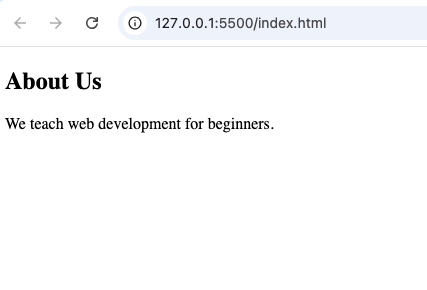
Why the <section> Tag is Important
Many beginners ask:
“Why not just use <div> elements?”
The answer is semantic meaning.
The <section> tag tells browsers and developers that the content inside belongs together as a meaningful part of the webpage.
Here are some important benefits.
1. Improves Webpage Structure
The <section> element organizes content into clear parts.
Without semantic elements, webpages become messy and harder to understand.
Old method:
<div class="about-section">Modern method:
<section>
The semantic version is cleaner and easier to read.
2. Better Accessibility
Screen readers can better understand webpage structure when semantic elements like <section> are used.
This helps users navigate content more easily.
3. Better SEO Structure
Search engines analyze webpage organization.
Using semantic elements properly helps search engines understand your content better.
4. Easier Teamwork
When developers work together, semantic HTML makes code easier to understand and maintain.
What Makes a Good <section>?
A proper <section> usually contains:
- A heading
- Related content
- A clear topic or purpose
Example:
<section>
  <h2>Our Services</h2>

  <p>We offer web design and SEO services.</p>
</section>
Everything inside this section relates to services.
Difference Between <section> and <div>
This is one of the biggest beginner questions.
Both elements are containers, but they serve different purposes.
<section> | <div> |
|---|---|
| Semantic element | Generic container |
| Groups related content | Used mainly for styling/layout |
| Has meaningful purpose | No special meaning |
| Usually contains headings | May or may not contain headings |
Use <section> when the content has a clear topic.
Use <div> when you only need a styling container.
Difference Between <section> and <article>
Beginners also confuse these two elements.
Here is the difference.
<section> | <article> |
|---|---|
| Groups related content | Represents standalone content |
| May depend on surrounding content | Can stand alone independently |
| Organizes webpage sections | Used for blog posts, news articles |
Example of <article>:
<article>
  <h2>How to Learn HTML</h2>
</article>
The article can stand alone by itself.
Example of <section>:
<section>
  <h2>HTML Tutorials</h2>
</section>
This groups related webpage content.
Where Can You Use the <section> Tag?
The <section> element can be used in many places on a webpage.
1. About Section
Example:
<section>
  <h2>About Us</h2>

  <p>We help beginners learn coding.</p>
</section>
2. Services Section
Example:
<section>
  <h2>Services</h2>

  <p>We provide website development.</p>
</section>
3. FAQ Section
Example:
<section>
  <h2>Frequently Asked Questions</h2>
</section>
4. Contact Section
Example:
<section>
  <h2>Contact Us</h2>
</section>
Why Headings Matter Inside <section>
A <section> element should usually contain a heading like:
<h1><h2><h3>
This helps define the purpose of the section clearly.
Example:
<section>
  <h2>Testimonials</h2>

  <p>Our students love our tutorials.</p>
</section>
Without headings, sections may lose meaning.
Can a Page Have Multiple <section> Elements?
Yes.
A webpage can contain many <section> elements.
Example:
<section>
  <h2>About</h2>
</section>

<section>
  <h2>Services</h2>
</section>

<section>
  <h2>Contact</h2>
</section>
This is completely normal.
HTML5 and the <section> Element
The <section> tag became popular with HTML5.
Before HTML5, developers mostly used:
<div id="services">Modern HTML encourages:
<section>
This creates better webpage structure.
Real-Life Example of <section>
Imagine a business website homepage.
The page may contain:
- Hero section
- About section
- Services section
- Testimonials section
- Contact section
Each part can be organized using <section>.
Example:
<section>
  <h2>Our Team</h2>

  <p>Meet our experienced developers.</p>
</section>
This makes the webpage easier to organize.
Common Beginner Mistakes
Here are mistakes beginners often make when using <section>.
1. Replacing Every <div> with <section>
Not every container should become a <section>.
Use <section> only for meaningful grouped content.
2. Using <section> Without a Heading
A section should usually have a heading to define its purpose.
Bad example:
<section>
  <p>Some random text.</p>
</section>
Better example:
<section>
  <h2>Introduction</h2>

  <p>Some text here.</p>
</section>
3. Using <section> for Tiny Styling Areas
Do not use <section> for small design-only containers.
Use <div> instead.
4. Confusing <section> with <article>
Remember:
<section>groups related content<article>represents standalone content
Combining <section> with Other Semantic Elements
The <section> element works well with:
<header><main><article><footer>
Example:
<main>

<section>
  <h2>About Us</h2>
</section>

<section>
  <h2>Services</h2>
</section>

</main>
This creates a clean webpage structure.
Styling the <section> Element with CSS
The <section> element can be styled with CSS like any other HTML element.
Example:
<section>
  <h2>Welcome</h2>
</section>
section {
padding: 20px;
background-color: lightgray;
}This adds spacing and background color.
Browser Support for <section>
The <section> element works in all modern browsers including:
- Chrome
- Firefox
- Safari
- Edge
- Opera
You can safely use it in modern web projects.
Benefits of Semantic HTML
The <section> tag is part of semantic HTML.
Semantic HTML improves:
- Readability
- Accessibility
- SEO
- Website maintenance
- Team collaboration
Examples of semantic elements include:
These elements help organize webpages clearly.
Example of a Full Webpage Structure
Here is a beginner-friendly webpage structure using <section> properly.
<!DOCTYPE html>
<html>

<head>
  <title>Section Example</title>
</head>

<body>

<header>
  <h1>My Website</h1>
</header>

<main>

<section>
  <h2>About Us</h2>

  <p>We teach HTML and CSS.</p>
</section>

<section>
  <h2>Services</h2>

  <p>We create modern websites.</p>
</section>

</main>

<footer>
  Copyright 2026
</footer>

</body>
</html>
This example uses semantic HTML correctly.
Best Practices for Using <section>
Here are some useful tips.
Use Clear Headings
Every section should explain its purpose clearly.
Keep Related Content Together
Only group content that belongs to the same topic.
Do Not Overuse <section>
Too many unnecessary sections can make code confusing.
Combine with Semantic HTML
Use <section> together with:
<main><article><header><footer>
This creates clean webpage organization.
Focus on Meaningful Structure
Ask yourself:
“Does this content represent a separate topic?”
If yes, a <section> may be appropriate.
<section> and SEO
Search engines understand webpage organization better when semantic elements are used properly.
Well-structured sections can help:
- Improve readability
- Improve crawling
- Organize content better
Good structure supports better SEO practices.
<section> and Accessibility
Accessibility tools rely on webpage structure.
Using semantic sections helps users:
- Navigate content faster
- Understand page organization
- Use screen readers more effectively
Modern websites should always consider accessibility.
The HTML <section> tag is one of the most useful semantic elements in modern web development. It helps divide webpages into meaningful content areas that are easier for developers, browsers, search engines, and users to understand.
Instead of relying only on generic <div> containers, using <section> properly improves webpage structure, readability, accessibility, and SEO.
As a beginner, understanding when and how to use the <section> element correctly is an important step toward building professional websites.
The more you practice using semantic HTML elements like <section>, the easier it becomes to create organized, user-friendly, and modern webpages.