
When building modern websites, organizing content properly is very important. HTML provides several semantic elements that help developers structure webpages in a meaningful way. One of the most useful semantic elements is the <article> tag.
The HTML <article> element is commonly used for blog posts, news stories, tutorials, forum posts, and other standalone content. Even though it looks simple, many beginners are not fully sure when or how to use it correctly.
In this beginner-friendly guide, you will learn what the HTML <article> element means, why it matters, where it should be used, common mistakes to avoid, and how it improves webpage structure.
This article focuses mainly on easy explanations instead of too much code so you can understand everything clearly.
What is the HTML <article> Element?
The HTML <article> element is a semantic tag used to represent independent, self-contained content on a webpage.
In simple words, it contains content that can stand on its own.
Think about things like:
- Blog posts
- News articles
- Tutorials
- Product reviews
- Forum discussions
- Social media posts
These types of content make sense even if they are viewed separately from the rest of the webpage.
That is exactly what the <article> element is designed for.
Simple Syntax of the <article> Element
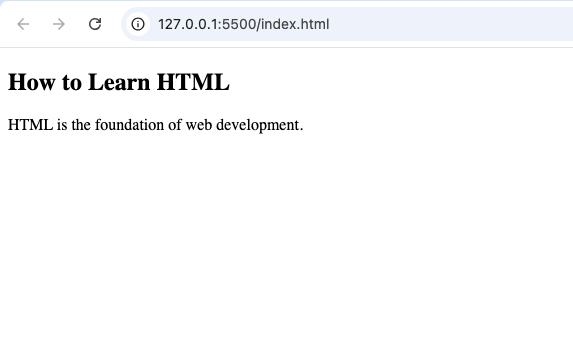
<article>
  <h2>How to Learn HTML</h2>

  <p>HTML is the foundation of web development.</p>
</article>
This creates a simple article with a title and paragraph.
Why the <article> Element is Important
Many beginners ask:
“Why not just use a <div> element?”
The answer is semantic meaning.
The <article> element clearly tells browsers, developers, search engines, and accessibility tools:
“This content is a standalone piece.”
Here are some important reasons why the <article> tag matters.
1. Improves Webpage Structure
The <article> element helps organize webpages into meaningful content blocks.
Without semantic HTML, webpages become harder to understand.
Old method:
<div class="blog-post">Modern method:
<article>
The semantic version is cleaner and more professional.
2. Better Accessibility
Screen readers can recognize article sections more easily.
This helps users navigate webpages better, especially visually impaired users.
3. Helps Search Engines Understand Content
Search engines analyze webpage structure carefully.
Using <article> helps identify important standalone content like blog posts and news stories.
4. Easier for Developers to Read
Developers can quickly identify independent content sections in the code.
This improves teamwork and website maintenance.
What Kind of Content Belongs Inside <article>?
The <article> element should contain content that makes sense independently.
Examples include:
- Blog posts
- Tutorials
- News stories
- Product reviews
- Forum comments
- User posts
- Documentation articles
Example:
<article>
  <h2>Best HTML Tips for Beginners</h2>

  <p>Learning HTML becomes easier with practice.</p>
</article>
This content could easily stand alone.
Difference Between <article> and <section>
Beginners often confuse these two elements.
They are related but not the same.
<article> | <section> |
|---|---|
| Independent standalone content | Groups related content |
| Can exist separately | Usually part of a larger page |
| Example: blog post | Example: About section |
Example of <article>:
<article>
  <h2>HTML Tutorial</h2>
</article>
This could be shared independently.
Example of <section>:
<section>
  <h2>Our Services</h2>
</section>
This organizes webpage content but may not stand alone.
Difference Between <article> and <div>
This is another common beginner question.
<article> | <div> |
|---|---|
| Semantic element | Generic container |
| Has meaningful purpose | No special meaning |
| Represents standalone content | Used mainly for styling/layout |
Use <article> when the content has independent meaning.
Use <div> for layout or design purposes.
Can a Webpage Have Multiple <article> Elements?
Yes.
A webpage can contain many <article> elements.
Example:
<article>
  <h2>News Story One</h2>
</article>

<article>
  <h2>News Story Two</h2>
</article>
This is common in blogs and news websites.
Real-Life Examples of <article>
The <article> element is widely used online.
Examples include:
- Blog entries
- Magazine articles
- Online tutorials
- News reports
- Social media posts
- Product reviews
Imagine a news website homepage.
Each news story can be placed inside its own <article> element.
Example of a Blog Layout
Here is a simple example:
<article>
  <h2>How to Build a Website</h2>

  <p>Building a website starts with HTML.</p>
</article>
This article can stand independently from the rest of the webpage.
Using Headings Inside <article>
Articles should usually contain headings like:
<h1><h2><h3>
This helps define the topic clearly.
Example:
<article>
  <h2>HTML Basics</h2>

  <p>HTML is used to structure webpages.</p>
</article>
The heading explains what the article is about.
Can <article> Be Nested?
Yes.
An <article> element can contain another <article> element in some situations.
This is common with:
- Blog comments
- Forum replies
- User discussions
Example:
<article>
  <h2>Main Blog Post</h2>

  <article>
    <h3>User Comment</h3>
  </article>
</article>
The nested article represents related independent content.
HTML5 and the <article> Element
The <article> element became officially supported with HTML5.
Before HTML5, developers mostly used:
<div class="post">Modern HTML encourages:
<article>
Browser Support for <article>
The <article> element works in all modern browsers including:
- Chrome
- Firefox
- Safari
- Microsoft Edge
- Opera
You can safely use it in modern websites.
Combining <article> with Other Semantic Elements
The <article> element works well with:
<header><section><main><footer>
Example:
<article>

<header>
  <h2>HTML Tutorial</h2>
</header>

<p>HTML is easy to learn.</p>

<footer>
  Published May 2026
</footer>

</article>
This creates a clean article structure.
Styling the <article> Element with CSS
The <article> element can be styled using CSS just like other HTML elements.
Example:
<article>
  <h2>Welcome</h2>
</article>
article {
padding: 20px;
border: 1px solid gray;
}This adds spacing and borders around the article.
Common Beginner Mistakes
Here are mistakes beginners often make.
1. Using <article> for Everything
Not every content block is an article.
Use <article> only for standalone content.
2. Confusing <article> with <section>
Remember:
<article>is independent<section>groups related content
3. Forgetting Headings
Articles should usually include headings to explain the topic.
4. Replacing Every <div> with <article>
The <article> element should not replace all containers.
Some areas still need regular <div> elements.
Semantic HTML and Why It Matters
The <article> element is part of semantic HTML.
Semantic HTML means using tags that clearly describe their purpose.
Examples include:
<header><nav><main><section><article><footer>
Benefits include:
- Cleaner code
- Better SEO
- Better accessibility
- Easier maintenance
- Professional structure
Accessibility Benefits of <article>
Accessibility tools rely heavily on webpage structure.
Using <article> properly helps screen readers:
- Identify standalone content
- Navigate webpages more efficiently
- Understand content organization
Modern websites should always consider accessibility.
SEO Benefits of <article>
Search engines analyze semantic structure.
Using <article> properly can help:
- Organize content better
- Improve crawling
- Clarify important content sections
Although it alone will not guarantee rankings, semantic HTML supports better SEO practices.
Example of a Full Webpage Structure
Here is a beginner-friendly webpage example using <article>
<!DOCTYPE html>
<html>

<head>
  <title>Article Example</title>
</head>

<body>

<header>
  <h1>My Blog</h1>
</header>

<main>

<article>
  <h2>How to Learn HTML</h2>

  <p>HTML is the starting point of web development.</p>
</article>

<article>
  <h2>Why CSS Matters</h2>

  <p>CSS makes websites look beautiful.</p>
</article>

</main>

<footer>
  Copyright 2026
</footer>

</body>
</html>
This example includes:
- Website header
- Main content
- Multiple articles
- Footer
It follows proper semantic HTML structure.
Best Practices for Using <article>
Here are some useful tips.
Use <article> for Independent Content
Ask yourself:
“Can this content stand alone?”
If yes, <article> may be appropriate.
Add Clear Headings
Every article should clearly explain its topic.
Combine with Semantic Elements
Use <article> together with:
<header><main><section><footer>
This creates better webpage structure.
Keep Articles Organized
Do not overload articles with unrelated content.
Think About Readers
Organize articles so users can read and understand them easily.
Real-World Websites That Use <article>
Many modern websites use <article> extensively.
Examples include:
- Blogs
- News websites
- Online magazines
- Tutorial websites
- Forums
Every blog post or news story is often wrapped inside an <article> element.
The HTML <article> element is one of the most useful semantic tags in modern web development. It helps identify standalone content clearly and professionally.
Instead of relying only on generic <div> elements, using <article> improves webpage organization, accessibility, readability, and SEO structure.
As a beginner, understanding how the <article> element works is an important step toward building professional and well-structured websites.
The more you practice using semantic HTML elements like <article>, the easier it becomes to create modern, organized, and user-friendly webpages