
Headings are one of the most important parts of any webpage. They help organize information, make articles easier to read, and improve the overall structure of a website. In HTML, headings range from <h1> to <h6>, with each level serving a different purpose. One heading that beginners often encounter is the <h3> tag.
Although the <h3> tag may seem simple, it plays a valuable role in creating well-organized webpages. It helps divide content into smaller sections, making it easier for visitors to scan, understand, and navigate information. Whether you’re writing a blog post, building a business website, or creating an online tutorial, the <h3> element can improve both readability and organization.
In this beginner-friendly guide, you’ll learn what the HTML <h3> tag is, why it is important, how it fits into the heading hierarchy, where it should be used, and the best practices for using it correctly.
This article focuses mainly on clear explanations with only a few simple code examples so you can understand the concept without being overwhelmed.
What is the HTML <h3> Tag?
The <h3> tag is the third-level heading element in HTML.
It is used to create subheadings beneath an <h2> heading. Think of it as a way to break larger topics into smaller, more detailed sections.
For example:
<h1>is usually the main page title.<h2>introduces major sections.<h3>divides those sections into smaller topics.
Using the correct heading levels makes your content easier to understand for both people and search engines.
Basic Syntax of the <h3> Tag
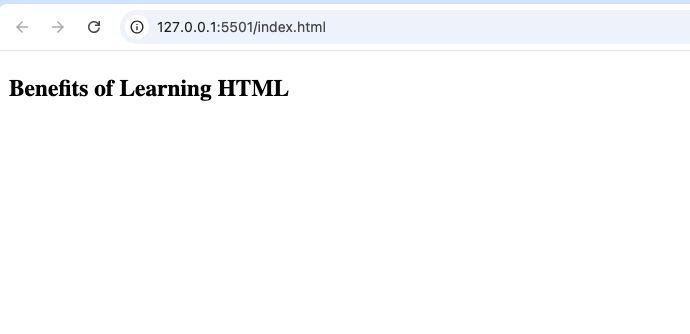
A simple <h3> heading looks like this:
<h3>Benefits of Learning HTML</h3>
The browser displays this text as a heading that is smaller than an <h2> but larger than an <h4>.
Why the <h3> Tag is Important
The <h3> element helps organize content into logical sections.
Imagine reading a long article without any headings. It would feel overwhelming because every paragraph would blend together.
The <h3> tag solves this problem by creating smaller sections that guide readers through the content.
It also helps:
- Improve readability
- Organize information
- Make long articles easier to scan
- Support better website accessibility
- Create a cleaner page structure
Understanding the HTML Heading Hierarchy
HTML headings work like an outline in a book.
Each level has its own purpose.
| Heading | Purpose |
|---|---|
<h1> | Main page title |
<h2> | Major section |
<h3> | Subsection under an <h2> |
<h4> | Smaller subsection |
<h5> | Supporting heading |
<h6> | Smallest heading |
The <h3> tag sits in the middle of this hierarchy, making it perfect for breaking large topics into manageable sections.
How the <h3> Tag Works
The browser automatically recognizes <h3> as a heading.
Unlike normal paragraph text, headings receive special styling by default.
An <h3> heading is usually:
- Bold
- Larger than paragraph text
- Smaller than an
<h2> - Displayed on its own line
Even without CSS, browsers make headings visually stand out.
When Should You Use the <h3> Tag?
The <h3> tag should be used whenever you need to divide an existing section into smaller topics.
Imagine you’re writing an article about web development.
Your structure might look like this:
Main Title (<h1>)
- Learn HTML for Beginners
Section (<h2>)
- HTML Basics
Subsections (<h3>)
- What is HTML?
- HTML Elements
- HTML Attributes
- HTML Documents
Each <h3> introduces a smaller topic inside the larger section.
Real-Life Example
Suppose you’re creating a recipe website.
Your page could be organized like this:
<h1>
Chocolate Cake Recipe
<h2>
Ingredients
<h3>
Dry Ingredients
<h3>
Wet Ingredients
This makes the recipe much easier to follow.
Why Readers Like Well-Organized Headings
Most people don’t read webpages from beginning to end.
Instead, they scan.
Clear headings help visitors quickly find:
- The information they need
- Specific sections
- Important details
Using <h3> headings improves the reading experience.
Difference Between <h2> and <h3>
Many beginners wonder which one to use.
The difference is simple.
<h2> | <h3> |
|---|---|
| Major topic | Smaller topic inside an <h2> |
| Larger heading | Slightly smaller heading |
| Introduces new section | Expands on the current section |
Think of <h2> as a chapter and <h3> as a subsection within that chapter.
Difference Between <h3> and Paragraphs
Headings and paragraphs have different purposes.
<h3> | <p> |
|---|---|
| Introduces a topic | Explains the topic |
| Bold by default | Regular text |
| Organizes content | Provides details |
A heading should summarize the content that follows.
The paragraph explains it.
Common Uses of the <h3> Tag
The <h3> element appears on many types of websites.
Blog Articles
Writers use <h3> headings to divide long articles into readable sections.
Online Tutorials
Coding tutorials often use <h3> headings for each lesson or concept.
Documentation
Technical documentation uses <h3> headings to explain features in detail.
Business Websites
Companies organize service pages with multiple heading levels.
Portfolio Websites
Developers divide project descriptions into separate subsections.
How Search Engines Use Headings
Search engines read headings to understand webpage structure.
A logical heading hierarchy helps search engines identify:
- Main topics
- Supporting information
- Content organization
While simply adding more headings won’t improve rankings, using them correctly contributes to better SEO and user experience.
Accessibility Benefits
Screen readers use headings to help visually impaired users navigate webpages.
Someone using assistive technology can jump directly between headings.
A proper heading hierarchy makes websites easier to navigate.
This is one reason semantic HTML is so important.
HTML5 and the <h3> Tag
The <h3> element has been part of HTML for many years and remains fully supported in HTML5.
Although modern HTML introduced new semantic elements such as:
<header><main><section><article>
headings remain essential for organizing the content inside these elements.
Browser Support
The <h3> tag works in every modern browser, including:
- Google Chrome
- Mozilla Firefox
- Microsoft Edge
- Safari
- Opera
Because headings are a fundamental part of HTML, they have excellent browser compatibility.
Styling the <h3> Tag with CSS
Developers often customize headings using CSS.
For example, they may change:
- Font size
- Font color
- Font family
- Spacing
- Alignment
Simple example:
<h3>Learning HTML</h3>
h3{
  color: navy;
}
CSS lets developers match headings to a website’s design.
Common Beginner Mistakes
Here are mistakes beginners often make when using <h3>.
1. Skipping Heading Levels
Some beginners jump from <h1> directly to <h3>.
This creates an inconsistent structure.
Instead, headings should generally follow a logical order.
2. Using Headings Only for Size
Headings are not just larger text.
They provide meaning and structure.
If you only want bigger text, use CSS instead of changing heading levels.
3. Making Every Heading an <h3>
Not every heading belongs at the same level.
Use the heading that best fits the page structure.
4. Forgetting Content Below the Heading
A heading should always introduce meaningful content.
Avoid placing empty headings on a page.
Practice Project Ideas
The <h3> tag is perfect for beginner projects.
Personal Portfolio
Use <h3> headings for:
- Skills
- Projects
- Education
- Experience
Recipe Website
Create sections such as:
- Ingredients
- Instructions
- Cooking Tips
Travel Blog
Divide destinations into smaller sections using <h3>.
Online Course Notes
Separate lessons into organized subsections.
Product Review Website
Use headings like:
- Features
- Performance
- Pros
- Cons
Best Practices for Using <h3>
Here are some useful tips.
Keep Headings Short
A heading should quickly describe the section.
Make Headings Descriptive
Instead of writing:
“More Information”
Write:
“Benefits of Semantic HTML”
Follow Logical Order
Move through heading levels naturally.
Avoid Overusing Headings
Too many headings can make pages look cluttered.
Think About Readers
Your headings should help visitors understand your content easily.
Why Every Beginner Should Learn Heading Tags
Understanding heading tags is one of the first steps toward writing well-structured HTML.
Learning how <h3> works also helps you understand:
- Semantic HTML
- Accessibility
- SEO basics
- Content organization
- Professional webpage structure
These skills become more valuable as your projects grow.
Real-World Websites That Use <h3>
Almost every major website uses multiple heading levels.
Examples include:
- News websites
- Educational platforms
- Government websites
- Online stores
- Company websites
- Documentation portals
Whenever you read a long webpage, chances are you’ll find <h3> headings helping organize the content.
Why Semantic HTML Matters
The <h3> tag is part of semantic HTML.
Semantic elements describe the purpose of content instead of simply changing its appearance.
Benefits include:
- Better accessibility
- Improved readability
- Cleaner HTML code
- Easier maintenance
- Better organization
Learning semantic HTML early will help you build websites that are easier for both people and search engines to understand.
The HTML <h3> tag is much more than a simple heading. It plays an important role in organizing webpages, improving readability, and creating a logical content structure. By dividing larger sections into smaller topics, it helps readers find information quickly and makes long articles easier to follow.
Whether you’re building a personal portfolio, writing blog posts, creating tutorials, or designing business websites, the <h3> element will become one of your most frequently used HTML tags.
As you continue learning HTML, remember that good webpage structure is just as important as good design. Using heading tags correctly will make your websites more professional, easier to navigate, and more enjoyable for everyone who visits them.