
When you’re learning HTML, one of the first things you’ll discover is that headings play an important role in organizing content. Just like chapters and subheadings in a book help readers understand the structure of the information, HTML heading tags help organize a webpage into clear sections.
Among the six HTML heading tags, the <h2> tag is one of the most commonly used. It represents a second-level heading that sits below the main page title but above smaller subheadings. Whether you’re building a blog, business website, portfolio, documentation page, or tutorial, you’ll use the <h2> tag regularly.
In this beginner-friendly guide, you’ll learn what the HTML <h2> tag is, why it’s important, when to use it, and how it helps improve both user experience and search engine optimization (SEO). This article focuses on easy-to-understand explanations with only a few simple code examples.
What is the HTML <h2> Tag?
The <h2> tag is the second-largest heading element in HTML.
It is used to create major section headings within a webpage.
Think of it like the chapter titles inside a book.
For example, if your webpage title is:
Complete Beginner’s Guide to HTML
That title would usually use the <h1> tag.
Then sections such as:
- Introduction
- What is HTML?
- HTML Elements
- HTML Forms
- Conclusion
would typically use <h2> headings.
The <h2> tag helps divide your content into logical sections, making it easier for readers to follow.
Basic Syntax of the <h2> Tag
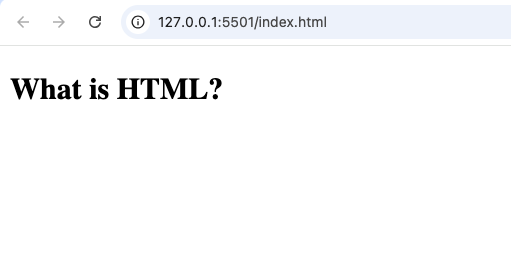
A simple <h2> element looks like this:
<h2>What is HTML?</h2>
Everything between the opening and closing tags becomes the heading text.
Why the <h2> Tag is Important
The <h2> tag does much more than make text larger.
It helps organize information for:
- Website visitors
- Search engines
- Screen readers
- Other developers
Without headings, webpages become difficult to read because all the information blends together.
Imagine reading a 2,000-word article with no headings. Finding the information you need would be frustrating.
The <h2> tag solves this problem by creating clear content sections.
Understanding the HTML Heading Hierarchy
HTML provides six heading levels.
They are:
<h1>– Main page heading<h2>– Major section heading<h3>– Subsection heading<h4>– Smaller subsection<h5>– Minor heading<h6>– Smallest heading
Think of them as an outline.
Example:
H1
- H2
- H3
- H3
- H2
- H3
The <h2> tag sits directly below the main title.
How the <h2> Tag Helps Readers
People rarely read webpages from top to bottom without skipping.
Instead, they scan pages looking for the information they need.
Clear <h2> headings help readers quickly identify sections.
For example, in a tutorial about HTML forms, a reader might jump directly to:
- Creating Forms
- Form Inputs
- Submit Buttons
Instead of reading every paragraph, they use the headings as guides.
Why Search Engines Like <h2> Tags
Search engines use headings to understand the structure of your content.
The <h2> tag helps identify the main topics discussed on a page.
A well-organized article with meaningful headings is easier for search engines to understand than one with large blocks of unstructured text.
Using descriptive headings also improves the reading experience for visitors, which is always a good practice.
Difference Between <h1> and <h2>
Many beginners confuse these two elements.
Here’s the difference.
<h1> | <h2> |
|---|---|
| Main page title | Main section heading |
| Usually used once | Can appear multiple times |
| Represents the overall topic | Divides the page into sections |
Example:
H1
Complete HTML Guide
H2
Introduction
H2
HTML Elements
H2
HTML Forms
The <h2> headings organize the content under the main topic.
Where Should You Use <h2>?
The <h2> tag is useful in almost every type of website.
Examples include:
- Blog posts
- Tutorials
- News articles
- Business websites
- Documentation
- Online courses
- Portfolio websites
Whenever your page contains multiple major sections, <h2> is usually the right choice.
Real-World Example
Imagine you’re writing an article titled:
How to Learn HTML
Your structure might look like this:
H1
How to Learn HTML
H2
What is HTML?
H2
HTML Editors
H2
HTML Elements
H2
Practice Projects
Each <h2> introduces a major topic within the article.
<h2> Improves Readability
Large blocks of text can overwhelm readers.
Breaking content into sections using <h2> headings makes articles:
- Easier to scan
- Easier to understand
- More visually appealing
- Less intimidating
Readers are more likely to continue reading when content is well organized.
<h2> and Accessibility
Accessibility means making websites usable for everyone, including people using screen readers.
Screen readers often allow users to jump directly between headings.
Meaningful <h2> headings make navigation much easier.
For example, someone using assistive technology can quickly move from one major section to another without listening to the entire page.
Common Uses of <h2> in Practice Projects
Here are some beginner-friendly examples.
1. Personal Portfolio
Use <h2> headings for:
- About Me
- Projects
- Skills
- Contact
This creates a clear structure for your portfolio.
2. Blog Articles
Each major topic should use an <h2> heading.
Examples:
- Introduction
- Benefits
- Examples
- Conclusion
3. Business Website
Common <h2> headings include:
- Our Services
- About Us
- Testimonials
- Contact Information
4. Online Store
Product pages often include headings like:
- Product Description
- Specifications
- Reviews
- Frequently Asked Questions
Difference Between <h2> and <h3>
These two headings work together.
<h2> | <h3> |
|---|---|
| Major section | Subsection |
| Larger heading | Smaller heading |
| Divides main topics | Divides smaller topics |
For example:
H2
HTML Forms
H3
Text Input
H3
Checkboxes
H3
Radio Buttons
The <h3> headings expand on the <h2> topic.
Best Practices for Using <h2>
Here are some useful tips.
Write Descriptive Headings
Instead of:
“More”
Use:
“Benefits of Learning HTML”
Readers immediately know what the section contains.
Keep Headings Short
A heading should summarize the section.
Avoid making it too long.
Follow a Logical Order
Use headings in sequence.
Don’t jump from <h1> directly to <h4> without reason.
A proper hierarchy makes the page easier to understand.
Don’t Use Headings Just for Size
Some beginners choose heading tags because they like the font size.
This is not the correct approach.
Headings should describe the structure of the content, not just its appearance.
If you want larger text, use CSS instead.
Common Beginner Mistakes
Here are some mistakes to avoid.
Using Multiple <h1> Tags Without Purpose
Most pages should have one clear main heading.
Use <h2> for the main sections.
Skipping Heading Levels
For example:
H1
↓
H4
This creates a confusing document structure.
Writing Vague Headings
Avoid headings like:
- Stuff
- More
- Other
Instead, use clear descriptions that explain the content.
Forgetting Headings Altogether
Without headings, articles become difficult to navigate.
Always organize long content into sections.
<h2> and CSS
The appearance of an <h2> heading can be changed with CSS.
Developers commonly customize:
- Font size
- Color
- Spacing
- Font family
- Alignment
This means you don’t have to rely on the browser’s default appearance.
The HTML provides the structure, while CSS controls the design.
SEO Benefits of Proper <h2> Usage
Good heading structure offers several SEO advantages.
It helps:
- Organize content clearly
- Improve readability
- Make pages easier to scan
- Help search engines understand page topics
Although headings alone won’t guarantee high rankings, they contribute to a better overall content structure.
Practice Project Ideas
If you’re learning HTML, here are some projects where you’ll naturally use <h2> headings.
Personal Resume Website
Organize sections like:
- Education
- Experience
- Skills
- Projects
Recipe Website
Use headings such as:
- Ingredients
- Instructions
- Nutrition Facts
Travel Blog
Create sections for:
- Attractions
- Food
- Accommodation
- Travel Tips
Technology Tutorial
Organize lessons into:
- Introduction
- Installation
- Examples
- Best Practices
Combining <h2> with Other HTML Elements
The <h2> tag works well alongside many semantic HTML elements, including:
<section><article><main><header><footer>
For example, each <section> often begins with its own <h2> heading.
This creates a clean and meaningful document structure.
Why Every Beginner Should Master <h2>
The <h2> tag may seem simple, but it’s one of the most important elements in HTML.
Understanding how to use headings correctly teaches you how to:
- Organize information
- Improve readability
- Build accessible websites
- Create SEO-friendly content
- Write professional webpages
Almost every webpage on the internet uses headings in some form.
Learning them early builds good coding habits that you’ll continue using as you progress.
The HTML <h2> tag is one of the most valuable tools for organizing webpage content. It serves as a major section heading that helps divide information into logical, easy-to-read parts.
Rather than thinking of <h2> as simply “large text,” think of it as a structural element that guides readers through your content. Whether you’re creating a blog post, documentation, portfolio, business website, or tutorial, properly using <h2> headings makes your pages cleaner, more accessible, and easier to understand.
As you continue learning HTML, make it a habit to use heading tags thoughtfully. A well-structured page is easier for visitors to navigate, easier for search engines to interpret, and much more enjoyable to read. Mastering the <h2> tag is a small step that leads to creating more professional and organized websites.