If you spend even a short amount of time learning HTML, you will quickly come across the <div> tag. It is one of the most commonly used HTML elements on the web and plays a major role in how websites are structured and designed.
While many modern HTML elements such as <header>, <section>, <article>, and <footer> have specific meanings, the <div> tag is different. It acts as a general-purpose container that helps organize content and create layouts.
At first, the <div> element may seem simple, but understanding how to use it properly is an important skill for every web developer.
In this beginner-friendly guide, you’ll learn what the <div> tag is, how it works, why it’s useful, and how to use it effectively in your HTML projects.
What is the HTML <div> Tag?
The <div> tag is a container element used to group other HTML elements together.
The word “div” is short for division.
Think of a <div> as a box that holds content.
Inside a <div>, you can place:
- Text
- Images
- Links
- Buttons
- Forms
- Videos
- Other HTML elements
The <div> itself does not add special visual styling. Instead, it helps organize content and makes it easier to apply CSS styling and JavaScript functionality.
Basic Syntax of the <div> Tag
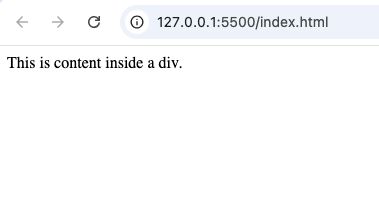
A simple <div> looks like this:
<div>
  This is content inside a div.
</div>
Everything between the opening and closing tags belongs to that container.
Real-World Example of Div Containers
Imagine a simple webpage layout.
The page might contain:
- A header area
- A navigation menu
- Main content
- Sidebar
- Footer
Each section can be wrapped inside its own <div>.
This makes the structure easier to understand and style later.
Common Uses of the <div> Tag
The <div> element is extremely flexible.
Here are some common uses.
1. Creating Page Sections
Developers often use divs to separate parts of a webpage.
Examples include:
- Hero sections
- Content sections
- Testimonials
- Contact areas
Each section can have its own container.
2. Building Layouts
Before semantic HTML became popular, many websites used divs for almost everything.
Today, divs are still widely used for layouts alongside CSS technologies such as:
- Flexbox
- Grid
These tools help position divs on the page.
3. Grouping Related Content
A div can group related elements together.
For example:
- A product image
- Product title
- Product description
- Buy button
All can be placed inside one container.
This makes management easier.
4. Applying CSS Styles
One of the main reasons developers use divs is styling.
Instead of styling each individual element separately, a developer can style the parent div.
This saves time and keeps code organized.
Div Tags and CSS
The true power of the <div> element appears when combined with CSS.
CSS can control:
- Colors
- Width
- Height
- Margins
- Padding
- Borders
- Layout
Without CSS, a div is simply a container.
With CSS, it becomes a building block for modern web design.
Understanding Nested Divs
A div can contain other divs.
This is called nesting.
Example structure:
<div>

  <div>
    Content Area
  </div>

</div>
Think of it like placing smaller boxes inside larger boxes.
Nested divs help create complex webpage layouts.
Example: A Website Card Layout
Many websites use card designs.
A card may contain:
- Image
- Title
- Description
- Button
All of these elements can be grouped inside a div container.
This makes it easier to style the entire card as a single unit.
Div Tags in Modern Websites
Almost every modern website uses divs somewhere.
Examples include:
- Online stores
- Blogs
- Portfolio websites
- News websites
- Dashboards
- Social media platforms
Divs are one of the foundational tools of web development.
Difference Between <div> and <section>
Beginners often confuse these elements.
Here is the difference:
<div> | <section> |
|---|---|
| Generic container | Semantic content section |
| No special meaning | Represents a meaningful section |
| Mainly for styling and layout | Mainly for content organization |
Use a <section> when the content has a clear purpose.
Use a <div> when you simply need a container.
Difference Between <div> and <span>
These tags are also commonly compared.
<div> | <span> |
|---|---|
| Block-level element | Inline element |
| Starts on a new line | Stays within a line |
| Used for larger content groups | Used for small text portions |
A div organizes blocks of content.
A span is usually used for small inline content.
Understanding Classes and Divs
Many divs include a class attribute.
Example:
<div class="container">Classes help developers:
- Identify elements
- Apply styles
- Target elements with JavaScript
Classes make large projects easier to manage.
Understanding IDs and Divs
Divs can also use IDs.
Example:
<div id="header">An ID uniquely identifies a specific element on a webpage.
Unlike classes, IDs should not be repeated.
Why Developers Love Div Tags
The <div> element offers several benefits.
Flexible Structure
Divs can hold almost any type of content.
Easy Styling
CSS works extremely well with div containers.
Better Organization
Divs help keep code clean and structured.
Reusable Layouts
Developers can create reusable design patterns using divs.
Beginner-Friendly
The concept is simple and easy to learn.
Common Beginner Mistakes
Here are some mistakes beginners often make.
1. Using Too Many Divs
Some beginners place everything inside multiple unnecessary divs.
This creates what developers call “div soup.”
Too many containers make code harder to read.
2. Ignoring Semantic HTML
Modern HTML provides elements such as:
<header><nav><main><article><section><footer>
Sometimes these elements are better choices than generic divs.
3. Forgetting Proper Structure
Poorly organized divs can make layouts confusing.
Always group related content logically.
4. Deep Nesting
Avoid creating too many layers of nested divs.
Overly deep structures become difficult to maintain.
Divs and Responsive Design
Responsive design ensures websites work on:
- Phones
- Tablets
- Laptops
- Desktops
Div containers help create flexible layouts that adapt to different screen sizes.
Modern CSS tools like Flexbox and Grid work especially well with divs.
Divs and Flexbox
Flexbox is a CSS layout system.
When applied to div containers, it makes it easier to:
- Align content
- Center items
- Create rows
- Create columns
Many modern layouts rely on Flexbox and div containers together.
Divs and CSS Grid
CSS Grid is another powerful layout system.
Grid allows developers to:
- Create columns
- Create rows
- Build complex page structures
Div containers often serve as grid items.
Accessibility Considerations
Because divs are generic containers, they do not provide meaning to screen readers.
This is why developers should use semantic HTML whenever appropriate.
For example:
Instead of:
<div>Sometimes it is better to use:
<section>
or
<article>
when the content has a specific purpose.
SEO and Div Tags
The <div> element itself does not directly improve SEO.
However, organized layouts help create cleaner webpages.
For SEO purposes, combining divs with semantic HTML elements is usually the best approach.
Practice Projects Using Divs
Here are some beginner-friendly projects.
Personal Portfolio
Use divs to create:
- Hero section
- About section
- Projects section
- Contact section
Product Card Layout
Create reusable product containers using divs.
Blog Homepage
Group:
- Articles
- Sidebars
- Featured posts
inside div containers.
Photo Gallery
Place each image inside its own div container for easier styling.
Landing Page
Most landing pages use multiple div sections for layout and organization.
Best Practices for Using Div Tags
Here are some useful tips.
Keep Divs Organized
Use divs to group related content together.
Use Meaningful Class Names
Choose descriptive names such as:
- hero-section
- product-card
- sidebar
instead of vague names.
Avoid Excessive Nesting
Keep structures simple whenever possible.
Combine Divs with Semantic HTML
Use semantic elements when they better describe the content.
Focus on Readability
Well-organized code is easier to maintain and update.
Why Every HTML Beginner Should Learn Divs
The <div> tag remains one of the most important HTML elements.
Even with the rise of semantic HTML, divs are still used in nearly every website because they provide flexibility and control.
Understanding divs helps you learn:
- Layout design
- CSS styling
- Responsive design
- Modern web development
It is one of the foundational skills every web developer should master.
The HTML <div> tag is a simple but powerful container element that helps organize webpage content and create layouts. While it does not have special meaning on its own, it serves as one of the most important building blocks in web development.
By learning how to use divs correctly, you can create cleaner layouts, better-organized code, and more professional websites. Whether you’re building a personal portfolio, an online store, a blog, or a landing page, divs will likely play a role in the structure of your project.
As you continue learning HTML and CSS, mastering the <div> element will make it much easier to build responsive, modern, and user-friendly webpages.
7 thoughts on “How to Use Div Tags in HTML”