
When learning HTML, you will often need to highlight certain words in your text. Sometimes you may want a word to stand out visually so readers notice it quickly. One of the HTML elements used for this purpose is the <b> tag.
The <b> tag makes text bold. This means the text appears darker and thicker than the surrounding words. It helps draw attention to specific parts of content.
In this beginner-friendly guide, you will learn what the <b> tag is, how it works, when to use it, and how it is different from other similar tags like <strong>
Understanding the <b> Tag
The <b> tag is an HTML element used to make text bold without giving it any special importance or meaning.
The letter b stands for bold.
When a browser reads the <b> tag, it simply displays the text in bold style.
Basic Syntax
Here is the basic syntax of the <b> tag:

The tag has:
- An opening tag
<b> - A closing tag
</b>
Everything inside the tags will appear bold on the webpage.
Example

Output in the browser:
This is a bold word inside a paragraph.
The word “bold word” will appear thicker than the rest of the sentence.

Why the <b> Tag Is Used
The <b> tag is mostly used when you want text to stand out visually but not necessarily carry strong importance.
For example:
- Product names
- Keywords
- Short highlights
- Labels
- Attention grabbing text
It simply changes the appearance of the text.
Example

Here, the course name is bold so readers notice it quickly.
Another Example of the <b> Tag
Here is another simple example:

The phrase becomes bold so it stands out in the sentence.

Where the <b> Tag Is Commonly Used
The <b> tag is useful in different situations where visual emphasis is needed.
1. Highlighting Keywords
Sometimes you want a keyword to be easily noticeable.
Example:

2. Highlighting Product Names
Many websites bold product names.
Example:

3. Labels in Text
Example:

Here the label Note stands out.
4. Key Points in Instructions
Example:

This makes instructions easier to scan.

<b> Tag vs <strong> Tag
Beginners often confuse the <b> tag with the <strong> tag.
Both make text bold in browsers, but they are not the same.
<b> Tag
- Makes text bold visually
- Does not add meaning
- Used mainly for styling
<strong> Tag
- Shows strong importance
- Adds semantic meaning
- Search engines and screen readers understand it as important text
Example Comparison


Both appear bold, but <strong> tells browsers and assistive technologies that the text is important.
How Browsers Display the <b> Tag
All modern browsers support the <b> tag.
Browsers like:
- Chrome
- Firefox
- Edge
- Safari
display the text as bold automatically.
However, the bold appearance actually comes from default browser styling.
Behind the scenes, browsers apply something similar to this CSS:

This means the text weight becomes thicker.
Using <b> Inside Different HTML Elements
The <b> tag can be used inside many HTML elements.
For example:
- Paragraphs
- Headings
- Lists
- Table cells
- Links
Example Inside a Paragraph

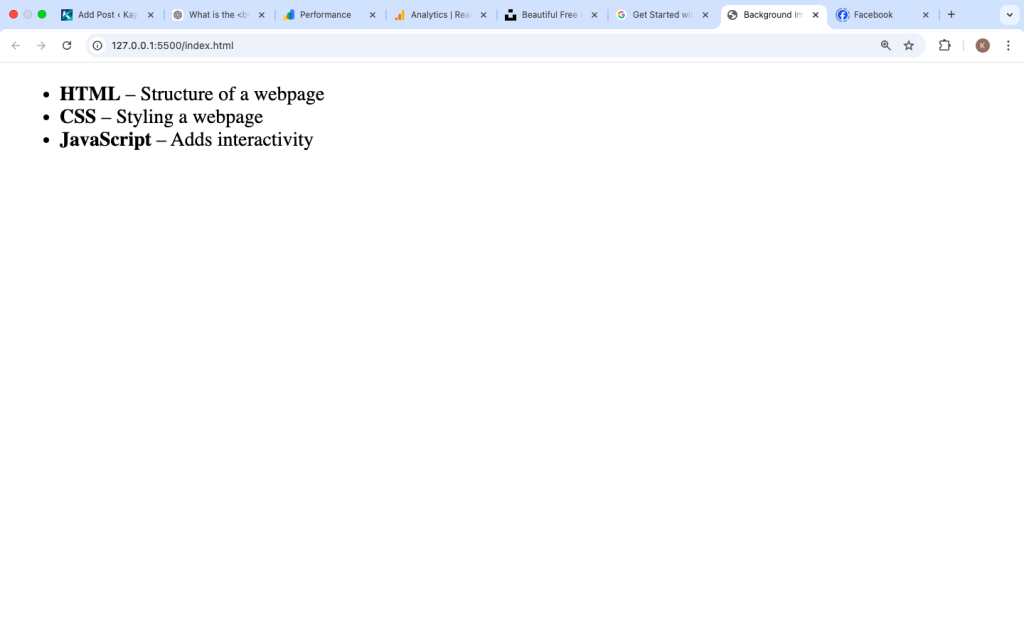
Example Inside a List

Nesting the <b> Tag
HTML allows you to combine the <b> tag with other tags.
Example:

In this case, the text will appear:
- Bold
- Italic
This shows how HTML elements can work together.
Using CSS Instead of the <b> Tag
Modern web development often uses CSS for styling.
Instead of writing:

You can use CSS like this:

Or in a stylesheet:

Then in HTML:

CSS gives developers more control over styling.
However, the <b> tag is still perfectly valid in HTML.

Common Mistakes Beginners Make
1. Using <b> for Important Text
Many beginners use <b> when they should use <strong>.
Example mistake:

Better version:

Because the message is important.
2. Overusing Bold Text
Too many bold words make content harder to read.
Use bold text only when needed.
Example of bad usage:

Bold text should highlight key information, not everything.
Best Practices for Using the <b> Tag
Follow these simple tips:
1. Use It for Visual Attention
Use <b> when the goal is to draw the reader’s eye.
Example:

2. Do Not Use It for Meaning
If the text has importance, use <strong> instead.
3. Keep It Minimal
Bold only important keywords, not full paragraphs.
4. Combine With CSS When Needed
For advanced styling, CSS is better.
Real Example of the <b> Tag in a Webpage
Here is a small example showing how the <b> tag might appear in real content.

This simple example highlights the technologies beginners should learn.

Is the <b> Tag Still Used Today?
Yes, the <b> tag is still part of modern HTML.
However, developers often prefer:
<strong>for importance- CSS for styling
Still, the <b> tag remains useful for visual emphasis without meaning.
The <b> tag is one of the simplest HTML elements beginners learn. Its purpose is to make text bold so it stands out from surrounding content.
The tag works by wrapping text between <b> and </b>, and browsers display the text in a thicker font. It is mainly used for visual emphasis, such as highlighting keywords, product names, labels, or small important points.
However, it is important to understand the difference between <b> and <strong>. While both appear bold in browsers, the <strong> tag carries semantic meaning and signals importance, while <b> only changes appearance.
When used correctly and in moderation, the <b> tag can help make content easier to scan and more visually clear for readers.
As you continue learning HTML, you will discover many other tags that help structure and style content on a webpage. Understanding simple elements like <b> is an important step toward building well-organized and readable web pages.