
Dates and times are important parts of many websites. Whether you’re publishing a blog post, announcing an event, displaying business hours, or showing when an article was updated, you often need to present time-related information to visitors.
HTML provides a special element for this purpose called the <time> tag.
The <time> element helps browsers, search engines, and other tools understand that a specific piece of content represents a date, time, or both. While it may look similar to regular text on a webpage, it adds meaning behind the scenes.
In this beginner-friendly guide, you’ll learn what the HTML <time> tag is, why it matters, how it works, and explore practical examples that you can use in real projects.
This article focuses on clear explanations rather than excessive code, making it easy for beginners to understand.
What is the HTML <time> Tag?
The HTML <time> tag is used to represent a specific date, time, or duration.
In simple terms, it tells browsers:
“This content is a date or time value.”
For example:
- January 1, 2026
- 8:30 AM
- 5:00 PM
- Monday, June 22
- 2 hours
All of these can be represented using the <time> element.
Why Was the <time> Tag Created?
Before the <time> element existed, developers usually displayed dates as plain text.
Example:
Published on January 1, 2026
While humans understand this easily, browsers and search engines may not always recognize it as a date.
The <time> tag helps solve this problem by adding semantic meaning.
This improves:
- Content organization
- Accessibility
- Machine readability
- Search engine understanding
Basic Syntax of the <time> Tag
A simple example looks like this:
<time>January 1, 2026</time>
This tells the browser that the content represents a time-related value.
How the <time> Tag Works
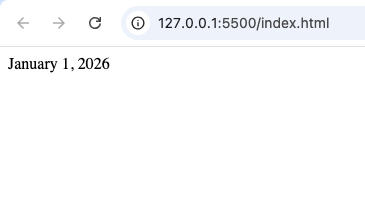
The <time> element behaves much like regular text on the page.
Visitors typically see:
January 1, 2026
However, behind the scenes, the browser understands that the content is a date rather than ordinary text.
This additional meaning is what makes semantic HTML powerful.
Common Uses of the <time> Tag
The <time> element appears in many real-world websites.
Let’s look at some common examples.
1. Blog Post Publishing Dates
Most blogs display the date an article was published.
Example:
<time datetime="2026-01-01">
January 1, 2026
</time>
Visitors see the formatted date while browsers understand the exact date value.
2. Article Update Dates
Many websites show when content was last updated.
Example:
“Last Updated: June 10, 2026”
Using the <time> tag helps clarify that this is a date.
3. Event Announcements
Event websites frequently display:
- Event dates
- Start times
- End times
The <time> element helps identify these details clearly.
4. Business Hours
Local businesses often publish operating hours.
Examples:
- Opens at 9:00 AM
- Closes at 6:00 PM
These times can be marked up using the <time> element.
5. Appointment Schedules
Booking systems often display:
- Meeting times
- Appointment dates
- Reservation schedules
The <time> tag is useful in these situations.
Understanding the datetime Attribute
One of the most important features of the <time> element is the datetime attribute.
The datetime attribute provides a machine-readable version of the date or time.
Example:
<time datetime="2026-06-22">
June 22, 2026
</time>
Visitors see:
June 22, 2026
But machines read:
2026-06-22
This standardized format improves consistency.
Why the datetime Attribute Matters
Humans and computers often prefer different date formats.
Humans might write:
- June 22, 2026
- 22 June 2026
- June 22nd, 2026
Computers prefer a structured format such as:
2026-06-22
The datetime attribute bridges this gap.
Human-Friendly vs Machine-Friendly Dates
Think of it this way:
Human-friendly:
June 22, 2026
Machine-friendly:
2026-06-22
The <time> element allows both versions to exist together.
Examples of Time Values
The <time> element can represent many kinds of information.
Examples include:
- Dates
- Times
- Combined date and time
- Durations
This flexibility makes it useful for many projects.
Example: Time Only
Suppose a meeting starts at 9:00 AM.
The <time> element can represent this value.
Visitors see:
9:00 AM
Browsers recognize it as a time value.
Example: Date and Time Together
Some situations require both.
For example:
June 22, 2026 at 9:00 AM
The <time> element can represent the complete timestamp.
Example: Event Schedule
Imagine a conference website.
Each session might display:
- Session title
- Speaker name
- Start time
- End time
The <time> tag helps structure the schedule clearly.
Why Semantic HTML Matters
The <time> tag is part of semantic HTML.
Semantic HTML means using elements that clearly describe their purpose.
Examples include:
<header><main><section><article><footer><time>
These elements help both humans and machines understand webpage content.
Benefits of Using the <time> Tag
There are several reasons to use this element.
Better Organization
The <time> tag clearly identifies time-related information.
This improves document structure.
Improved Accessibility
Assistive technologies can better understand dates and times.
This creates a better experience for users who rely on screen readers.
Enhanced Machine Readability
Search engines and software tools can process date information more accurately.
Cleaner HTML
Using the correct element makes your code easier to understand.
Real-World Example: News Websites
News websites often display:
- Publication dates
- Update dates
- Event times
The <time> element is commonly used to mark up this information.
Real-World Example: Blogs
Almost every blog contains dates.
Examples include:
- Publishing date
- Last modified date
- Comment timestamps
The <time> tag helps organize these values.
Real-World Example: Event Websites
Event websites frequently display:
- Conference schedules
- Concert dates
- Webinar times
The <time> element improves the structure of this information.
Difference Between <time> and Plain Text
Beginners sometimes ask:
“Why not just write the date normally?”
The answer is semantics.
Plain text:
June 22, 2026
Semantic HTML:
<time>June 22, 2026</time>
The second version provides additional meaning.
Difference Between <time> and <span>
Both can display text.
However:
<time> | <span> |
|---|---|
| Represents dates and times | Generic inline container |
| Semantic meaning | No special meaning |
| Better for structured data | Mainly used for styling |
Use <time> when the content represents a date or time.
Common Beginner Mistakes
Here are mistakes beginners often make.
1. Ignoring the <time> Element
Many beginners write dates as plain text.
Using the <time> tag creates better HTML.
2. Using Invalid Date Formats
The datetime attribute should follow proper formatting rules.
Incorrect formats can reduce effectiveness.
3. Using <time> for Non-Time Content
Only use this element when the content truly represents:
- Dates
- Times
- Durations
4. Forgetting Semantic HTML
The <time> element is part of writing meaningful HTML.
Do not overlook it.
Browser Support
The <time> element is supported in all modern browsers, including:
- Chrome
- Firefox
- Safari
- Edge
- Opera
This makes it safe to use in modern websites.
Accessibility Benefits
Screen readers often perform better when semantic HTML is used correctly.
The <time> element helps identify dates and times more accurately.
This improves the overall user experience.
SEO Considerations
While the <time> element alone will not guarantee higher rankings, it can help search engines understand your content better.
Structured content is generally easier for search engines to process.
Practical Project Ideas
Here are some beginner projects where you can practice using the <time> tag.
Personal Blog
Display:
- Publish dates
- Update dates
Event Landing Page
Show:
- Event date
- Start time
- End time
Business Website
Display:
- Opening hours
- Closing hours
News Website Layout
Add:
- Article publication dates
- Breaking news timestamps
Online Course Website
Show:
- Lesson release dates
- Webinar schedules
Best Practices for Using the <time> Tag
Follow these tips when using the element.
Use It for Actual Dates and Times
Only apply the <time> tag to genuine time-related content.
Include the datetime Attribute
Whenever possible, provide a machine-readable value.
Keep Display Text User-Friendly
Show dates in a format that visitors can easily understand.
Combine with Semantic HTML
Use the <time> element alongside:
<article><section><header>
for better structure.
Test Your Markup
Verify that dates and times appear correctly across devices and browsers.
Why Every Beginner Should Learn the <time> Tag
The <time> element may seem small, but it teaches an important lesson about semantic HTML.
Modern web development is not just about displaying content.
It is also about describing content properly.
The <time> element helps developers create webpages that are:
- More organized
- Easier to understand
- More accessible
- Better structured
These skills become increasingly valuable as your projects grow.
The HTML <time> tag is a simple but powerful semantic element designed to represent dates, times, and durations. While it looks similar to regular text on a webpage, it provides additional meaning that helps browsers, search engines, and accessibility tools understand your content more effectively.
Whether you’re building a blog, event page, business website, news platform, or portfolio project, the <time> element can help structure time-related information in a clear and professional way.
As you continue learning HTML, incorporating semantic elements like <time> into your projects will help you write cleaner, more meaningful, and more future-friendly code.