
When learning HTML, you’ll come across many tags that help structure content in meaningful ways. Some tags are very common, such as headings, paragraphs, links, and images. Others are more specialized and are used in specific situations. One of these specialized elements is the <dfn> tag.
Although the <dfn> tag is not used on every website, it plays an important role when defining terms, concepts, or technical vocabulary. It helps both readers and browsers understand that a particular word or phrase is being introduced or explained for the first time.
If you write tutorials, documentation, educational content, glossaries, or technical articles, the <dfn> tag can be very useful.
In this beginner-friendly guide, you’ll learn what the HTML <dfn> tag is, how it works, why it matters, and how to use it correctly in your practice projects.
This article focuses on easy-to-understand explanations rather than large amounts of code.
What is the HTML <dfn> Tag?
The <dfn> tag stands for Definition.
It is used to indicate that a word, phrase, or term is being defined within the content.
In simple terms, the <dfn> element tells readers:
“This is the term being explained.”
When someone encounters a new concept in an article, the <dfn> tag can highlight the exact term that is being introduced.
For example, if you’re writing about web development and explaining what HTML means, you could mark the term HTML with the <dfn> element.
Why the <dfn> Tag Exists
HTML is not just about making content appear on a screen.
HTML also helps describe the meaning of content.
The <dfn> tag exists to provide semantic meaning.
Instead of simply making a word bold or italic, the <dfn> element tells browsers and assistive technologies that the word is being formally defined.
This creates more meaningful and structured content.
Basic Syntax of the <dfn> Tag
A simple example looks like this:
<p>
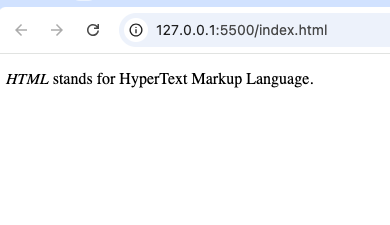
  <dfn>HTML</dfn> stands for HyperText Markup Language.
</p>
In this example:
- HTML is the term being defined.
- The explanation follows immediately after it.
The browser may display the term in italics by default, but the main purpose is semantic meaning rather than appearance.
How the <dfn> Tag Works
Think of the <dfn> element as a label that identifies a term being introduced.
For example:
Imagine you’re writing a tutorial about web development.
You may write:
“A browser is a software application used to access websites.”
The word “browser” is the term being defined.
Using <dfn> tells browsers that this word is the definition target.
Real-World Example
Educational websites often explain unfamiliar terms.
For example:
- HTML
- CSS
- JavaScript
- Database
- Server
- API
When introducing these concepts for the first time, the <dfn> element can mark the term clearly.
This helps create better documentation and learning materials.
Common Uses of the <dfn> Tag
The <dfn> tag is especially useful in educational and reference content.
Let’s look at some common situations.
1. Technical Tutorials
Programming tutorials often introduce new terminology.
Examples include:
- Variable
- Function
- Class
- Framework
The <dfn> element helps identify these terms as definitions.
2. Online Dictionaries
Dictionary websites define thousands of words.
The <dfn> tag is naturally suited for this purpose.
It clearly identifies the word being explained.
3. Glossaries
Many websites include a glossary section.
A glossary contains:
- Terms
- Definitions
- Explanations
The <dfn> element helps organize this information.
4. Educational Articles
Learning platforms often explain concepts step by step.
The <dfn> tag helps highlight key terms throughout the content.
Why Semantic HTML Matters
The <dfn> tag is an example of semantic HTML.
Semantic HTML focuses on meaning rather than appearance.
Compare these two approaches:
Visual Styling
<b>HTML</b>
Semantic Meaning
<dfn>HTML</dfn>
Both may draw attention to the term.
However, only the second example tells browsers that the term is being defined.
This added meaning is valuable.
Difference Between <dfn> and <strong>
Beginners often confuse these elements.
Here is the difference.
<dfn> | <strong> |
|---|---|
| Indicates a definition term | Indicates importance |
| Adds semantic meaning for definitions | Adds semantic meaning for emphasis |
| Used when introducing terms | Used when stressing content |
Use <dfn> when defining something.
Use <strong> when emphasizing importance.
Difference Between <dfn> and <em>
These tags also serve different purposes.
<dfn> | <em> |
|---|---|
| Defines a term | Emphasizes content |
| Introduces concepts | Changes emphasis in meaning |
| Semantic definition element | Semantic emphasis element |
The <em> tag changes emphasis.
The <dfn> tag introduces definitions.
Browser Appearance of <dfn>
Most browsers display <dfn> text in italics.
For example:
HTML
However, this visual appearance is not its primary purpose.
The real purpose is semantic meaning.
Developers can always change the appearance with CSS if needed.
The Importance of Definitions in Content
Readers often encounter unfamiliar words.
Good educational content explains these terms clearly.
Using the <dfn> element helps:
- Improve clarity
- Improve understanding
- Highlight important concepts
- Organize learning materials
This is especially useful for beginners.
HTML5 and the <dfn> Tag
The <dfn> element continues to be supported in HTML5.
HTML5 encourages developers to use semantic elements whenever possible.
This improves:
- Accessibility
- Readability
- Maintainability
- Search engine understanding
The <dfn> tag fits well within these goals.
Accessibility Benefits
Accessibility is an important part of modern web development.
The <dfn> element helps assistive technologies understand content better.
Screen readers can identify terms being defined.
This improves the experience for users who rely on accessibility tools.
SEO Benefits of Semantic HTML
The <dfn> tag does not directly improve rankings by itself.
However, semantic HTML helps create better-structured content.
Search engines aim to understand webpage meaning.
Clear definitions and organized content can contribute to a better user experience.
Practice Projects Using <dfn>
The best way to learn HTML is through practice.
Here are some beginner-friendly projects where the <dfn> element fits naturally.
1. HTML Glossary Website
Create a webpage explaining terms such as:
- HTML
- CSS
- JavaScript
- Browser
- Server
Each term can be marked with <dfn>.
2. Programming Dictionary
Build a simple dictionary for coding terms.
Examples include:
- Variable
- Loop
- Function
- Object
The <dfn> tag helps identify the defined word.
3. Educational Blog
Write tutorials that explain beginner concepts.
Use <dfn> whenever introducing new terminology.
4. Science Learning Page
Scientific articles often define technical vocabulary.
The <dfn> tag works well for educational content.
Best Practices for Using <dfn>
Here are some helpful guidelines.
Define Terms Clearly
Always provide a clear explanation after introducing a term.
Readers should immediately understand its meaning.
Use It for Actual Definitions
Avoid using <dfn> simply for styling.
It should only be used when a definition is being introduced.
Keep Content Easy to Understand
Definitions should be written in simple language whenever possible.
This helps beginners learn more effectively.
Combine with Educational Content
The <dfn> element works best in:
- Tutorials
- Documentation
- Glossaries
- Dictionaries
Focus on Meaning
Remember that semantic HTML is about meaning, not appearance.
Common Beginner Mistakes
Here are some mistakes beginners often make.
1. Using <dfn> for Random Words
The <dfn> tag should only mark terms being defined.
Do not use it simply because a word looks important.
2. Forgetting the Definition
A term marked with <dfn> should have an explanation nearby.
Without a definition, the tag loses its purpose.
3. Confusing It with Styling Tags
The <dfn> element is not primarily a styling tool.
Its purpose is semantic meaning.
4. Overusing Definitions
Not every word needs to be defined.
Use the <dfn> element when introducing important concepts.
Real-World Websites That Use Definitions
Many websites use definitions regularly.
Examples include:
- Online dictionaries
- Educational platforms
- Programming documentation
- Technical manuals
- Learning management systems
These sites often introduce and explain specialized terminology.
Why Learning Specialized HTML Tags Is Valuable
Some beginners focus only on common elements.
However, specialized tags like <dfn> teach important lessons about semantic HTML.
They help you understand:
- Content structure
- Accessibility
- Web standards
- Meaningful markup
Even if you do not use the <dfn> element every day, learning it improves your overall HTML knowledge.
Understanding Semantic Web Design
The web is moving toward more meaningful content structures.
Semantic elements help machines understand information more accurately.
Examples include:
<article><section><aside><time><abbr><dfn>
Each element has a specific purpose.
Using them correctly improves content quality.
Combining <dfn> with Other HTML Elements
The <dfn> element works well alongside:
- Paragraphs
- Articles
- Sections
- Lists
- Glossaries
This makes it easy to integrate into educational content.
The HTML <dfn> tag is a simple but useful semantic element designed to identify terms being defined within content. While it may not be used as frequently as elements like <div> or <p>, it plays an important role in educational articles, glossaries, tutorials, and technical documentation.
By using the <dfn> tag correctly, you can create more meaningful, organized, and accessible content. It helps readers understand new concepts and allows browsers and assistive technologies to recognize definition terms properly.
As you continue learning HTML, understanding elements like <dfn> will help you build cleaner, more professional webpages and deepen your knowledge of semantic web development.