
CSS selectors are one of the most important parts of CSS. If you understand selectors well, styling a website becomes much easier. This guide explains CSS selectors in a simple way for beginners, without complex grammar or unnecessary theory.
By the end of this article, you will understand how CSS selectors work, the common types of selectors, and how to use them correctly in real projects.
What Are CSS Selectors?
CSS selectors tell the browser which HTML elements should be styled.
They act like a targeting system.
Think of HTML as a structure and CSS as the paint.
Selectors decide where the paint goes.
Example:
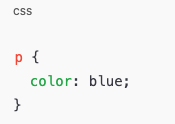
This selector tells the browser:
“Find all <p> elements and make their text blue.”
Without selectors, CSS would not know what to style.
Basic Structure of a CSS Rule
Before diving into selectors, it helps to understand how CSS rules are written.
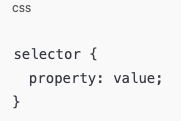
- Selector – chooses the HTML element
- Property – what you want to change
- Value – how you want to change it
Example:
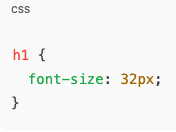
This applies a font size to all <h1> elements.
Why CSS Selectors Matter
CSS selectors matter because:
- They control design consistency
- They help you write clean and reusable CSS
- They prevent unnecessary repetition
- They allow precise styling without affecting other elements
Bad selector usage leads to messy code.
Good selector usage leads to maintainable websites.
Type Selector (Element Selector)
The type selector targets HTML elements by their tag name.
Example:
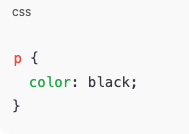
This selects all paragraph elements.
Common examples:
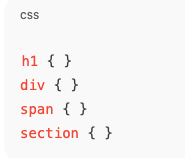
When to use it
- When styling all elements of the same type
- For base styles like fonts and spacing
When not to use it
- When you want to style only one specific element
Class Selector
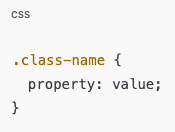
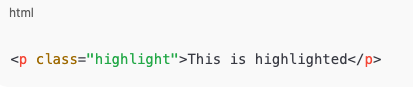
The class selector targets elements with a specific class attribute.
Syntax:
HTML:
CSS:
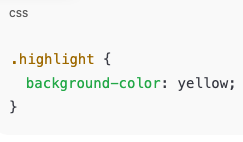
This only styles elements with the class highlight.
Why Class Selectors Are Important
- Classes are reusable
- Multiple elements can share the same class
- Most modern CSS relies heavily on classes
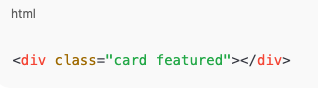
You can also apply multiple classes to one element:

ID Selector
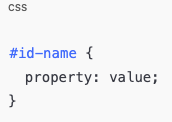
The ID selector targets one unique element.
Syntax:
HTML:
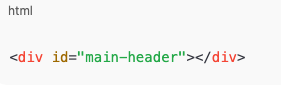
CSS:
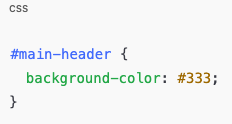
Important Rules About IDs
- IDs must be unique
- One ID per page
- Use sparingly
IDs have higher priority than class selectors, so overusing them can cause problems later.
Universal Selector
The universal selector targets all elements on the page.
Syntax:
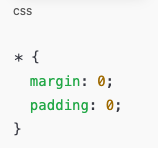
Common uses:
- Resetting default browser styles
- Setting global box sizing
Example:
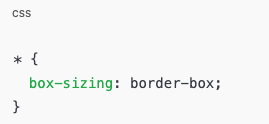
Use carefully, because it affects everything.
Grouping Selectors
Grouping selectors lets you apply the same style to multiple elements.
Example:
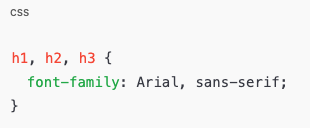
This saves time and keeps CSS clean.
Descendant Selector
The descendant selector targets elements inside another element.
Example:
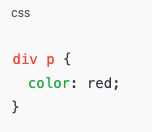
This selects:
- All
<p>elements inside a<div>
It does NOT select paragraphs outside the div.
Practical Example
HTML:
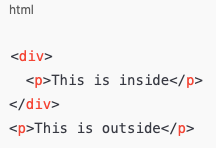
Only the first paragraph will be styled.
Child Selector
The child selector is more specific than the descendant selector.
Syntax:
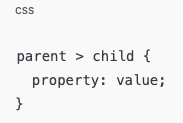
Example:
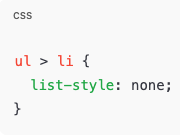
This selects:
- Only direct children
It does not affect nested elements deeper inside.
Attribute Selector
Attribute selectors target elements based on attributes.
Example:
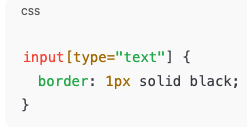
This selects only text input fields.
Other examples:
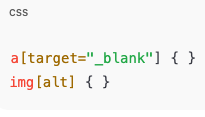
Very useful for forms and links.
Pseudo-class Selectors
Pseudo-classes select elements based on state.
Common examples:
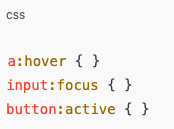
Example:
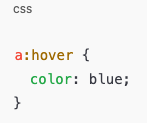
This applies when the user hovers over a link.
Common Pseudo-classes
:hover:focus:active:visited:first-child:last-child
Pseudo-element Selectors
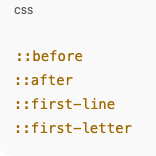
Pseudo-elements style parts of an element.
Example:
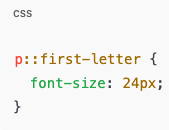
Common pseudo-elements:
Example:
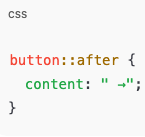
Used often for icons, decorations, and effects.
Combining Selectors
You can combine selectors for more control.
Example:
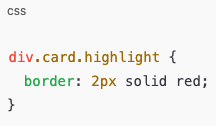
This targets:
divelements- with class
card - and class
highlight
Combining selectors increases accuracy.
Selector Specificity (Important for Beginners)
Specificity decides which style wins when multiple rules apply.
Priority order (simple version):
- Inline styles
- ID selectors
- Class selectors
- Element selectors
Example:
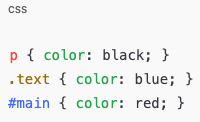
If an element has all three, red will apply.
Understanding this avoids confusion when styles do not work.
Common Beginner Mistakes with Selectors
- Overusing ID selectors
- Writing selectors that are too long
- Using
*everywhere - Not understanding specificity
- Styling elements instead of reusable classes
Keeping selectors simple makes CSS easier to manage.
Best Practices for CSS Selectors
- Prefer classes over IDs
- Keep selectors short
- Avoid deep nesting
- Name classes clearly
- Write readable CSS
Good selectors improve performance and readability.
Real-World Use of CSS Selectors
CSS selectors are used everywhere:
- Website layouts
- Buttons and forms
- Navigation menus
- Animations
- Responsive design
Once you master selectors, learning advanced CSS becomes easier.
CSS selectors are the foundation of CSS. Without them, styling a website is impossible. As a beginner, focus on understanding:
- Element selectors
- Class selectors
- ID selectors
- Descendant and child selectors
- Pseudo-classes and pseudo-elements
Practice using selectors in small projects. The more you use them, the more natural they become. Clean selectors lead to clean websites.