When you first start learning HTML, you’ll quickly come across both the <div> and <section> elements. At first glance, they seem very similar because both are used to group content on a webpage. This often leaves beginners wondering: What is the difference between a <div> and a <section>? More importantly, when should you use one instead of the other?
The answer is simpler than it might seem. Although both elements can contain text, images, videos, forms, and other HTML elements, they are designed for different purposes. Knowing the difference will help you write cleaner, more organized, and more professional HTML.
In this beginner-friendly guide, you’ll learn what the <div> and <section> tags do, how they differ, when to use each one, common mistakes to avoid, and practical examples you can apply in your own projects.
This article focuses on clear explanations with only a few simple code examples so you can understand the concepts without feeling overwhelmed.
Why Understanding These Two Tags Matters
Many beginners use <div> for almost everything because it is simple and flexible.
While that approach may work, modern HTML encourages developers to use semantic elements like <section> whenever they describe the meaning of the content.
Choosing the right element makes your code:
- Easier to read
- Easier to maintain
- Better for accessibility
- Better organized
- More meaningful for search engines
Understanding this difference is an important step toward writing professional HTML.
What Is the <div> Tag?
The <div> tag is a generic container.
It does not describe the type of content inside it.
Instead, it simply groups elements together so they can be styled with CSS or manipulated with JavaScript.
Think of a <div> as an empty box.
You decide what goes inside it.
That box could contain:
- Text
- Images
- Buttons
- Forms
- Videos
- Navigation
- Entire layouts
The <div> itself provides no meaning about the content.
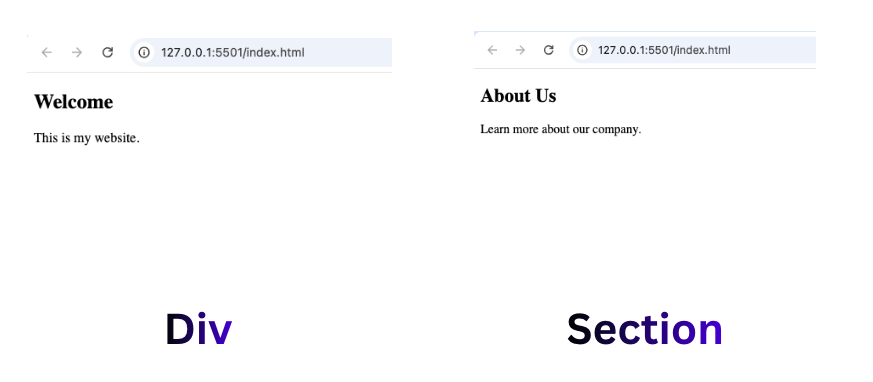
Simple <div> Example
<div>
    <h2>Welcome</h2>
    <p>This is my website.</p>
</div>
The browser simply sees this as a container.
What Is the <section> Tag?
The <section> tag is a semantic HTML element.
Unlike <div>, it tells browsers and developers that the content belongs to a specific section of the webpage.
Think of it as a chapter inside a book.
Each chapter covers one particular topic.
Similarly, every <section> should contain related content centered around one subject.
Simple <section> Example
<section>
    <h2>About Us</h2>
    <p>Learn more about our company.</p>
</section>
Here, the browser understands that this content forms a meaningful section of the page.
The Biggest Difference Between <div> and <section>
The easiest way to remember the difference is this:
<div>groups content for layout or styling.<section>groups content because it belongs together logically.
One focuses on structure.
The other focuses on meaning.
Think of a House
Imagine you’re building a house.
A <div> is like a storage box.
You can put anything inside it.
It doesn’t tell anyone what the contents are.
A <section> is like labeling a room.
Examples include:
- Kitchen
- Bedroom
- Living Room
- Bathroom
Each room has a clear purpose.
That is exactly how semantic HTML works.
Why HTML Introduced the <section> Tag
Before HTML5, developers used <div> for nearly everything.
A webpage might have looked like this:
<div id="header">
<div id="menu">
<div id="content">
<div id="footer">
Although this worked, the code had very little meaning.
HTML5 introduced semantic elements such as:
<header><nav><main><section><article><aside><footer>
These tags make webpages easier to understand.
When Should You Use a <div>?
Use a <div> whenever you simply need a container.
Examples include:
- Wrapping elements for CSS styling
- Creating layouts
- Building Flexbox containers
- Creating CSS Grid layouts
- Grouping buttons
- Grouping images
If the container has no specific meaning, a <div> is usually the correct choice.
When Should You Use a <section>?
Use <section> whenever the content represents a meaningful topic.
Examples include:
- About Us
- Services
- Contact
- Testimonials
- Features
- Pricing
- Frequently Asked Questions
Each section should have its own purpose.
Comparing Both Elements
<div> | <section> |
|---|---|
| Generic container | Semantic section |
| No special meaning | Has meaning |
| Mainly for styling | Mainly for organizing related content |
| Works well with CSS | Improves document structure |
| Used almost everywhere | Used for major content groups |
Real-World Website Example
Imagine you’re creating a business website.
The page might include:
- Hero banner
- About company
- Services
- Team members
- Contact form
Each of these areas can be a <section> because each covers one topic.
Inside those sections, you may still use several <div> containers to arrange images, text, and buttons.
This is how both elements work together.
Can a <section> Contain <div> Elements?
Yes.
This is actually very common.
For example:
<section>

    <div>
        Image
    </div>

    <div>
        Text
    </div>

</section>
The section defines the topic.
The divs help organize the layout.
Can a <div> Contain a <section>?
Yes.
Although it’s less common, it is perfectly valid.
Large layouts often use outer <div> containers with semantic elements inside.
Should Every <section> Have a Heading?
Generally, yes.
Most sections include a heading such as:
<h2>Services</h2>
This makes the purpose of the section clear.
It also improves accessibility.
Practical Project Example 1: Personal Portfolio
Imagine you’re building your first portfolio.
Good sections might include:
- Hero
- About Me
- Skills
- Projects
- Contact
Each one deserves its own <section>.
Inside each section, you can use <div> elements for arranging cards, images, or buttons.
Practical Project Example 2: Online Store
An online shop may contain:
- Featured Products
- Categories
- Customer Reviews
- Newsletter
Each area is a different topic.
Therefore, each can become a <section>.
Inside the Featured Products section, each product card can be wrapped in a <div>.
Practical Project Example 3: Blog Homepage
A blog homepage may include:
- Latest Articles
- Popular Posts
- Categories
- Author Information
Again, these are meaningful content groups.
Using <section> makes perfect sense.
Why Semantic HTML Matters
Semantic HTML improves many parts of web development.
It helps:
- Search engines understand your page
- Screen readers navigate content
- Developers read your code
- Teams maintain projects
- Future updates become easier
This is one reason professional developers rely heavily on semantic HTML.
Accessibility Benefits
Screen readers help visually impaired users browse websites.
Semantic elements like <section> provide useful information about page structure.
A generic <div> cannot communicate this meaning.
Using semantic HTML improves accessibility for everyone.
SEO Benefits
While simply changing a <div> into a <section> won’t automatically improve rankings, semantic HTML helps search engines understand the organization of your content.
Clear structure contributes to better indexing and a better user experience.
Common Beginner Mistakes
Here are some common mistakes beginners make.
1. Using <div> for Everything
This is probably the most common mistake.
Although it works, it makes your HTML less meaningful.
Whenever a semantic element fits the content, use it instead.
2. Replacing Every <div> with <section>
The opposite mistake is also common.
Not every container needs to be a section.
If the container exists only for layout or styling, use a <div>.
3. Creating Empty Sections
Every <section> should contain meaningful content.
Avoid creating empty semantic elements.
4. Forgetting Headings
Most sections should include a heading to identify the topic.
Without headings, sections become harder to understand.
Modern CSS Works with Both
Whether you use:
- Flexbox
- CSS Grid
- Positioning
- Responsive layouts
Both <div> and <section> work equally well.
CSS does not care which one you choose.
The difference is meaning, not styling.
How Professional Developers Use Them
Most professional websites combine both elements.
A typical layout might look like this:
<main><section><div><div>
<section><div><div>
The semantic elements describe the page.
The divs help build the layout.
Practice Project Ideas
To understand the difference better, try building these projects:
1. Personal Portfolio
Create sections for:
- Hero
- About
- Skills
- Projects
- Contact
Use divs inside each one for layouts.
2. Restaurant Website
Sections could include:
- Menu
- Chef
- Gallery
- Reservations
Arrange each item with div containers.
3. Photography Portfolio
Use sections for:
- Nature
- Portraits
- Weddings
- Contact
Each gallery image can sit inside its own div.
4. Landing Page
Typical sections include:
- Hero
- Features
- Testimonials
- Pricing
- FAQ
Divs help organize the cards inside those sections.
Best Practices
Here are a few simple rules to remember.
- Use
<section>for meaningful content groups. - Use
<div>for styling and layout. - Give most sections a heading.
- Avoid unnecessary nesting.
- Combine semantic HTML with CSS for clean designs.
- Write code that is easy for other developers to understand.
The difference between the <div> and <section> tags is one of the first important concepts every HTML beginner should learn.
A <div> is a flexible, generic container used mainly for layout, styling, and grouping elements together. It doesn’t describe the content inside it.
A <section>, on the other hand, is a semantic element that represents a meaningful part of a webpage. It helps organize related content into logical sections, making your HTML easier to understand for developers, browsers, screen readers, and search engines.
In modern web development, the best approach is not choosing one over the other it is learning when to use each. By combining semantic elements like <section> with flexible containers like <div>, you’ll create webpages that are cleaner, more accessible, easier to maintain, and better prepared for real-world projects.
As you continue learning HTML and CSS, mastering this distinction will help you build websites that follow modern best practices and professional coding standards.
Try it yourself
Change the code, then run it to see the result.