
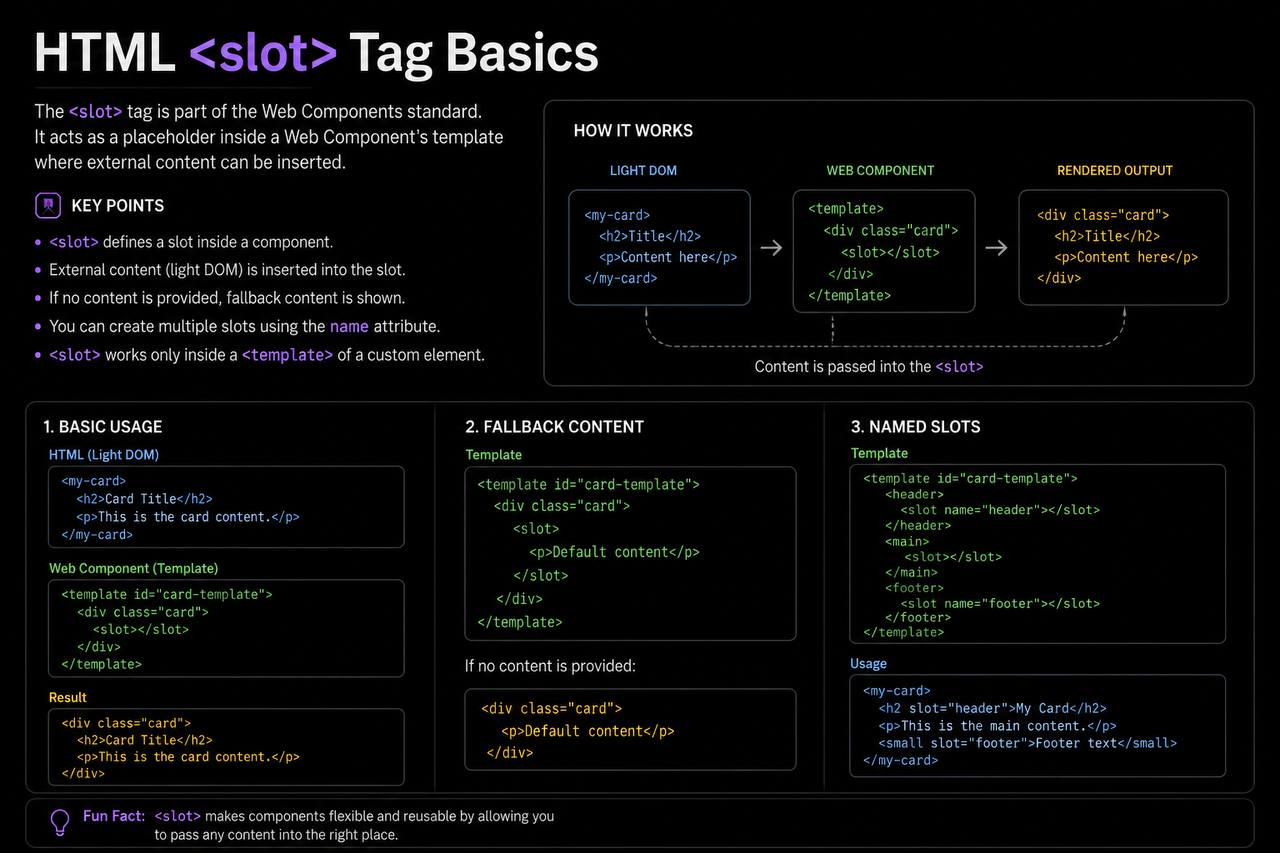
The HTML <slot> tag is one of the most interesting elements introduced alongside Web Components. While many beginners spend most of their time learning common tags like <div>, <p>, <section>, and <article>, the <slot> tag opens the door to building reusable and customizable components.
At first, the <slot> element may seem advanced because it is commonly used with Web Components. However, understanding the basic idea behind it is actually quite simple. Think of a slot as a placeholder where content can be inserted later.
In this beginner-friendly guide, you’ll learn what the HTML <slot> tag is, why it exists, how it works, and where it can be used in practice projects. The explanations are designed to be easy to understand without overwhelming you with complex code.
What is the HTML <slot> Tag?
The <slot> tag is used as a placeholder inside a Web Component.
A placeholder is simply an area where content can be inserted later.
Think about a picture frame.
The frame itself stays the same, but the picture inside can change.
The <slot> element works in a similar way.
It allows developers to create reusable components where users can insert different content without changing the component’s structure.
Why Was the <slot> Tag Created?
Modern websites often reuse the same layouts repeatedly.
Examples include:
- User profile cards
- Product cards
- Notification boxes
- Navigation menus
- Custom buttons
- Reusable widgets
Instead of rewriting the same code repeatedly, developers create reusable components.
The <slot> tag makes these reusable components more flexible.
Basic Syntax of the <slot> Tag
A simple slot looks like this:
<slot></slot>
This creates an empty placeholder.
Content can later be inserted into that space.
Understanding the Main Idea Behind Slots
Imagine building a reusable profile card.
The card layout might stay the same:
- Profile image area
- Name section
- Description section
However, different users need different information.
Instead of creating separate cards every time, you create one reusable component and allow certain areas to accept custom content.
That customizable area is where a slot becomes useful.
Think of a Slot as an Empty Container
A helpful way to understand the <slot> element is to think of it as an empty container waiting to be filled.
For example:
A reusable card may say:
“Insert content here.”
The slot acts as that insertion point.
When content is provided, the slot displays it.
When no content is provided, the slot remains empty or displays default content.
What Are Web Components?
Since the <slot> element is closely connected to Web Components, it helps to understand the basics.
Web Components are reusable pieces of a webpage.
Think of them as custom HTML elements.
Examples include:
- Custom buttons
- Custom cards
- Custom navigation bars
- Custom product displays
The <slot> tag allows these components to accept custom content.
Why Developers Use Slots
The <slot> element provides several benefits.
1. Reusability
Developers can build one component and use it many times.
Instead of rewriting layouts repeatedly, the same structure can be reused.
2. Flexibility
Different content can be inserted into the same component.
This makes designs more adaptable.
3. Cleaner Code
Slots reduce duplication.
Less repeated code usually means easier maintenance.
4. Better Organization
Reusable components help keep projects organized and easier to manage.
Real-World Example: Profile Cards
Imagine a website displaying employee information.
Every card contains:
- Photo area
- Name area
- Job title area
Instead of creating dozens of unique cards, a developer creates one card component.
Slots allow each card to display different content.
The structure stays the same while the information changes.
Real-World Example: Product Cards
Online stores often display products using identical layouts.
Each card contains:
- Product image
- Product name
- Price
- Buy button
The layout remains consistent.
Slots allow different product information to appear in the correct places.
Default Slot Content
The <slot> tag can contain fallback content.
Fallback content appears when no custom content is supplied.
For example:
<slot>
  Default Content
</slot>
If nothing is inserted into the slot, users see “Default Content.”
This helps prevent empty spaces.
Named Slots
Sometimes a component needs multiple insertion areas.
Examples:
- Header content
- Main content
- Footer content
Named slots allow developers to specify exactly where content should appear.
Think of them as labeled placeholders.
Instead of one generic slot, there can be multiple designated locations.
Why Named Slots Are Useful
Imagine creating a reusable webpage card.
You may want separate areas for:
- Title
- Body text
- Footer actions
Named slots help keep these sections organized.
Each piece of content knows where it belongs.
Difference Between <slot> and <div>
Beginners often compare these two elements.
<slot> | <div> |
|---|---|
| Placeholder for content | Generic container |
| Used with Web Components | Used in regular HTML |
| Allows content insertion | Holds existing content |
| Supports component flexibility | Supports layout organization |
Although both can contain content, they serve different purposes.
Difference Between <slot> and <template>
The <slot> and <template> elements are often discussed together.
However, they have different jobs.
<slot> | <template> |
|---|---|
| Receives content | Stores content |
| Displays inserted content | Holds reusable hidden content |
| Used inside components | Used for reusable structures |
A template stores content.
A slot receives content.
Browser Support for <slot>
The <slot> element is supported in all major modern browsers including:
- Chrome
- Firefox
- Safari
- Edge
- Opera
This makes it reliable for modern web development.
Accessibility Benefits
The <slot> element can improve accessibility when used correctly.
Reusable components allow developers to maintain consistent structures across a website.
Consistency often improves usability for:
- Screen readers
- Keyboard navigation
- Assistive technologies
Accessibility becomes easier when components follow predictable patterns.
SEO Considerations
The <slot> element itself does not directly affect search engine rankings.
However, reusable and organized components often lead to:
- Cleaner code
- Better maintenance
- Improved user experience
These factors can indirectly contribute to a better website overall.
Common Beginner Mistakes
When learning about slots, beginners often make a few mistakes.
1. Thinking Slots Work Alone
The <slot> tag is designed for Web Components.
Using it by itself in a regular webpage usually does not provide much benefit.
2. Confusing Slots with Containers
A slot is not simply a content box.
It is a placeholder designed to receive content.
3. Ignoring Fallback Content
Providing default content can improve the user experience when no custom content is available.
4. Overcomplicating Small Projects
Many beginner projects do not require Web Components.
Learn the concept first before trying to use it everywhere.
Practice Project Ideas Using Slots
Once you understand the basics, here are some project ideas.
Profile Card Component
Create a reusable profile card where names and descriptions are inserted through slots.
Product Display Component
Build a product card that accepts:
- Product images
- Product names
- Prices
through slot placeholders.
Custom Notification Box
Create a reusable notification component with slots for:
- Message title
- Main message
- Action buttons
Blog Post Card
Build a reusable article preview card with customizable content sections.
Testimonial Component
Create a testimonial box where user quotes and names are inserted through slots.
Benefits of Learning the <slot> Tag
Although the <slot> element is more advanced than many beginner HTML tags, learning it provides several advantages.
You gain a better understanding of:
- Component-based development
- Modern web design
- Reusable code structures
- Web Components
- Scalable project architecture
These concepts become increasingly important as your skills grow.
Best Practices for Using Slots
Here are some useful recommendations.
Keep Components Reusable
Build components that can serve multiple purposes.
Use Meaningful Slot Names
When creating named slots, choose descriptive names.
Provide Fallback Content
Default content improves usability.
Keep Components Simple
Avoid unnecessary complexity when starting out.
Focus on Learning the Concept
Understanding why slots exist is more important than memorizing syntax.
Why the <slot> Tag Matters
The <slot> element represents a shift toward modern, reusable web development.
Instead of creating the same structures repeatedly, developers build flexible components that accept different content.
This approach:
- Saves time
- Reduces duplication
- Improves organization
- Supports scalable projects
As websites become more complex, reusable components become increasingly valuable.
The HTML <slot> tag is a powerful tool used in Web Components to create flexible and reusable content placeholders. Although it may seem advanced at first, the core idea is simple: a slot is a place where content can be inserted later.
By understanding how slots work, beginners gain insight into modern web development practices and reusable component design. Whether you’re building profile cards, product displays, notifications, or custom widgets, the <slot> element helps make components more adaptable and maintainable.
As you continue learning HTML and modern web technologies, the <slot> tag will become an important concept that supports cleaner, more scalable projects. Even if you do not use it immediately, understanding its purpose will prepare you for more advanced development techniques in the future.