When building web pages, you want your text to look clean and easy to read on every screen size. Sometimes, however, you may have very long words, URLs, file names, or product codes that don’t fit nicely within a page. Instead of wrapping naturally, they may stretch outside their container or make your layout look broken.
HTML provides a simple solution for this problem: the <wbr> tag.
Although the <wbr> element is one of the lesser-known HTML tags, it can be very useful when displaying long strings of text that may need to wrap onto the next line. It gives the browser permission to insert a line break only if one becomes necessary.
In this beginner-friendly guide, you’ll learn what the <wbr> tag is, how it works, where it is used, and why it can improve the appearance of your webpages. The explanations focus on practical understanding rather than lots of code, making this article easy for beginners to follow.
What is the HTML <wbr> Tag?
The <wbr> tag stands for Word Break Opportunity.
It tells the browser that it may insert a line break at a specific location if the text becomes too long to fit on one line.
In simple words, the <wbr> tag marks a safe place where a long word or string can wrap onto the next line when needed.
Unlike the <br> tag, which always forces a new line, the <wbr> tag only creates a possible break point. If there is enough room on the line, nothing changes.
Why is the <wbr> Tag Important?
Modern websites are viewed on many different devices, including:
- Desktop computers
- Laptops
- Tablets
- Smartphones
A line of text that fits perfectly on a large monitor may become too long on a mobile phone.
Without a proper break point, very long text can:
- Overflow outside its container
- Stretch the page layout
- Reduce readability
- Create horizontal scrolling
The <wbr> tag helps prevent these issues by giving the browser flexibility.
Basic Syntax of the <wbr> Tag
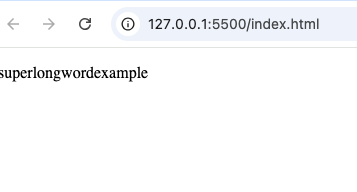
Here is a simple example:
<p>superlongword<wbr>example</p>
The browser treats the position of the <wbr> element as an optional place to wrap the text.
How the <wbr> Tag Works
Imagine you have a very long product name like this:
SuperUltraMegaProfessionalGamingLaptopEdition2026
On a large screen, the entire text may fit on one line.
On a smaller screen, however, the browser may need to move part of the word onto the next line.
By placing <wbr> at suitable positions, you allow the browser to break the word naturally if needed.
If there is enough space, the browser simply ignores the break point.
Difference Between <wbr> and <br>
Many beginners confuse these two tags.
Although both involve line breaks, they work differently.
<wbr> | <br> |
|---|---|
| Creates an optional line break | Creates an immediate line break |
| Browser decides whether to wrap | Browser always starts a new line |
| Used for long words | Used for separating lines of content |
| Helps responsive layouts | Controls text formatting |
Think of it this way:
<br>says “Start a new line now.”<wbr>says “You may start a new line here if necessary.”
Common Uses of the <wbr> Tag
The <wbr> element is useful whenever you expect long text that may not fit comfortably on smaller screens.
Here are some common examples.
1. Long Website URLs
Sometimes websites display lengthy web addresses.
Without break opportunities, these URLs can overflow the page.
The <wbr> tag allows browsers to wrap long addresses more neatly.
2. File Names
Some downloaded files have very long names.
Examples include:
- Project reports
- Backup files
- Software packages
Adding optional break points improves readability.
3. Product Names
Online stores often have products with long names.
For example:
- Electronics
- Computer accessories
- Technical equipment
The <wbr> tag helps these names fit smaller screens.
4. Email Addresses
Some email addresses can become very long.
Optional break points make them easier to display without breaking the layout.
5. Technical Documentation
Developer documentation often includes:
- Long class names
- Variable names
- Function names
- API endpoints
These long strings benefit from controlled wrapping.
Real-Life Example
Imagine an online electronics store.
One product is named:
UltraHighPerformanceWirelessBluetoothNoiseCancellingHeadphonesProEdition
On a desktop, the name looks fine.
On a phone, however, it might stretch beyond the screen.
By placing <wbr> between logical parts of the name, the browser can wrap it neatly when necessary.
This creates a better reading experience.
The <wbr> Tag and Responsive Design
Responsive design means creating websites that work well on different screen sizes.
The <wbr> tag supports responsive design because it allows text to adjust naturally without forcing awkward breaks.
Instead of overflowing, long text wraps only when required.
When Should You Use the <wbr> Tag?
You should consider using <wbr> when displaying:
- Long URLs
- Long product names
- Technical identifiers
- Programming examples
- File paths
- Email addresses
- Long scientific terms
If normal text wraps naturally, there is usually no need to use it.
When You Should Not Use <wbr>
The <wbr> tag should not replace normal punctuation or sentence formatting.
Avoid using it:
- Between every word
- In short sentences
- Where regular spaces already exist
- Simply to create visual spacing
Its purpose is to provide optional break opportunities inside long strings.
Browser Support
The <wbr> element is supported by all major modern browsers, including:
- Google Chrome
- Mozilla Firefox
- Microsoft Edge
- Safari
- Opera
Because browser support is excellent, you can confidently use it in modern web development.
Accessibility Benefits
The <wbr> tag helps improve readability without changing the meaning of the text.
Because it only provides an optional break point, screen readers generally treat the text naturally.
This makes it useful for creating cleaner layouts while maintaining accessibility.
SEO Considerations
The <wbr> element does not directly affect search engine rankings.
However, it contributes to a better user experience by improving text presentation.
Better readability can help visitors stay engaged with your content.
Difference Between <wbr> and CSS Word Wrapping
HTML and CSS both offer ways to handle long text.
The difference is:
- CSS controls how text wraps in general.
<wbr>gives you precise control over where wrapping is allowed.
Many developers use both together for the best results.
Practical Practice Projects Using <wbr>
Here are some beginner-friendly projects where you can practice using this tag.
Portfolio Website
Display long project URLs or GitHub repository links without breaking the layout.
Online Store
Allow lengthy product names to wrap neatly on mobile devices.
Documentation Website
Present long programming examples and API names more clearly.
Blog
Display long article links or downloadable resource names.
Download Center
Show software package names and file downloads without causing overflow.
Common Beginner Mistakes
Here are a few mistakes beginners often make when using the <wbr> tag.
1. Confusing <wbr> with <br>
Remember:
<wbr> creates a possible break.
<br> forces a break.
2. Adding Too Many Break Opportunities
Only insert <wbr> where a logical break would make sense.
Too many break points can make text look messy.
3. Using It in Normal Sentences
Ordinary sentences already contain spaces where browsers can wrap naturally.
The <wbr> tag is mainly for unusually long strings.
4. Forgetting Mobile Devices
Always think about how long text appears on smaller screens.
The <wbr> tag becomes much more valuable in responsive layouts.
Best Practices
Here are some helpful tips when using the <wbr> element.
Place Break Opportunities Logically
Insert break points where words naturally separate or where a reader would expect a pause.
Test on Different Screen Sizes
View your page on both desktop and mobile devices.
Keep Readability First
Use <wbr> only when it genuinely improves the appearance of long text.
Combine with Responsive Design
The <wbr> element works well alongside modern CSS techniques that create flexible layouts.
Why Every Beginner Should Learn the <wbr> Tag
Although it is not used as often as tags like <div> or <p>, the <wbr> element solves a very specific problem.
Learning how to use it teaches you:
- Better responsive design
- Cleaner typography
- Improved user experience
- Practical HTML techniques
Even if you only use it occasionally, it is a useful tool to have in your HTML knowledge.
Real-World Websites That Benefit from <wbr>
Many types of websites can use the <wbr> tag effectively, including:
- E-commerce websites
- Programming documentation
- Educational platforms
- Technical blogs
- Download portals
- Company websites
- Online manuals
Wherever long text appears, the <wbr> tag can help improve presentation.
The HTML <wbr> tag is a small but valuable element that helps browsers handle long words and strings of text more gracefully. Instead of forcing a line break, it provides an optional place where the browser may wrap text when space becomes limited.
This simple feature can greatly improve readability, especially on mobile devices and responsive websites.
While many beginners may not use the <wbr> tag every day, understanding its purpose prepares you to solve layout problems that often appear in real-world projects. Whether you’re displaying long URLs, product names, technical terms, or file names, the <wbr> element gives you more control over how your content appears.
As you continue learning HTML, remember that even the smallest tags can make a noticeable difference in creating clean, professional, and user-friendly webpages.
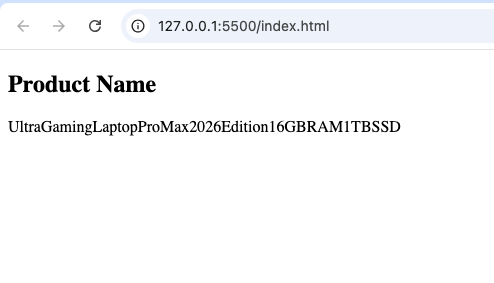
<!DOCTYPE html>
<html lang="en">
<head>
    <meta charset="UTF-8">
    <meta name="viewport" content="width=device-width, initial-scale=1.0">
    <title>HTML wbr Example</title>
</head>
<body>

<h2>Product Name</h2>

<p>
UltraGamingLaptop<wbr>Pro<wbr>Max<wbr>2026<wbr>Edition<wbr>16GB<wbr>RAM<wbr>1TB<wbr>SSD
</p>

</body>
</html>