
The <th> tag in HTML is used to define a header cell inside a table. It is an important part of creating structured tables because it tells the browser and users that a particular cell is a heading, not just normal data.
When you build tables in HTML, you usually use tags like <table>, <tr>, <td>, and <th>. Among these, the <th> tag stands out because it gives meaning to the data. It helps users understand what each column or row represents.
In simple terms, <th> means table header.
Basic Syntax of the <th> Tag
Here is the simplest way to use the <th> tag:
<table>
  <tr>
    <th>Name</th>
    <th>Age</th>
    <th>Country</th>
  </tr>
</table>
Explanation:
<table>: Creates the table<tr>: Defines a row<th>: Defines header cells
In this example, “Name”, “Age”, and “Country” are headers for the table columns.
Example with Table Data
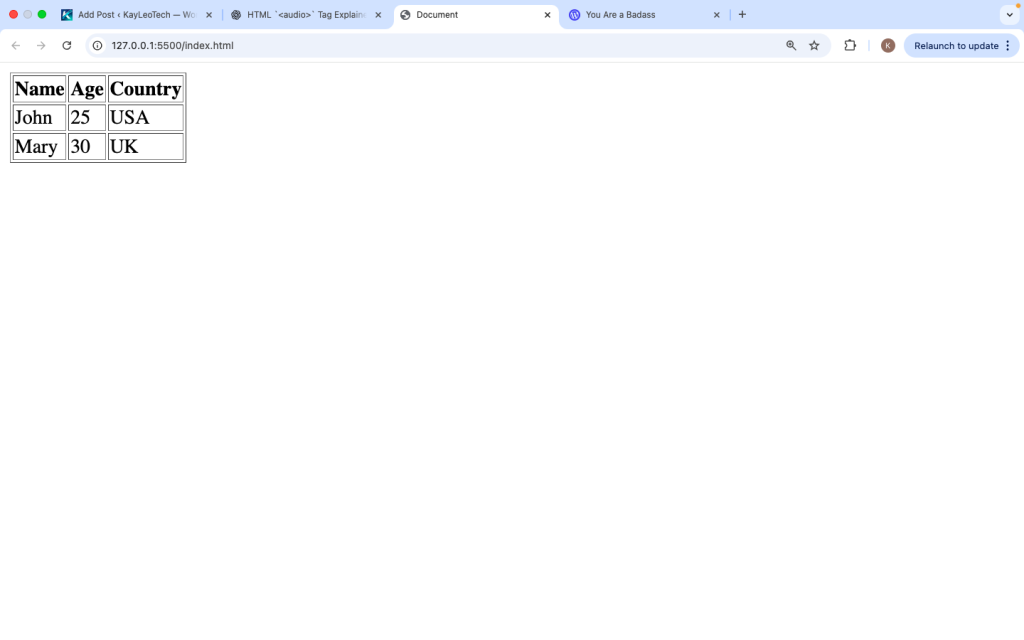
To understand better, let’s combine <th> with <td> (table data):
<table border=”1″>
<tr>
<th>Name</th>
<th>Age</th>
<th>Country</th>
</tr>
<tr>
<td>John</td>
<td>25</td>
<td>USA</td>
</tr>
<tr>
<td>Mary</td>
<td>30</td>
<td>UK</td>
</tr>
</table>
What happens here:
- The first row uses
<th>for headings - The other rows use
<td>for actual data
This makes the table clear and easy to read.
Why Use the <th> Tag
You might think you can just use <td> everywhere, but <th> has important benefits:
1. Better Structure
It clearly defines headings in a table.
2. Improved Readability
Browsers usually display <th> text in bold and centered by default.
3. Accessibility
Screen readers use <th> to understand table structure, helping visually impaired users.
4. SEO Benefits
Search engines can better understand your table content.
Default Styling of <th>
Browsers apply default styles to <th> elements:
- Bold text
- Center alignment
Example:
<th>Title</th>
Even without CSS, it looks different from <td>.
<th> vs <td>
Here is a simple comparison:
| Feature | <th> | <td> |
|---|---|---|
| Purpose | Header cell | Data cell |
| Default style | Bold, centered | Normal text |
| Importance | High (labels data) | Regular content |
Use <th> for headings and <td> for data.
Using <th> for Row Headers
You can also use <th> in rows, not just columns:
<table border="1">
  <tr>
    <th>Name</th>
    <td>John</td>
  </tr>
  <tr>
    <th>Age</th>
    <td>25</td>
  </tr>
</table>
Explanation:
- The first column acts as row headers
- Useful for key-value tables
Important Attributes of <th>
The <th> tag supports several useful attributes.
1. scope
The scope attribute tells the browser what the header applies to.
<th scope=”col”>Name</th>
<th scope=”row”>Age</th>
Values:
col: Header for a columnrow: Header for a row
This improves accessibility.
2. colspan
Used to make a header span multiple columns.
<th colspan="2">Full Name</th>
This merges rows vertically.
Example with colspan and rowspan
<table border="1">
  <tr>
    <th rowspan="2">Name</th>
    <th colspan="2">Info</th>
  </tr>
  <tr>
    <th>Age</th>
    <th>Country</th>
  </tr>
</table>
What this does:
- “Name” spans two rows
- “Info” spans two columns
This helps organize complex tables.
Styling <th> with CSS
You can style <th> to match your design.
Example:
<style>
th {
background-color: #333;
color: white;
padding: 10px;
}
</style>
This makes header cells more visible.
Aligning Text in <th>
You can change alignment using CSS:
th {
text-align: left;
}
Or center:
th {
  text-align: center;
}
Adding Borders
table, th, td {
  border: 1px solid black;
  border-collapse: collapse;
}
This makes the table clean and structured.
Accessibility Best Practices
To make your table accessible:
Use scope
Always define if the header is for a row or column.
Use clear labels
Avoid vague headings like “Data”.
Keep structure simple
Complex tables can confuse users.
Common Mistakes to Avoid
1. Using <td> instead of <th>
This removes the meaning of headers.
2. Not using scope
This affects screen readers.
3. Overusing rowspan/colspan
Too much merging can make tables confusing.
4. Missing table structure
Always use <tr> correctly.
Real-Life Example
Here is a practical table:
<table border="1">
  <tr>
    <th>Product</th>
    <th>Price</th>
    <th>Stock</th>
  </tr>
  <tr>
    <td>Laptop</td>
    <td>$800</td>
    <td>Available</td>
  </tr>
  <tr>
    <td>Phone</td>
    <td>$500</td>
    <td>Out of stock</td>
  </tr>
</table>
This is how tables are used in real websites.
When to Use <th>
Use <th> when:
- You are labeling columns
- You are labeling rows
- You want better structure
- You care about accessibility
When Not to Use <th>
Avoid using <th> when:
- The cell is not a header
- You are just displaying normal data
Browser Support
The <th> tag works in all modern browsers:
- Chrome
- Firefox
- Safari
- Edge
There are no compatibility issues.
<th> in Modern Web Design
Even with modern layouts using CSS Grid and Flexbox, tables are still useful for structured data. The <th> tag remains important when displaying:
- Data tables
- Reports
- Schedules
- Pricing tables
The <th> tag is used to define header cells in an HTML table. It helps organize content, improve readability, and make tables more accessible.
By using <th> correctly, you give meaning to your data, making it easier for both users and search engines to understand your content.
The <th> tag may look simple, but it plays a big role in creating clear and structured tables. It defines headings, improves accessibility, and helps users quickly understand data.
When building tables, always use <th> for headers and <td> for data. Add attributes like scope, and use styling to improve appearance.
If you follow these simple rules, your tables will be clean, easy to read, and professional.
Learning how to use the <th> tag properly is an important step in mastering HTML and building better web pages.
https://shorturl.fm/zd96D
Solid platform with a great selection of games. The registration was a breeze and I started playing in minutes. Check betmgmcasino