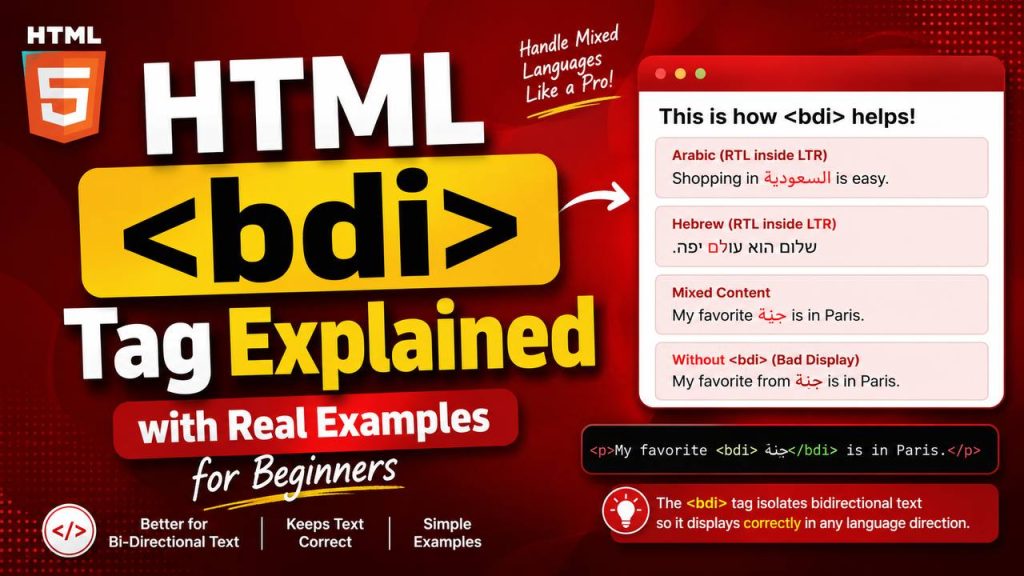
If you’ve been learning HTML, you’ve probably become familiar with common elements like headings, paragraphs, links, images, and lists. As you continue exploring HTML, you’ll discover some lesser-known tags that solve very specific problems. One of these is the <bdi> tag.
Although the <bdi> element is not used in every website, it plays an important role when displaying text in multiple languages. As websites become more global, it’s common to display names, comments, product descriptions, and messages written in different writing systems. The <bdi> tag helps ensure these pieces of text appear correctly, even when different languages are mixed together.
At first, the <bdi> tag might seem complicated because it deals with text direction rather than appearance. However, once you understand its purpose, it becomes much easier to use.
In this beginner-friendly guide, you’ll learn what the HTML <bdi> tag is, why it exists, how it works, where it’s commonly used, and how you can apply it in your own practice projects.
This article focuses mainly on easy-to-understand explanations instead of lots of code, making it suitable for beginners.
What is the HTML <bdi> Tag?
The <bdi> tag stands for Bidirectional Isolation.
It is used to isolate a piece of text whose writing direction may be different from the surrounding content.
In simple terms, it tells the browser:
“Treat this text separately so its direction does not affect the rest of the sentence.”
This is especially useful when displaying user-generated content, names, or text written in languages that read from right to left.
Why Does Text Direction Matter?
Not every language is written from left to right.
For example:
Left-to-right (LTR) languages
- English
- French
- Spanish
- German
- Portuguese
Right-to-left (RTL) languages
- Arabic
- Hebrew
- Persian
- Urdu
When these languages appear together in the same sentence, browsers sometimes struggle to display them correctly.
The <bdi> tag helps solve this problem.
Basic Syntax
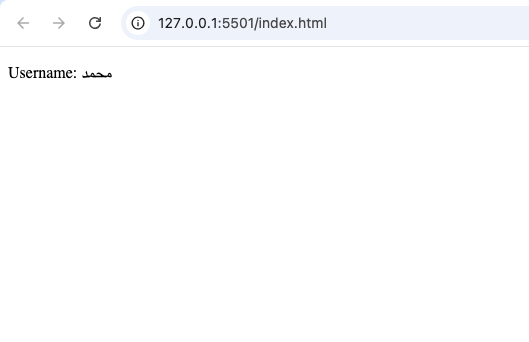
A simple example looks like this:
<p>Username: <bdi>محمد</bdi></p>
The <bdi> element isolates the username so it is displayed correctly regardless of the surrounding text.
Understanding the Problem Without <bdi>
Imagine you’re building a social media website.
A user posts a comment using Arabic, while the rest of the website is written in English.
Without proper text isolation, punctuation marks and surrounding words may appear in unexpected positions.
Although modern browsers handle many situations well, mixed-direction text can still become confusing.
The <bdi> tag helps keep everything organized.
What Does “Bidirectional” Mean?
The word bidirectional simply means two writing directions.
HTML mainly deals with two directions:
- Left to right
- Right to left
The <bdi> tag helps browsers determine the correct direction automatically for isolated content.
Why the <bdi> Tag Was Introduced
As the internet expanded globally, websites began serving users from many different countries.
People started entering:
- Names
- Usernames
- Product names
- Comments
- Reviews
- Messages
in many languages.
Without a way to isolate text direction, mixed-language webpages sometimes looked incorrect.
The <bdi> tag was introduced to solve this challenge.
Real-World Example 1: Usernames
Imagine a discussion forum.
One user’s name is:
- James
Another user’s name is written in Arabic.
If both appear inside the same English sentence, the browser needs to know how each name should behave.
The <bdi> element keeps each username independent.
Real-World Example 2: Online Shopping Websites
International online stores often display seller names from different countries.
Examples include:
- English sellers
- Arabic sellers
- Hebrew sellers
- Persian sellers
The <bdi> tag helps display these names correctly without affecting nearby text.
Real-World Example 3: Social Media Platforms
Social media websites receive millions of posts in different languages every day.
A single page may contain:
- English comments
- Arabic usernames
- Hebrew replies
- Japanese profile names
The <bdi> element helps organize this multilingual content.
Real-World Example 4: News Websites
International news websites often quote people from different countries.
Using the <bdi> element ensures quoted names display correctly alongside English text.
How the <bdi> Tag Works
The browser examines the isolated text.
It then determines its natural writing direction automatically.
Unlike some other HTML elements, you usually do not have to specify the direction manually.
This automatic behavior makes the <bdi> element convenient for displaying unknown user-generated content.
Difference Between <bdi> and <bdo>
Beginners often confuse these two tags.
<bdi> | <bdo> |
|---|---|
| Automatically detects text direction | Forces a specific text direction |
| Used for unknown content | Used when developers intentionally override direction |
| Common for usernames | Common for special formatting needs |
Think of it this way:
<bdi>lets the browser decide.<bdo>tells the browser exactly what to do.
Difference Between <bdi> and <span>
These two elements also serve different purposes.
<bdi> | <span> |
|---|---|
| Handles text direction | Generic inline container |
| Semantic purpose | Mainly used for styling |
| Helps multilingual content | Helps CSS and JavaScript |
A <span> changes nothing about writing direction.
A <bdi> specifically manages text direction.
HTML5 and the <bdi> Tag
The <bdi> element was introduced in HTML5.
As multilingual websites became more common, HTML needed better support for international content.
The <bdi> tag became one of the tools that improved global web compatibility.
Browser Support
The <bdi> element is supported in all major modern browsers, including:
- Google Chrome
- Mozilla Firefox
- Microsoft Edge
- Safari
- Opera
Because support is excellent, developers can confidently use it in modern projects.
Accessibility Benefits
Accessibility is an important part of modern web development.
The <bdi> element improves readability by helping assistive technologies interpret mixed-direction text more accurately.
Users who rely on screen readers can benefit from properly structured multilingual content.
SEO Benefits
The <bdi> tag does not directly improve search engine rankings.
However, it contributes to:
- Better readability
- Cleaner HTML
- Improved user experience
- More organized multilingual content
These qualities support a well-structured website.
Practice Projects That Can Use <bdi>
Even if your current projects are simple, it’s useful to know where the <bdi> element fits.
Here are some examples.
1. User Profile Page
Display usernames submitted by visitors from different countries.
2. Comment Section
Allow users to write comments in multiple languages.
3. Online Marketplace
Display seller names from around the world.
4. Chat Application
Support conversations between users speaking different languages.
5. International Directory
Show names, cities, or organizations written in their native languages.
Why Beginners Should Learn <bdi>
Some HTML elements are used every day.
Others are more specialized.
The <bdi> tag belongs to the second category.
Although you may not use it immediately, learning about it helps you understand:
- International websites
- Language support
- Semantic HTML
- Browser behavior
- Modern web standards
Common Beginner Mistakes
Here are some common mistakes to avoid.
1. Confusing <bdi> with <bdo>
Remember:
<bdi>isolates text.<bdo>overrides text direction.
These are different purposes.
2. Using <bdi> Everywhere
Most English-only websites do not need the <bdi> tag.
Only use it when displaying text with unknown or mixed writing directions.
3. Ignoring Multilingual Support
If your website allows international users, planning for multilingual content early is a good practice.
4. Thinking It Changes Appearance
The <bdi> element does not make text bold, larger, or colorful.
Its purpose is controlling text direction behavior.
<bdi> and User-Generated Content
One of the biggest strengths of the <bdi> element is handling user-generated content.
Examples include:
- Usernames
- Comments
- Product reviews
- Messages
- Forum posts
Because you cannot predict which language users will type, automatic isolation becomes very useful.
Comparing <bdi> with Other Semantic HTML Elements
Like many HTML elements, <bdi> has a specific job.
Examples include:
| Element | Purpose |
|---|---|
<header> | Page header |
<footer> | Page footer |
<article> | Independent content |
<section> | Content section |
<details> | Expandable content |
<summary> | Expandable heading |
<bdi> | Isolates text direction |
Each element solves a different problem.
Why Semantic HTML Matters
Semantic HTML makes webpages easier to understand for:
- Browsers
- Search engines
- Screen readers
- Developers
Instead of using generic containers for everything, semantic elements communicate their purpose clearly.
The <bdi> tag contributes to this goal by handling multilingual text correctly.
Best Practices for Using <bdi>
Here are some useful guidelines.
Use it for unknown text direction
It works best when you cannot predict the language users will enter.
Keep your HTML clean
Only use the <bdi> tag where it is actually needed.
Test multilingual content
If your project supports different languages, test your pages using real multilingual examples.
Learn related HTML elements
Understanding <bdi> becomes easier when you also learn about <bdo>, <dir>, and language-related HTML features.
Real-World Websites That Benefit from <bdi>
Many websites that support international users can benefit from the <bdi> element, including:
- Social media platforms
- Online forums
- Learning management systems
- E-commerce websites
- Job boards
- Messaging applications
- Community websites
- Customer support portals
These platforms regularly display content created by users from different parts of the world.
The HTML <bdi> tag is a small but valuable element that helps display multilingual content correctly by isolating text with different writing directions. Although many beginner websites may never need it immediately, understanding its purpose prepares you for building websites that serve a global audience.
As your web development skills grow, you’ll discover that HTML contains many specialized elements designed to solve specific challenges. The <bdi> tag is an excellent example of how thoughtful HTML features make websites more accessible, readable, and user-friendly.
By learning how and when to use the <bdi> element, you’ll gain a deeper understanding of semantic HTML and be better prepared to create modern websites that work well for people around the world.
Try it yourself
Change the code, then run it to see the result.
The app version is way more convenient than the browser. Installation was quick and it runs perfectly on my Android. Get the jili66appdownload and play on the go.