

A login page is one of the most common and important elements of modern websites and applications. It acts as a secure entry point where users provide their credentials, usually a username and password, to gain access to protected content. From social media platforms and online banking systems to blogs and dashboards, login pages are everywhere. For beginners learning web development, creating a login page is often the first real step toward understanding how websites interact with users.
In simple terms, a login page is a form that collects user information and sends it to a system for verification. While advanced systems rely on servers and databases to authenticate users, the visual structure of a login page can be built entirely with HTML and CSS. This makes it a perfect beginner project because it focuses on layout, design, and user experience without requiring complex programming logic.
HTML, which stands for HyperText Markup Language, is responsible for the structure of the page. It defines what elements appear on the screen, such as headings, input fields, buttons, and text. CSS, or Cascading Style Sheets, controls how those elements look. It handles colors, spacing, fonts, alignment, and overall visual appeal. When combined, HTML and CSS allow developers to create clean, professional-looking interfaces.
In this guide, the goal is to build a simple yet elegant login page that looks modern and welcoming. The design is centered on the screen, uses soft colors, smooth edges, and clear typography. Such a layout is not only user-friendly but also ideal for creating short visual content for platforms like TikTok, where clean and attractive designs perform well.
The login page will include a title, two input fields for email and password, and a login button. The layout will be responsive, meaning it adapts well to different screen sizes. While the page will not perform real authentication, it provides a solid foundation that can later be connected to JavaScript or backend technologies.
Understanding each line of code is just as important as writing it. That is why this article not only presents the complete HTML and CSS files but also explains every part in plain language. This approach helps beginners learn faster, encourages meaningful engagement through comments or reviews, and improves clarity for search engines indexing the content.
By the end of this guide, readers will understand what a login page is, how it is structured, how styling improves user experience, and how HTML and CSS work together to create a polished interface. This knowledge forms a strong base for anyone planning to advance into JavaScript, frameworks, or full-stack development.
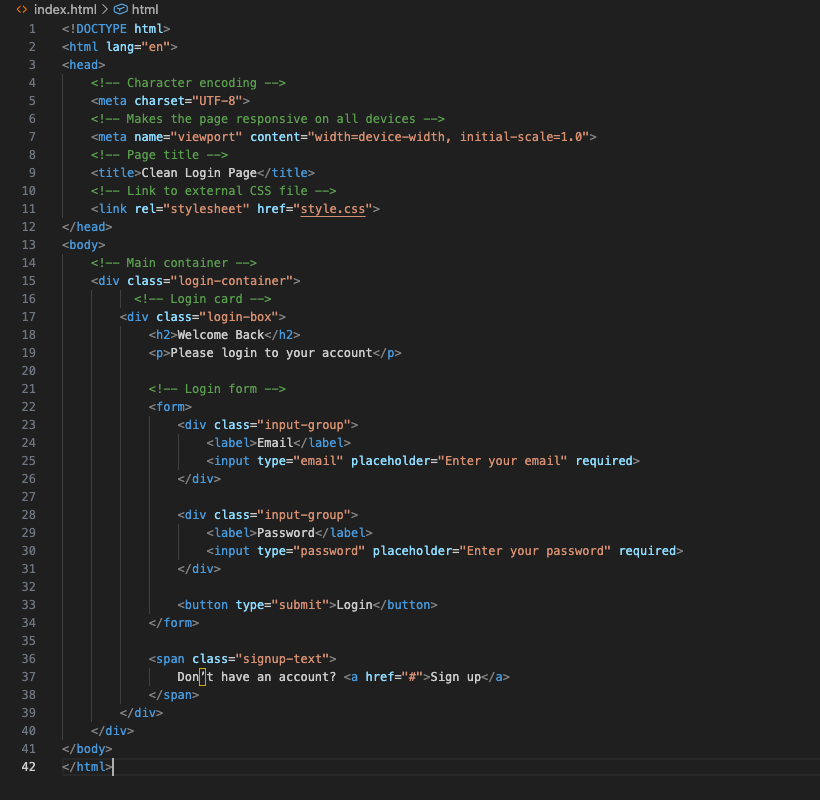
HTML Code (login.html)
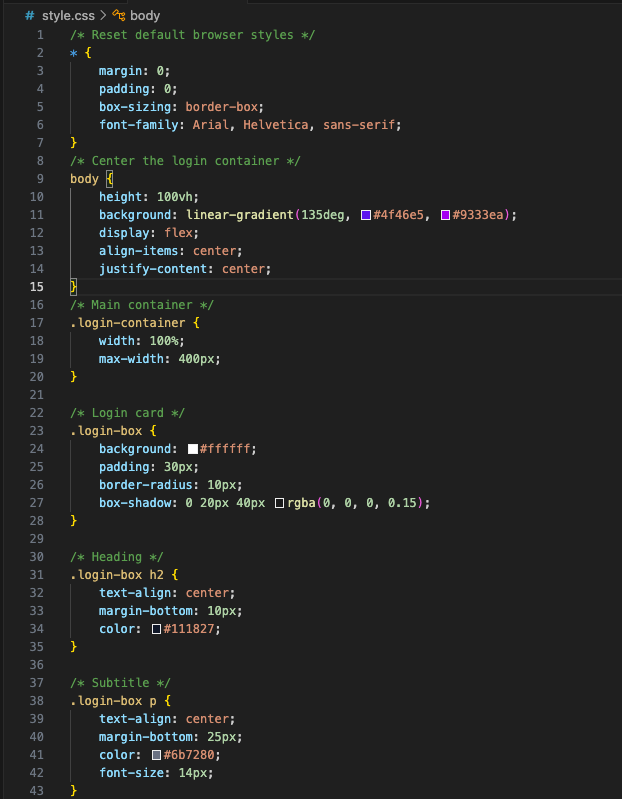
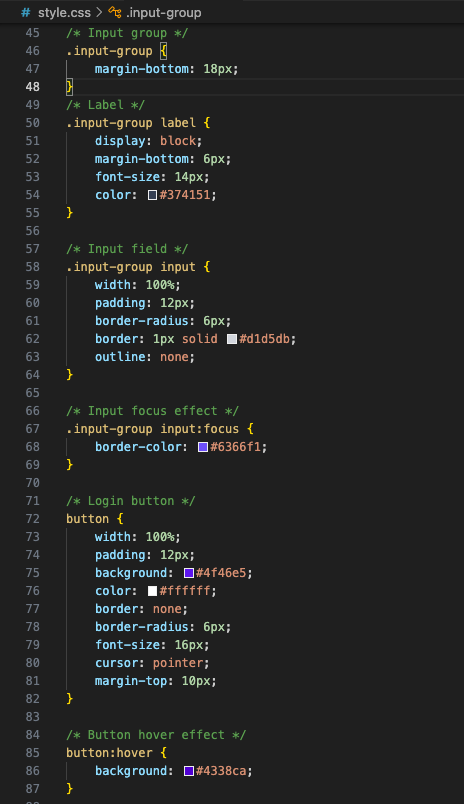
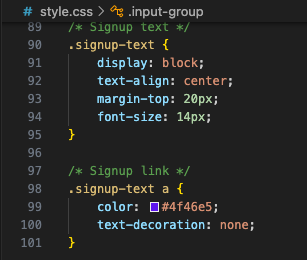
CSS Code (style.css)
<!DOCTYPE html> This tells the browser that this file uses HTML5, the latest HTML standard.
<html lang=”en”>Defines the document language as English, which helps browsers and SEO.
<meta charset=”UTF-8″>Allows the website to display all characters correctly, including symbols and emojis.
<meta name=”viewport”>Makes the page responsive so it looks good on mobile devices.
<link rel=”stylesheet” href=”style.css”>Connects the HTML file to the external CSS file for styling.
<div class=”login-container”>This wraps the entire login layout and helps with centering.
<form>Holds all user input fields like email and password.
<input type=”email”>Ensures the user enters a valid email address.
<button type=”submit”>Submits the login form when clicked.
CSS EXPLANATION
*{margin: 0; padding: 0; } Removes default browser spacing for clean design.
body { display: flex; } Uses Flexbox to center the login box perfectly.
background: linear-gradient(…) Creates a modern gradient background.
.login-box This is the white card that holds the login form.
border-radius Makes the edges smooth and modern.
box-shadow Adds depth so the card looks lifted from the page.
input:focus Changes the border color when the user clicks an input field.
button:hover Adds a hover effect to improve user experience.
Even without advanced programming or a backend system, this simple login page user interface offers a wide range of practical and meaningful uses. Many beginners often assume that a project is only valuable once it connects to a database or performs real authentication. In reality, a well-designed interface alone already serves several important purposes, especially in the early stages of learning web development.One of the most important things this login page helps with is understanding layout and structure. By working with this interface, learners become familiar with how web pages are organized, how elements relate to one another, and how spacing and alignment affect usability. These skills form the foundation of all web design work and are essential before moving into more complex concepts.This UI can also be used as a design prototype. Designers and developers frequently create visual mockups before building full systems. With only this login page, you can present a clear idea of how a future website or application will look and feel. This is useful when sharing concepts with clients, teammates, or collaborators, allowing feedback to be gathered early without technical complexity.Another important benefit is user experience practice. The placement of input fields, the readability of text, and the visual clarity of buttons all influence how users interact with a page. By adjusting colors, fonts, or spacing in this UI, you can test what feels comfortable and intuitive. This helps build an understanding of how users think and behave when interacting with digital products.For content creators, this interface is ideal for educational and visual demonstrations. Because the design is clean and centered, it works well for screen recordings, tutorials, and short videos on platforms like TikTok or YouTube Shorts. You can explain HTML and CSS concepts step by step while showing real results on screen, making learning more engaging and relatable.This login page can also serve as a reusable template. Once created, it can be adapted for multiple projects such as signup pages, contact forms, admin dashboards, or landing pages. Changing text, colors, or field labels allows the same structure to support different use cases without starting from scratch.Most importantly, this UI builds confidence. Completing a functional and attractive interface gives beginners a sense of progress and motivation. It demonstrates that with basic tools like HTML and CSS, it is possible to create professional-looking designs. That confidence encourages continued learning and experimentation.In conclusion, even as a standalone interface, this login page has real value. It supports learning, creativity, communication, and presentation. It proves that meaningful progress in web development does not always require complex systems. Sometimes, mastering the basics and understanding how simple elements work together is the most important step forward.