
When building a website, one of the most important pieces of information you may need to include is contact information. Whether it’s a personal portfolio, a business website, a blog, or an online store, visitors often look for details such as an email address, phone number, office location, or social media links.
HTML provides a special semantic element called the <address> tag that is designed specifically for this purpose. Instead of placing contact information inside a generic <div> or <p> element, the <address> element gives that information a clear meaning.
Learning how to use the <address> tag correctly helps you create webpages that are more organized, easier to understand, and more accessible. It also encourages good HTML practices that will benefit you as your web development skills grow.
In this beginner-friendly guide, you’ll learn what the HTML <address> element is, why it matters, where it should be used, common mistakes to avoid, and practical ways to include it in your own projects. The explanations focus on concepts and real-world usage rather than large amounts of code, making the topic easy to understand even if you’re just starting with HTML.
What Is the HTML <address> Tag?
The HTML <address> tag is a semantic element used to identify contact information for a person, organization, article, or webpage.
In simple terms, it tells browsers and other tools:
“The content inside this element contains contact details.”
Unlike a normal paragraph, the <address> tag gives the information a specific meaning.
This makes your HTML more descriptive and easier for both people and software to understand.
Basic Syntax of the <address> Tag
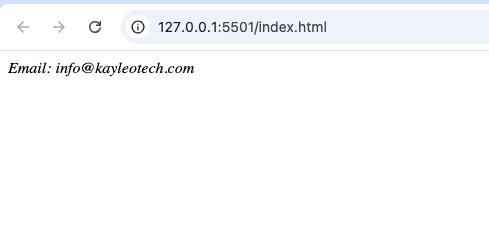
A simple example looks like this:
<address>
  Email: hello@example.com
</address>
The browser usually displays the text in italics by default, although this appearance can be changed with CSS.
Why the <address> Tag Is Important
Many beginners ask why they should use <address> instead of a regular <div> or <p>.
The answer is simple: semantic HTML.
Semantic HTML uses elements that describe the purpose of their content.
The <address> element immediately tells browsers, developers, and assistive technologies that the enclosed content is contact information.
This improves the structure of your webpage without making the code more complicated.
Understanding Semantic HTML
Semantic HTML means choosing elements based on what the content represents instead of how it looks.
For example:
<header>represents introductory content.<main>contains the primary content.<article>represents independent content.<footer>contains closing information.<address>represents contact information.
Using semantic elements makes your HTML easier to read and maintain.
What Kind of Information Can Go Inside <address>?
The <address> tag can contain many kinds of contact information, including:
- Email addresses
- Phone numbers
- Business names
- Physical addresses
- Mailing addresses
- Website URLs
- Social media links
- Customer support details
The information should relate to the author, organization, or owner of the content.
Common Places to Use the <address> Tag
The <address> element works well in many situations.
1. Website Footer
One of the most common locations is the footer.
Visitors often scroll to the bottom of a webpage when looking for contact details.
An <address> element fits naturally here.
2. Business Websites
Businesses often include:
- Office address
- Telephone number
- Email address
- Customer service information
Grouping these details inside an <address> element makes the page more organized.
3. Personal Portfolio Websites
Developers, designers, writers, and freelancers often include contact information so potential clients can reach them.
Examples include:
- Professional email
- LinkedIn profile
- Portfolio website
- Social media accounts
4. Blog Author Information
Blog posts sometimes include information about the author.
An <address> element can contain the author’s contact details or website.
How the <address> Tag Improves Organization
Imagine a webpage with contact details scattered across different paragraphs.
Visitors may struggle to find important information.
Now imagine those same details grouped inside one clearly labeled contact section.
The page becomes easier to scan and understand.
This is one of the biggest advantages of using the <address> tag.
Accessibility Benefits
Accessibility means making websites usable for as many people as possible, including those who use assistive technologies.
Semantic elements help screen readers identify different parts of a webpage.
When a screen reader encounters an <address> element, it understands that the enclosed content represents contact information.
This creates a better experience for users who rely on accessibility tools.
Browser Support
The <address> element has excellent browser support.
It works in all major browsers, including:
- Google Chrome
- Mozilla Firefox
- Microsoft Edge
- Safari
- Opera
Because it has been part of HTML for many years, it is safe to use in modern web development.
Styling the <address> Element
By default, browsers often display <address> text in italics.
However, developers can completely customize its appearance using CSS.
For example, you can change:
- Font size
- Text color
- Background color
- Margins
- Padding
- Borders
This flexibility allows the contact section to match the overall design of your website.
Practical Practice Projects
Here are several beginner-friendly projects where the <address> element fits naturally.
Personal Portfolio
Include:
- Email address
- GitHub profile
- LinkedIn profile
- Portfolio website
This helps visitors contact you professionally.
Small Business Website
Create a contact section containing:
- Company address
- Phone number
- Business hours
- Customer support email
Restaurant Website
Restaurants often display:
- Street address
- Reservation phone number
- Map link
An <address> element helps group these details.
School Project Website
If you’re building a fictional school website, the contact section might include:
- School address
- Admissions office
- Phone number
Online Store
E-commerce websites often include:
- Customer support email
- Business headquarters
- Return address
- Contact phone number
The <address> element provides a clear place for this information.
Difference Between <address> and <footer>
Many beginners think these elements are the same.
They are not.
<address> | <footer> |
|---|---|
| Holds contact information | Represents the closing section of a page |
| Focuses on communication details | Can contain copyright, navigation, and contact information |
| Semantic contact element | Semantic page section |
An <address> element is often placed inside a <footer>, but they have different purposes.
Difference Between <address> and <div>
A <div> is simply a generic container.
An <address> element specifically identifies contact information.
If the content is contact-related, using <address> gives the page more meaning.
Common Beginner Mistakes
Learning what not to do is just as important as learning what to do.
Using <address> for Non-Contact Information
Do not use the <address> element for unrelated content such as:
- Product descriptions
- Blog paragraphs
- News articles
It should only contain contact information.
Mixing Random Content
Avoid placing unrelated text inside the contact section.
Keep it focused on communication details.
Forgetting Semantic HTML
Some beginners place every section inside generic <div> elements.
Whenever HTML provides a more meaningful element, it’s usually a better choice.
Adding Too Much Information
Keep contact sections clean and organized.
Visitors should quickly find the information they need.
SEO Considerations
The <address> element does not directly improve search engine rankings.
However, semantic HTML contributes to better page structure.
A well-organized website often provides a better user experience, which is an important goal of modern web development.
Why Contact Information Matters
Visitors may want to:
- Ask questions
- Request services
- Report problems
- Give feedback
- Discuss business opportunities
A clearly organized contact section makes communication easier.
Using <address> with Other Semantic Elements
The <address> element works well alongside:
<header><main><section><article><footer>
For example, a webpage footer may contain copyright information followed by an <address> element for contact details.
This creates a logical page structure.
Best Practices
Here are several good habits to follow when using the <address> tag.
Keep Contact Details Updated
Old contact information can confuse visitors.
Review and update your details regularly.
Use Clear Labels
If you include multiple contact methods, make them easy to identify.
For example:
- Phone
- Office
Group Related Information
Keep all contact details together instead of scattering them throughout the page.
Combine with CSS
Use CSS to make your contact section attractive and easy to read.
A clean design improves the overall user experience.
Think About Mobile Users
Many visitors browse websites on phones.
Make sure phone numbers and email addresses are easy to tap and read.
Real-World Examples
You can find <address> elements on many types of websites, including:
- Company websites
- Government websites
- Universities
- Online stores
- Personal portfolios
- Blogs
- Nonprofit organizations
Although some websites use generic containers instead, semantic HTML remains the recommended approach.
Why Every Beginner Should Learn the <address> Tag
The <address> element may seem small, but it teaches an important lesson about HTML.
Web development is not only about making pages look attractive.
It is also about giving content the correct meaning.
Learning semantic elements early helps you build better coding habits and prepares you for larger projects in the future.
The HTML <address> tag is a simple yet valuable semantic element designed specifically for grouping contact information. Instead of relying on generic containers, it clearly identifies communication details for a webpage, business, author, or organization.
Using the <address> element helps improve the structure, readability, and accessibility of your HTML while encouraging best practices that remain useful as your skills grow.
Whether you’re creating a portfolio, a business website, a blog, or a practice project, using semantic HTML elements like <address> makes your webpages more organized and professional.
As you continue learning HTML, remember that choosing the right element is just as important as writing the content itself. Small decisions like using <address> appropriately contribute to cleaner code, better accessibility, and websites that are easier for everyone to understand.