
HTML contains many elements that help structure and describe content on a webpage. Some tags are used every day, such as headings, paragraphs, images, and links. Others are less common but still useful because they add meaning to specific types of content. One of these lesser-known elements is the <var> tag.
The HTML <var> tag is designed to represent a variable. It is commonly used in mathematical formulas, programming examples, scientific explanations, and technical documentation. Although it is a simple element, it helps make content more understandable and semantically correct.
Many beginners overlook the <var> tag because they are focused on learning the basics of HTML. However, understanding this tag can improve the quality of your code examples and educational content.
In this beginner-friendly guide, you will learn what the <var> tag is, why it exists, how it works, where it is used, and best practices for using it effectively.
This article focuses on clear explanations and practical understanding rather than large amounts of code.
What is the HTML <var> Tag?
The HTML <var> tag is used to represent a variable in text.
A variable is a symbol, letter, or name that stands for a value that can change.
For example:
- x in mathematics
- y in an equation
- username in programming
- price in a calculation
The <var> tag tells browsers and developers that the enclosed text represents a variable rather than ordinary text.
In simple terms, it adds meaning to content.
Basic Syntax of the <var> Tag
Here is a simple example:
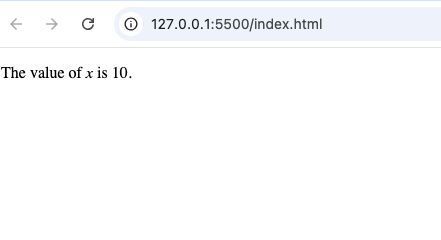
<p>The value of <var>x</var> is 10.</p>In this example, x is identified as a variable.
Most browsers display variables in an italic style by default.
Why Does the <var> Tag Exist?
You might wonder:
“Why not just use normal text?”
The answer is semantics.
HTML is not only about displaying content. It is also about describing the meaning of content.
The <var> tag helps identify text that represents a variable.
This makes content:
- Easier to understand
- More meaningful
- Better organized
- More consistent
Understanding Variables
Before going deeper into the tag, it’s helpful to understand what a variable is.
A variable is a placeholder for information.
Examples include:
- A student’s score
- A product price
- A user’s name
- A mathematical value
Variables can change depending on the situation.
For example:
If price equals $20 today and $25 tomorrow, the value changes, but the variable name remains the same.
Common Places Where <var> is Used
The <var> tag appears most often in educational and technical content.
Examples include:
- Programming tutorials
- Math lessons
- Science articles
- Technical documentation
- Coding guides
These areas frequently use variables to explain concepts.
Using <var> in Mathematics
One of the most common uses of the <var> tag is in mathematics.
Mathematical equations often contain variables such as:
- x
- y
- z
- a
- b
Example:
<var>x</var> + <var>y</var> = 10The variables represent unknown values.
Using <var> makes it clear that these letters are mathematical symbols rather than regular words.
Using <var> in Programming Tutorials
Programming guides frequently use variables.
Examples include:
- username
- password
- score
- age
- total
When explaining code, developers often use the <var> tag to highlight these variable names.
This helps readers distinguish variables from normal text
Example: User Input
Imagine a tutorial explaining user registration.
The guide may refer to variables such as:
- username
- password
Using <var> identifies these names as placeholders for actual values.
Using <var> in Science Content
Scientific content often uses variables.
For example:
- Temperature
- Velocity
- Distance
- Mass
A physics lesson might refer to variables that represent changing measurements.
The <var> tag helps communicate this clearly.
How Browsers Display the <var> Tag
Most browsers display text inside a <var> element in italics.
For example:
Variable: x
This styling helps distinguish variables from surrounding text.
However, the main purpose of the tag is semantic meaning, not appearance.
Semantic Meaning of <var>
Semantic HTML helps describe the purpose of content.
For example:
| Tag | Meaning |
|---|---|
<strong> | Important text |
<em> | Emphasized text |
<code> | Computer code |
<var> | Variable |
The <var> tag specifically tells readers and tools that the text represents a variable.
Difference Between <var> and <code>
Beginners sometimes confuse these elements.
Here is the difference:
<var> | <code> |
|---|---|
| Represents variables | Represents code |
| Often used inside explanations | Displays programming code |
| Semantic meaning: variable | Semantic meaning: code |
A variable may appear inside code, but the two tags serve different purposes.
Difference Between <var> and <em>
These tags may look similar because both often appear italicized.
However, their meanings are different.
<var> | <em> |
|---|---|
| Represents a variable | Emphasizes text |
| Technical meaning | Emotional or linguistic emphasis |
| Used in equations and documentation | Used in normal writing |
Always choose the tag based on meaning rather than appearance.
Difference Between <var> and <i>
Another common comparison is with the <i> tag.
<var> | <i> |
|---|---|
| Indicates a variable | Indicates alternate voice or styling |
| Semantic purpose | Mostly presentation-related |
| Preferred for variables | Not ideal for variables |
When referring to variables, <var> is usually the better choice.
Real-World Example: Programming Documentation
Imagine reading a programming tutorial.
The guide explains:
“Store the user’s name inside the variable username.”
Using <var> makes the variable stand out clearly.
This improves readability.
Real-World Example: Algebra Lessons
Educational websites often explain equations.
Example:
“The value of x depends on y.”
The variables can be marked using <var>.
This makes mathematical explanations easier to follow.
Accessibility Benefits
Semantic HTML improves accessibility.
The <var> tag helps assistive technologies understand that certain text represents a variable.
This can improve the experience for users who rely on screen readers.
Accessibility is an important part of modern web development.
SEO and the <var> Tag
The <var> element does not directly improve search rankings.
However, semantic HTML helps create well-structured content.
Search engines prefer content that is organized and meaningful.
Using the correct HTML elements contributes to better content quality.
HTML5 and the <var> Tag
The <var> element remains part of modern HTML standards.
It continues to serve the same purpose:
Representing variables in text.
Even though it is not used as frequently as some other tags, it remains valuable for educational and technical content.
Browser Support
The <var> tag is supported by all modern browsers including:
- Chrome
- Firefox
- Safari
- Edge
- Opera
Because it is a simple text element, compatibility is excellent.
Common Beginner Mistakes
Here are mistakes beginners often make when using <var>.
1. Using It for Regular Words
The <var> tag should only represent variables.
Ordinary words should remain as regular text.
2. Using <i> Instead of <var>
Some developers use italics for variables without using semantic HTML.
While the text may look similar, the meaning is different.
3. Confusing Variables with Code
A variable can appear inside code, but not all code is a variable.
Use <code> for code snippets and <var> for variable names.
4. Ignoring Semantic HTML
Choosing the correct HTML element improves readability and maintainability.
Semantic HTML is worth learning.
Practical Situations Where You Might Use <var>
You may use the <var> tag when creating:
- Coding tutorials
- Math lessons
- Science articles
- Technical documentation
- Educational websites
- Online courses
These types of content frequently discuss variables.
Combining <var> with Other HTML Elements
The <var> tag often appears alongside:
<code><p><article><section><strong>
This combination helps create clear and organized educational content.
Why Semantic HTML Matters
The <var> element is a good example of semantic HTML.
Semantic elements describe meaning rather than just appearance.
Benefits include:
- Better readability
- Improved accessibility
- Cleaner code
- Easier maintenance
Learning semantic HTML helps developers build higher-quality websites.
Best Practices for Using <var>
Follow these simple guidelines.
Use It Only for Variables
Reserve the tag for values that can change.
Focus on Meaning
Choose <var> because the content is a variable, not because you want italic text.
Keep Content Clear
Readers should immediately understand what the variable represents.
Use Semantic HTML Consistently
Combine <var> with other meaningful HTML elements.
Maintain Readability
Clear content is always easier to understand.
Why Beginners Should Learn the <var> Tag
Some HTML tags are used daily.
Others appear less often but still serve important purposes.
The <var> tag teaches an important lesson:
HTML is about meaning, not just appearance.
By learning tags like <var>, you develop a deeper understanding of semantic web design.
This knowledge becomes valuable as you build more advanced projects.
Examples of Variables in Everyday Life
Variables are not limited to programming.
You encounter them everywhere.
Examples include:
- Product prices
- User names
- Exam scores
- Temperatures
- Distances
- Quantities
The value changes, but the label remains the same.
This is exactly what variables represent.
Learning HTML Beyond the Basics
As you continue learning HTML, you’ll discover many specialized elements.
Examples include:
<code><kbd><samp><var>
These tags help communicate specific types of information more clearly.
Understanding them helps you write better HTML.
The HTML <var> tag is a simple but useful element designed to represent variables in text. It is commonly used in mathematics, programming tutorials, scientific explanations, and technical documentation.
While it may not appear in every website, understanding the <var> element helps you learn the principles of semantic HTML and proper content structure.
Instead of using generic italics or plain text, the <var> tag clearly identifies variable names and placeholders. This improves readability, accessibility, and overall content quality.
As you continue your HTML journey, learning specialized elements like <var> will help you build more professional, organized, and meaningful webpages.
minoxidil support answers
minoxidil support answers
minoxidil women’s shedding overview
minoxidil women’s shedding overview
sildenafil cost breakdown
sildenafil cost breakdown
vardenafil 20 mg dose info
vardenafil 20 mg dose info
avanafil safe online approach
avanafil safe online approach
vardenafil caution alerts
vardenafil caution alerts
orlistat food behavior
orlistat food behavior
how orlistat works
how orlistat works
Onset Conditions Hub
Onset Conditions Hub
comparison of two PDE5 inhibitors
comparison of two PDE5 inhibitors
this tadalafil brands overview
this tadalafil brands overview