
When learning HTML, you will come across many tags used to structure and organize content. One of the lesser-known but very useful tags is the <dd> tag. It works together with other tags to create structured descriptions, making your content more meaningful and easier to read.
In this guide, you will learn what the <dd> tag is, how it works, where to use it, and best practices. This is an evergreen guide, so the knowledge will stay relevant as you continue your web development journey.
What is the <dd> Tag?
The <dd> tag stands for “description details.” It is used to provide a description, definition, or value for a term inside a description list.
It is always used inside a <dl> (description list) and comes after a <dt> (description term).
Simple meaning:
<dl>→ The list container<dt>→ The term or name<dd>→ The explanation or value
Basic Syntax
Here’s the basic structure of how <dd> is used:
<dl>
<dt>HTML</dt>
<dd>A markup language used to create web pages.</dd>
<dt>CSS</dt>
<dd>A language used to style web pages.</dd>
</dl>
How the <dd> Tag Works
The <dd> tag provides additional information about a term. Think of it like a dictionary:
- The word =
<dt> - The meaning =
<dd>
Example:
<dl>
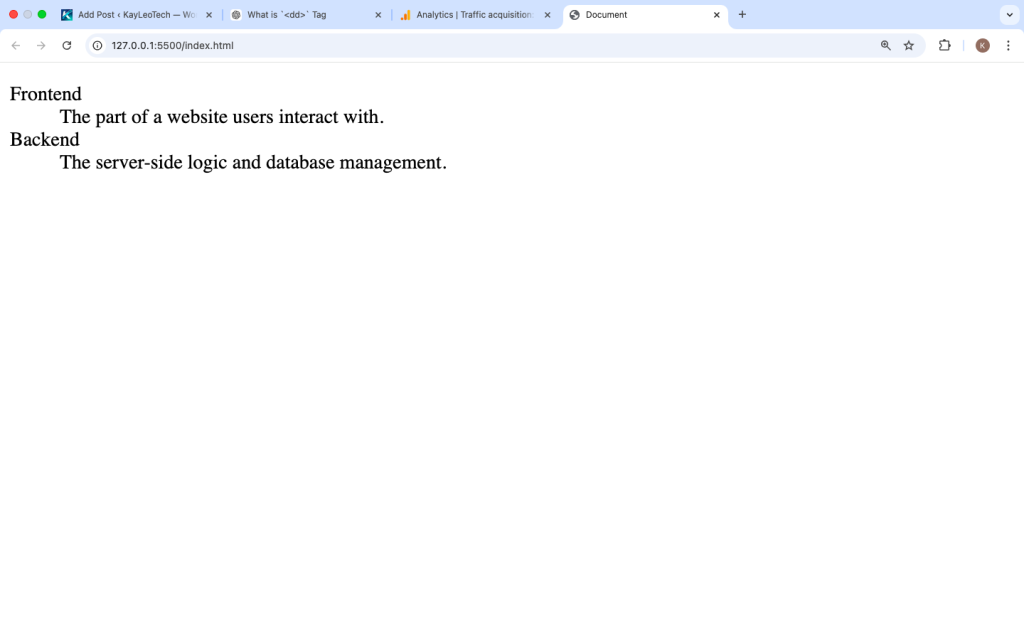
<dt>Frontend</dt>
<dd>The part of a website users interact with.</dd>
<dt>Backend</dt>
<dd>The server-side logic and database management.</dd>
</dl>
In a browser, this will appear as a list where the descriptions are slightly indented under each term.
Default Browser Behavior
Browsers automatically apply some styling to <dd>:
- It is displayed as a block element
- It usually has left indentation
- It appears directly under its
<dt>
You can change this styling using CSS if needed.
Multiple <dd> Tags for One Term
You can use more than one <dd> for a single <dt>. This is useful when a term has multiple meanings or explanations.
Example:
<dl>
<dt>JavaScript</dt>
<dd>A programming language for the web.</dd>
<dd>Used for creating interactive features.</dd>
</dl>
This helps organize information clearly without repeating the term.
Using <dd> for Key-Value Pairs
The <dd> tag is not just for definitions. You can also use it for key-value data like:
- Product details
- User profiles
- Metadata
Example:
<dl>
<dt>Name</dt>
<dd>John Doe</dd>
<dt>Email</dt>
<dd>john@example.com</dd>
<dt>Location</dt>
<dd>Lagos, Nigeria</dd>
</dl>
This creates a clean and structured layout.
Styling the <dd> Tag with CSS
You can fully customize how <dd> looks using CSS.
Example:
<style>
dd {
margin-left: 20px;
color: #555;
}
dt {
font-weight: bold;
}
</style>
Result:
- Terms become bold
- Descriptions look lighter and spaced properly
Difference Between <dd> and <li>
| Feature | <dd> | <li> |
|---|---|---|
| Used in | <dl> | <ul> or <ol> |
| Purpose | Description/definition | List item |
| Structure | Works with <dt> | Works alone |
Example:
<dl>
<dt>HTML</dt>
<dd>Structure of web pages</dd>
</dl>
<!– Unordered list –>
<ul>
<li>HTML</li>
<li>CSS</li>
</ul>
Real-Life Use Cases
Here are practical ways you can use <dd>:
1. FAQs
<dl>
  <dt>What is HTML?</dt>
  <dd>HTML is used to structure web content.</dd>  <dt>What is CSS?</dt>
  <dd>CSS styles the content.</dd>
</dl>
2. Glossary
<dl>
<dt>SEO</dt>
<dd>Search Engine Optimization</dd>
<dt>API</dt>
<dd>Application Programming Interface</dd>
</dl>
3. Product Information
<dl>
<dt>Product Name</dt>
<dd>Smartphone X</dd>
<dt>Price</dt>
<dd>$500</dd>
</dl>
4. Contact Information
<dl>
<dt>Phone</dt>
<dd>+234 123 456 789</dd>
<dt>Email</dt>
<dd>contact@example.com</dd>
</dl>
Semantic Importance of <dd>
HTML is not just about appearance — it’s about meaning.
Using <dd> correctly:
- Improves accessibility
- Helps screen readers
- Makes your content more structured
- Improves SEO understanding
Search engines better understand your content when it is properly structured.
Accessibility Benefits
Screen readers rely on semantic HTML. When you use <dd> correctly:
- Users with disabilities can navigate easily
- Terms and descriptions are clearly connected
- Content becomes more inclusive
Common Mistakes to Avoid
1. Using <dd> Outside <dl>
❌ Wrong:
<dd>This is wrong</dd>
✔ Correct:
<dl>
<dd>This is correct</dd>
</dl>
2. Skipping <dt>
Always include a <dt> before <dd>.
3. Using <dd> for Styling Only
Do not use <dd> just for indentation. Use it only when it makes semantic sense.
Advanced Example
Here is a more complete example combining everything:
<!DOCTYPE html>
<html>
<head>
  <title>DD Tag Example</title>
  <style>
    dl {
      background: #f9f9f9;
      padding: 10px;
    }    dt {
      font-weight: bold;
      margin-top: 10px;
    }    dd {
      margin-left: 20px;
      color: #333;
    }
  </style>
</head>
<body><h2>Web Development Terms</h2><dl>
  <dt>HTML</dt>
  <dd>Used to structure web content.</dd>  <dt>CSS</dt>
  <dd>Used to style web pages.</dd>  <dt>JavaScript</dt>
  <dd>Used to add interactivity.</dd>
</dl></body>
</html>
When Should You Use <dd>?
Use <dd> when:
✔ You are explaining a term
✔ You are defining something
✔ You are showing key-value data
✔ You are building structured content
Avoid using it when:
✘ You just need a simple list
✘ You want visual spacing only
<dd> vs Modern Layouts
Even though modern CSS (Flexbox, Grid) can create similar layouts, <dd> still matters because:
- It adds meaning, not just design
- It improves SEO
- It supports accessibility tools
Browser Support
The <dd> tag is supported in all browsers:
- Chrome
- Firefox
- Safari
- Edge
You can safely use it in any project.
Best Practices
- Always use
<dd>inside<dl> - Pair it with
<dt> - Keep descriptions clear and short
- Use CSS for styling, not HTML hacks
- Use multiple
<dd>if needed for clarity
The <dd> tag may look simple, but it plays an important role in creating structured and meaningful content in HTML.
It works alongside <dl> and <dt> to define terms, provide descriptions, and organize information in a clean way. Whether you’re building a glossary, FAQ, or displaying product details, <dd> helps make your content more readable and accessible.
As you continue learning HTML, mastering tags like <dd> will improve both your coding skills and the quality of your web pages.
123betwin is my go-to when I’m looking to place some bets. Good odds and a user-friendly interface what else do you need? Bet and win with 123betwin.
Goal11 Casino login is a breeze! Been enjoying their game selection. Easy to navigate pa! Try mo: goal11casinologin
Gold99Slot has some pretty shiny reels! I’ve been testing my luck there. So far so good! Pwede na pang-dagdag budget! Link here: gold99slot