
When learning HTML, you’ll come across different tags used to structure content on a web page. One of those tags is the <dt> tag. It’s not as commonly used as <div> or <p>, but it plays an important role when working with structured data like definitions, FAQs, and descriptions.
In this guide, you’ll learn what the <dt> tag is, how it works, where to use it, and how to write clean code with it. Everything is explained in a simple and clear way so you can understand and start using it immediately.
What is the <dt> Tag?
The <dt> tag stands for Definition Term. It is used inside a description list (<dl>) to define a term or title.
It is always paired with the <dd> tag, which provides the description of that term.
So in simple words:
<dt>= the name or title<dd>= the explanation
Basic Structure
The <dt> tag does not work alone. It must be used inside a <dl> (description list).
Here’s the basic structure:
<dl>
<dt>Term</dt>
<dd>Description of the term</dd>
</dl>
Simple Example
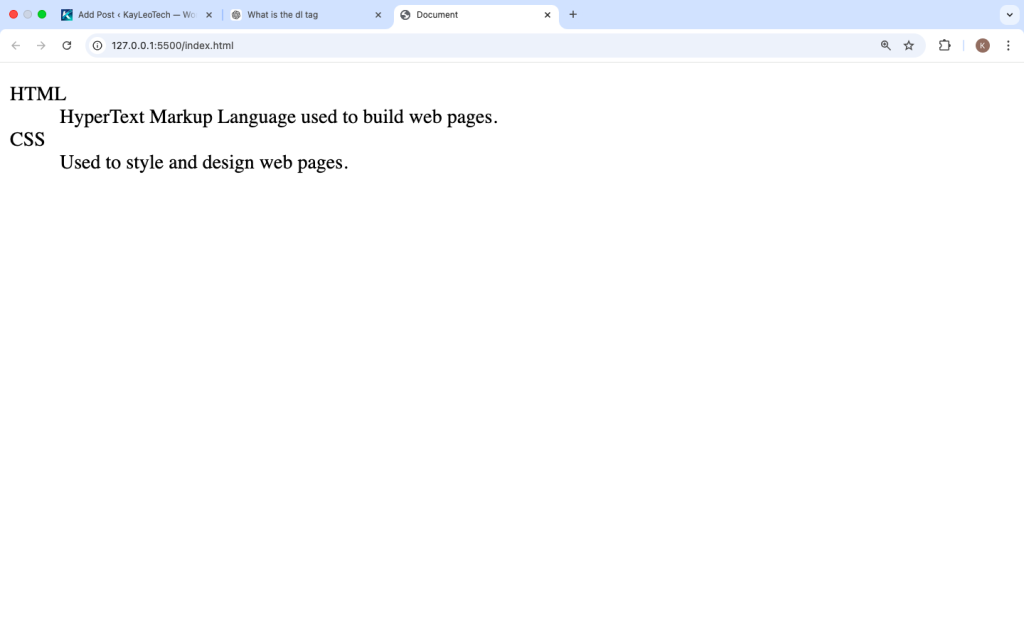
<dl>
  <dt>HTML</dt>
  <dd>HyperText Markup Language used to build web pages.</dd>  <dt>CSS</dt>
  <dd>Used to style and design web pages.</dd>
</dl>
What this does:
Their meanings are inside <dd>
“HTML” and “CSS” are the terms → defined using <dt>
How the <dt> Tag Works
Think of the <dt> tag as a label. It introduces something that needs explanation.
The browser will usually display the <dt> text slightly bold or separated, while the <dd> appears indented underneath.
Key Points:
<dt>is always inside<dl>- It comes before
<dd> - It defines a term, not a paragraph
When Should You Use <dt>?
You should use the <dt> tag when you are presenting paired information, where one item explains another.
Common use cases:
1. Glossary
<dl>
<dt>Frontend</dt>
<dd>The part users interact with.</dd>
<dt>Backend</dt>
<dd>Handles server and database logic.</dd>
</dl>
2. FAQs (Questions and Answers)
<dl>
<dt>What is HTML?</dt>
<dd>It is the structure of web pages.</dd>
<dt>Is HTML easy?</dt>
<dd>Yes, it is beginner-friendly.</dd>
</dl>
3. Product Details
<dl>
<dt>Product Name</dt>
<dd>Laptop X</dd>
<dt>Price</dt>
<dd>$800</dd>
</dl>
Multiple <dt> Tags
You can use more than one <dt> before a <dd>.
<dl>
<dt>Car</dt>
<dt>Vehicle</dt>
<dd>A machine used for transportation.</dd>
</dl>
This means both “Car” and “Vehicle” share the same meaning.
One <dt> with Multiple <dd>
You can also describe one term with multiple explanations.
<dl>
<dt>HTML</dt>
<dd>Used to structure web pages.</dd>
<dd>Works with CSS and JavaScript.</dd>
</dl>
Styling the <dt> Tag with CSS
By default, browsers style <dt> in a simple way. But you can customize it.
<style>
dt {
font-weight: bold;
color: #222;
margin-top: 10px;
}
dd {
margin-left: 20px;
color: #555;
}
</style>
Difference Between <dt> and Other Tags
Many beginners confuse <dt> with headings or list items. Let’s compare:
| Tag | Purpose |
|---|---|
<dt> | Defines a term |
<dd> | Describes the term |
<li> | List item |
<h1>–<h6> | Headings |
Example Comparison
<ul>
<li>HTML</li>
</ul>
<dl>
<dt>HTML</dt>
<dd>Markup language</dd>
</dl>
Why Not Use <div> Instead?
You can use <div>, but <dt> is better because:
- It gives meaning to your content (semantic HTML)
- Helps search engines understand your page
- Improves accessibility
Accessibility Benefits
Using <dt> correctly helps:
- Screen readers understand relationships
- Makes content easier to navigate
- Improves SEO
Instead of random tags, <dt> clearly tells browsers: “This is a term.”
Common Mistakes to Avoid
1. Using <dt> Outside <dl>
Wrong:
<dt>HTML</dt>
Correct:
<dl>
<dt>HTML</dt>
<dd>Description here</dd>
</dl>
2. Not Adding <dd>
A <dt> without a description makes no sense.
3. Using <dt> for Styling Only
Do not use <dt> just to make text bold. Use CSS instead.
Real-Life Example: Profile Information
<dl>
<dt>Name</dt>
<dd>John Doe</dd>
<dt>Email</dt>
<dd>john@example.com</dd>
<dt>Location</dt>
<dd>Nigeria</dd>
</dl>
This is a clean way to display user details.
Advanced Usage with HTML Inside <dd>
You can include other elements inside <dd>:
<dl>
<dt>HTML</dt>
<dd>
<p>HTML is used for building websites.</p>
<ul>
<li>Easy to learn</li>
<li>Widely supported</li>
</ul>
</dd>
</dl>
Browser Support
The <dt> tag works in all major browsers:
- Chrome
- Firefox
- Safari
- Edge
So it is safe to use in any modern website.
Best Practices
- Always use
<dt>inside<dl> - Pair it with
<dd> - Use it only for term-description content
- Keep terms short and clear
- Style it with CSS for better UI
Quick Summary
<dt>means Definition Term- It is used inside
<dl> - It defines a title or term
- It works with
<dd>for descriptions - Used in glossaries, FAQs, and structured data
The <dt> tag is simple but very useful when you want to organize information clearly. While many beginners overlook it, using it correctly makes your HTML cleaner, more meaningful, and easier to understand.
If you’re building websites with structured content like definitions, questions, or product info the <dt> tag is the right choice. It keeps your code semantic and improves both user experience and accessibility.
Start practicing with small examples, and soon you’ll be comfortable using <dt> in real projects.