
When building web pages, there are times when you want certain text to stand out clearly so users can quickly notice it. This is especially useful when highlighting keywords, search results, or important parts of a sentence.
In HTML, the <mark> tag is used for this purpose.
The <mark> tag highlights text, usually with a yellow background by default, making it easy to spot. It works like using a highlighter pen on paper.
In this guide, you will learn what the <mark> tag is, how it works, when to use it, and best practices for using it effectively. Everything is explained in a simple and clear way for beginners.
Understanding the <mark> Tag
The <mark> tag is an HTML element used to highlight text.
It tells the browser:
👉 “This text is important or relevant in this context.”
By default, most browsers display <mark> text with a yellow background and black text, similar to a highlighted section in a book.
Basic Syntax
The <mark> tag has an opening and closing tag.
Example:

Anything inside the <mark> tag will appear highlighted on the webpage.
Example Inside a Paragraph

When displayed in the browser, the words “highlighted text” will have a colored background.

Why the <mark> Tag Is Used
The <mark> tag is used to show relevant or important text within a context.
It is not just for design. It gives meaning to the highlighted content.
This is helpful in situations where users need to quickly find specific information.
Common Use Cases of the <mark> Tag
Let’s look at where the <mark> tag is commonly used.
1. Highlighting Search Results
When users search for something on a website, matching keywords are often highlighted.
Example:

This makes it easier for users to see what they searched for.

2. Highlighting Important Words
Example:

This draws attention to important advice.
3. Marking Key Points in Text
Example:

This helps readers focus on the main idea.
4. Educational Content
Tutorial websites use <mark> to highlight key terms.
Example:

This is very useful for learning.

How Browsers Display the <mark> Tag
Browsers apply default styling similar to this:

This gives the text a highlighted look.
Browsers that support <mark> include:
- Chrome
- Firefox
- Edge
- Safari
All modern browsers display it correctly.
Using <mark> Inside Different Elements
The <mark> tag can be used inside many HTML elements.
For example:
- Paragraphs
- Headings
- Lists
- Table content
Example Inside a Heading

This highlights a word inside the heading.
Example Inside a List
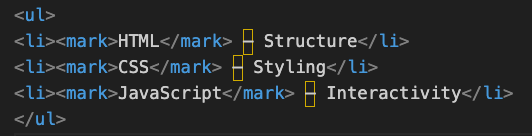
This makes key terms stand out.

<mark> Tag vs <strong> Tag
These two tags are different but often confused.
<mark> Tag
- Highlights text
- Shows relevance
- Background color
<strong> Tag
- Shows importance
- Usually bold text
- Semantic meaning
Example:

Both stand out, but they serve different purposes.
<mark> Tag vs <span> with CSS
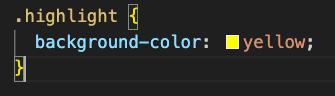
You can also highlight text using CSS.
Example:

CSS:
Difference
<mark> | CSS |
|---|---|
| Has semantic meaning | Only styling |
| Built-in highlight | Fully customizable |
Using <mark> is better when the highlight has meaning.

Customizing the <mark> Tag with CSS
You can change how the highlight looks.
Example:
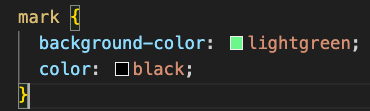
This changes the highlight color.
You can also do:

This gives a different visual style.
Combining <mark> with Other Tags
The <mark> tag can work with other HTML tags.
Example:

This combines:
- Highlight (
<mark>) - Bold (
<strong>)
Accessibility and the <mark> Tag
The <mark> tag is supported by screen readers.
It helps indicate that text is important in context.
However, color alone should not be the only way to show importance. Some users may have difficulty seeing colors.
It is good practice to combine <mark> with clear writing.
Common Mistakes Beginners Make
1. Using <mark> Too Much
If everything is highlighted, nothing stands out.
Example:

Use it only for important parts.
2. Using <mark> for Decoration Only
The <mark> tag should highlight meaningful content.
For design-only highlighting, CSS is better.
3. Highlighting Large Blocks of Text
Highlighting long paragraphs reduces readability.
Keep highlights short and focused.
Best Practices for Using the <mark> Tag
Use It for Relevant Content
Highlight words that matter in the current context.
Keep It Minimal
Only highlight key parts of the text.
Combine with Clear Writing
Good content should still be easy to read without highlights.
Use Consistent Styling
If you customize the highlight, keep it consistent across the site.
Real Example of the <mark> Tag
Here is a practical example:

In this example:
- The tag name is highlighted
- Important keywords are highlighted
This improves readability.

Is the <mark> Tag Still Used Today?
Yes, the <mark> tag is widely used in modern web development.
It is especially useful for:
- Search result highlighting
- Tutorials
- Educational content
- Notes and key points
Even though CSS can create similar effects, <mark> remains useful because it provides semantic meaning.
The <mark> tag in HTML is used to highlight text and show that it is relevant or important in a specific context. It works by wrapping text between <mark> and </mark>, which causes browsers to display it with a highlighted background.
This tag is commonly used for search results, key points, and important words in content. It improves readability and helps users quickly find important information.
While CSS can also create highlight effects, the <mark> tag adds meaning to your content, making it a valuable tool in modern HTML.
By using the <mark> tag correctly, you can make your web pages clearer, more engaging, and easier to understand for your readers.