
When learning HTML, you will discover many tags used to format and display text on a webpage. Some tags control structure, while others affect how text looks. One simple formatting tag is the <i> tag.
The <i> tag is used to display text in italic style. Italic text appears slightly slanted compared to normal text. It helps certain words stand out visually from the rest of the content.
Even though the <i> tag looks simple, it is useful in many situations when writing content for websites.
In this guide, you will learn what the <i> tag is, how it works, when to use it, and how it is different from other similar tags.
Understanding the <i> Tag
The <i> tag is an HTML element that displays text in an italic style.
The letter “i” stands for italic.
When a browser sees this tag, it changes the appearance of the text inside the tag so it looks slanted.
Basic Syntax
Here is the basic structure of the <i> tag:

The tag includes:
- An opening tag
<i> - A closing tag
</i>
Anything between these tags will appear in italic style on the webpage.
Simple Example

When this code runs in the browser, the words “italic text” will appear slanted.

Why the <i> Tag Is Used
The <i> tag is mainly used to display text that is visually different from surrounding text.
It does not necessarily mean the text is important. It simply changes the appearance.
Italic text is often used for:
- Foreign words
- Book titles
- Scientific names
- Technical terms
- Thoughts or expressions
The tag helps readers easily recognize these types of words.
Example of the <i> Tag
Here is another simple example:

The word “bonjour” appears italic because it is a foreign word.
This makes the sentence easier to understand.

Common Uses of the <i> Tag
The <i> tag is commonly used in several situations when writing web content.
1. Foreign Words or Phrases
When a word comes from another language, it is often written in italics.
Example:

This tells readers the word is from another language.
2. Titles of Books or Movies
Titles of books, movies, and artworks are sometimes displayed in italic style.
Example:

This helps distinguish the title from normal text.
3. Scientific Names
In science, species names are often written in italics.
Example:

This is a common rule in biology and academic writing.

Difference Between <i> and <em>
Beginners often confuse the <i> tag with the <em> tag.
Both usually display italic text in browsers, but they are used differently.
<i> Tag
- Changes text appearance to italic
- Mostly used for visual styling
- Does not add emphasis to meaning
<em> Tag
- Adds emphasis to text
- Has semantic meaning
- Screen readers read it with emphasis
Example Comparison

Both appear italic visually, but the <em> tag adds meaning to the text.

How Browsers Display the <i> Tag
All modern browsers support the <i> tag.
Browsers like:
- Google Chrome
- Firefox
- Safari
- Microsoft Edge
display the text in italic style automatically.
Behind the scenes, browsers apply a default style similar to this CSS:

This makes the text slanted.
Using the <i> Tag Inside Other HTML Elements
The <i> tag can be used inside many HTML elements such as:
- Paragraphs
- Headings
- Lists
- Table cells
- Links
Example Inside a Paragraph

Example Inside a List

This can make certain terms stand out.

Combining the <i> Tag with Other Tags
HTML allows tags to work together.
You can combine the <i> tag with other tags like <b> or <strong>.
Example:

In this case, the text will appear both bold and italic.
This shows how HTML formatting can be combined.
Using CSS Instead of the <i> Tag
In modern web design, CSS is often used for styling text.
Instead of using the <i> tag, you can apply italic style with CSS.
Example:

Then apply it in HTML:

CSS allows more flexibility and control over design.
However, the <i> tag is still valid and widely supported.

Common Beginner Mistakes
1. Using <i> for Emphasis
Many beginners use <i> when they actually want emphasis.
Example mistake:

Better Version:

The <em> tag is better for emphasizing meaning.
2. Overusing Italic Text
Too much italic text can make content hard to read.
Use italic styling only when needed.
Example of bad usage

Italic text works best for small parts of content.
3. Forgetting the Closing Tag
Always close the <i> tag.
Correct example:

Incorrect example:

Unclosed tags can cause formatting problems.
Best Practices for Using the <i> Tag
Here are some helpful tips when using the <i> tag.
Use It for Special Text
Use <i> for things like foreign words, titles, and technical terms.
Do Not Use It for Important Messages
If the text has strong importance, use <strong> or <em> instead.
Avoid Overusing Italics
Italic text should highlight specific words, not large blocks of content.
Combine with CSS for Styling
CSS gives better control over typography and design.
Real Example of the <i> Tag in a Webpage
Here is a simple real-world example.
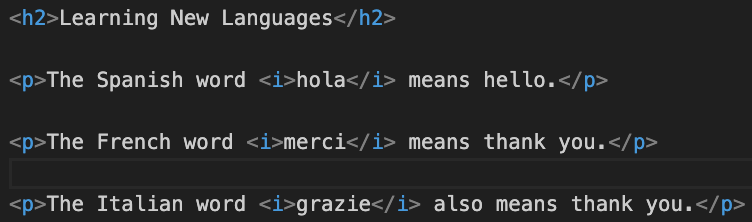
This example shows how italic text can highlight foreign words.

Is the <i> Tag Still Used Today?
Yes, the <i> tag is still used in modern HTML.
However, developers sometimes prefer CSS for styling and semantic tags like <em> for emphasis.
Even so, the <i> tag remains useful when text needs a different tone or style without adding importance.
The <i> tag in HTML is used to display text in italic style. It changes the appearance of text so it looks slanted and stands out from surrounding words.
This tag is commonly used for foreign words, titles, scientific names, and special terms. While it mainly affects visual styling, it can also help readers recognize different types of content.
It is important to remember that the <i> tag is different from the <em> tag. The <i> tag changes appearance, while <em> adds emphasis and meaning.
When used properly and in moderation, the <i> tag helps make content clearer and more readable.
Understanding simple formatting tags like <i> is an important step in learning HTML and building well-structured webpages.
Read More