
When learning HTML, you will come across many tags that help organize and structure content. Some tags create big changes, like paragraphs or headings. Others are small but powerful — and one of those is the <span> tag.
At first, <span> may seem confusing because it does not visibly change anything on a webpage by itself. But once you understand its purpose, you will see that it is one of the most useful tools for styling and controlling small pieces of content.
In this guide, you will learn:
- What the
<span>tag is - What it does
- Why it is important
- How to use it
- How it works with CSS
- When to use it and when not to use it
Everything is explained clearly and simply so beginners can understand easily.
What the <span> Tag Means
The <span> tag is an inline container used to mark or group small parts of text or content so you can style or control them.
That is the main idea.
👉 It groups small pieces of content inside other elements.
Unlike paragraphs or headings, <span> does not create structure or layout. It simply wraps around content so you can target it with CSS or JavaScript.
The Most Important Thing to Know
By default, the <span> tag does nothing visually.
If you use it without styling, you will not see any change on the webpage.
Example:

On the page, it looks exactly like normal text.
So why use it?
Because it allows you to style or modify specific words or parts of text.
Basic Example: Styling One Word
Here is a simple example where <span> changes the color of one word.


Now the word “simple” becomes red, while the rest of the sentence stays the same.
This is the power of <span> — targeting specific content.

Why the <span> Tag Is Useful
Sometimes you do not want to style a whole paragraph — only part of it.
Examples:
- Highlighting keywords
- Coloring specific words
- Changing font size for one phrase
- Adding special effects
- Styling numbers or labels
- Formatting parts of a sentence
Without <span>, this would be difficult.
<span> Is an Inline Element
This is very important.
HTML elements are either:
- Block elements
- Inline elements
The <span> tag is an inline element.
This means:
✔ It stays inside a line of text
✔ It does not start a new line
✔ It only affects the content inside it
Example:

Everything stays on the same line.
<span> vs <div> — Common Confusion
Beginners often mix up <span> and <div>.
They both group content — but they behave differently.
<span>
- Inline element
- Used for small parts of content
- Does not break the line
<div>
- Block element
- Used for larger sections
- Starts on a new line
Example Comparison

Inline — no line break.
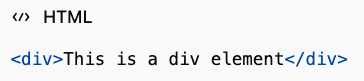
Block — new line created.

Real Example: Highlight Important Words


This draws attention to key information.
Styling Multiple Text Effects
You can apply many styles using <span>.
Example:


Now different words have different sizes.

Using <span> for Text Color
One of the most common uses.
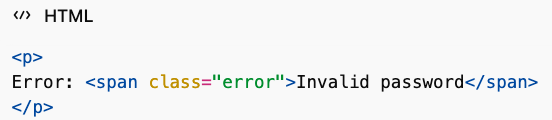
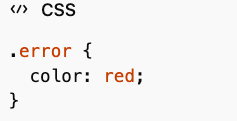

This helps users quickly notice warnings or messages.
Using <span> for Background Highlight


Works like a highlighter pen.

Using <span> Inside Headings
You can style part of a heading.

This allows custom design inside headings.
Using <span> with Icons or Symbols
Sometimes icons appear next to text.

You can style the icon separately.
Using <span> with JavaScript
JavaScript can target a specific span and change it dynamically.
Example:

avaScript can update the number automatically.
This is common in:
- Counters
- Live updates
- Notifications
- Interactive websites
Nesting <span> Tags
You can place spans inside other spans.
Example:

This allows layered styling.
When You SHOULD Use <span>
Use <span> when you need to target small parts of content.
Good uses:
✔ Styling words or phrases
✔ Highlighting text
✔ Formatting numbers
✔ Adding effects
✔ JavaScript targeting
✔ Inline customization
When You Should NOT Use <span>
Do not use <span> to structure layout.
Bad uses:
❌ Creating page sections
❌ Replacing headings
❌ Replacing paragraphs
❌ Organizing large content areas
Use <div> or semantic elements instead.
Semantic Meaning of <span>
The <span> tag has no semantic meaning.
It does not describe content type.
It only groups content for styling or scripting.
That is why it is called a generic container.
Accessibility Considerations
Because <span> has no meaning, overusing it can reduce clarity for assistive technologies.
Best practice:
- Use semantic HTML first
- Use
<span>only when needed for styling
Common Beginner Mistakes
1. Using <span> Instead of Paragraphs
Wrong:

Correct:

2. Overusing <span> Everywhere
Too many unnecessary spans make code messy.
Keep it simple.
3. Expecting Visual Change Without CSS
Remember — <span> alone does nothing visually.
Real Website Example

Clean and targeted styling.

Styling Tips for <span>
Common CSS properties used:
- color
- background-color
- font-size
- font-weight
- text-decoration
- padding
- border
These create visual emphasis.
HTML5 Support
The <span> tag is fully supported in all browsers.
No compatibility problems.
Works everywhere.
Quick Summary Table
| Feature | <span> Tag |
|---|---|
| Type | Inline element |
| Purpose | Group small content |
| Default styling | None |
| Semantic meaning | None |
| Used for | Styling and scripting |
| Creates new line | No |
Best Practices
Follow these simple rules:
✔ Use for small text styling
✔ Keep usage minimal
✔ Combine with CSS
✔ Do not use for structure
✔ Keep HTML clean
Why the <span> Tag Is Important
Even though it looks simple, <span> gives you precise control over small parts of content.
It allows:
- Fine styling control
- Flexible design
- Interactive content
- Clean formatting
Without <span>, styling individual words would be much harder.
The <span> tag is a small but powerful HTML element. It does not create layout or structure, but it gives you control over specific pieces of content.
Remember the main idea:
👉 <span> groups small inline content so you can style or control it.
Use it when you need precision. Avoid using it for structure. Combine it with CSS and JavaScript to create dynamic and visually clear webpages.
Once you understand <span>, you gain much better control over how content appears and behaves.
22jilicrown, sounds regal! Had a crack on there. Decent enough, give it a try and let me know what you think 22jilicrown
Yo guys, if you’re looking for a quick and easy way to get into the action, check out betup777login. It’s a pretty straightforward site to navigate. Get your game on at betup777login!
Betvipmax? Yeah, it’s got that ‘vip’ feel. Might be worth checking out if you’re looking for something a bit more exclusive. More info over at betvipmax!