
If you are learning HTML, one of the first formatting elements you will see is the <br> tag. It is simple, but very useful. Many beginners use it often sometimes correctly, sometimes not.
In this guide, you will learn exactly what the <br> tag does, when to use it, when NOT to use it, and how it works inside real web pages. Everything is explained in simple language so you can understand and apply it immediately.
What the <br> Tag Means
The <br> tag stands for line break.
It tells the browser:
👉 “Stop this line here and continue the text on the next line.”
It works like pressing the Enter key when typing in a text editor — but inside a webpage.
So instead of text continuing in one long line, it breaks and moves down.
Basic Example of the <br> Tag
Here is the simplest example:

What happens on the webpage:
Hello world!
Welcome to my website.
Without <br>, the text would stay on the same line.
Where the <br> Tag Is Used
The <br> tag is used when you want to break a line without starting a new paragraph.
That is important.
A new paragraph creates space between blocks of text.
A line break just moves text down slightly — no big space.
Common real-life uses include:
- Writing addresses
- Poems or song lyrics
- Short lines of information
- Contact details
- Forms
- Labels with multiple lines
Example: Address Formatting

This keeps everything inside one paragraph but on separate lines.

<br> vs Paragraph (<p>) — Important Difference
Beginners often confuse <br> with <p>.
Let’s make it very clear.
<br> Tag
- Breaks a line
- No extra space between lines
- Used inside text
<p> Tag
- Creates a new paragraph
- Adds space above and below
- Used for blocks of content
Example Comparison
Using <br>

Using <p>

The second example creates more vertical spacing.
The <br> Tag Does NOT Need a Closing Tag
Most HTML elements have opening and closing tags:

But <br> is different.
It is a self-closing tag.
That means it works by itself.
Correct:

Also acceptable (older or XHTML style):

Both work in modern browsers.
Multiple Line Breaks
You can stack <br> tags to create more vertical space.
Multiple Line Breaks
You can stack <br> tags to create more vertical space.
Example:

This adds extra empty lines.
However…
⚠️ This is NOT the best way to create space in professional web design.
Spacing should usually be controlled with CSS, not repeated <br> tags.
We will explain this later.
Real Example: Contact Information Block
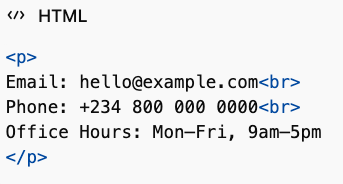
Clean, simple, readable.
How Browsers Treat Line Breaks Without <br>
HTML ignores normal line breaks in your code.
Look at this:

Browser output:
Hello Welcome Good morning
Everything becomes one line.
If you want visible line breaks, you must use <br>.
Using <br> Inside Headings
Yes, you can use <br> in headings.
Example:

This splits the heading into two lines.
Designers often use this for visual style.
Using <br> in Poems or Lyrics
Poetry needs line control. <br> is perfect here.
Example:

Each line stays exactly where you want it.
When You SHOULD Use <br>
Use <br> when line breaks are part of the meaning or structure of the content.
Good uses:
✔ Addresses
✔ Poems
✔ Lyrics
✔ Contact info
✔ Labels
✔ Short structured lines
When You SHOULD NOT Use <br>
This is very important.
Do NOT use <br> to create layout spacing or design structure.
Bad uses:
❌ Creating big empty space
❌ Separating sections of content
❌ Replacing margins or padding
❌ Controlling page layout
Why?
Because HTML controls structure.
CSS controls design and spacing.
Wrong Way to Create Space

This is messy and hard to maintain.
Correct Way Using CSS


This is clean and professional.
Accessibility Considerations
Screen readers interpret content differently from visual users.
Too many <br> tags can confuse assistive technologies because they do not represent meaningful structure.
Proper structure improves accessibility:
- Use headings for sections
- Use paragraphs for content
- Use
<br>only for real line breaks
HTML5 and the <br> Tag
In modern HTML (HTML5), <br> is fully supported.
It behaves the same across all modern browsers:
- Chrome
- Firefox
- Safari
- Edge
No compatibility problems.
Styling <br> with CSS
Technically, you can style line breaks — but it’s uncommon.
Example:

However, most developers avoid styling <br> directly.
Spacing is better handled with margins, padding, or line height on text elements.
How <br> Works in Forms
Sometimes labels or instructions need multiple lines.
Example:
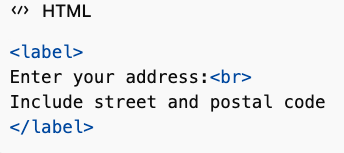
This keeps related information grouped.

Common Beginner Mistakes
1. Using <br> Instead of Paragraphs
Wrong:

Correct:

2. Using Too Many Line Breaks
This makes messy code and poor layout control.
3. Thinking <br> Adds Design Spacing
It only breaks lines — not layout structure.
Real Website Example Structure
Here is a realistic use case combining multiple elements:

Simple, readable, structured.

| Feature | <br> Tag |
|---|---|
| Purpose | Line break |
| Closing tag | No |
| Adds spacing | Minimal |
| Creates paragraph | No |
| Good for layout | No |
| Good for structured lines | Yes |
Best Practices for Using <br>
Follow these simple rules:
✔ Use it only when a line break is meaningful
✔ Keep content readable
✔ Avoid stacking many <br> tags
✔ Use CSS for spacing
✔ Use paragraphs for text blocks
Why the <br> Tag Is Still Important
Even though it is small, the <br> tag solves a specific problem:
👉 It gives precise control over line positioning inside text.
Without it, certain content would be hard to format correctly, especially:
- Addresses
- Poetry
- Short data blocks
- Structured text
It keeps content readable without breaking semantic structure.
The <br> tag is one of the simplest HTML elements, but understanding how to use it properly is an important step in becoming a good web developer.
Remember the core idea:
<br> breaks a line — it does not create structure or layout.
Use it carefully and only when needed.
For design spacing, always use CSS.
For content structure, use proper HTML elements like paragraphs and headings.
If you follow these rules, your webpages will be cleaner, more professional, and easier to maintain.