
HTML file naming is one of the most overlooked aspects of web development. Beginners often focus heavily on writing tags, styling pages, or adding interactivity, while treating file names as an afterthought. In reality, how you name your HTML files affects readability, maintainability, SEO, collaboration, server behavior, and long-term scalability.
Good file naming practices do not make your website visually better, but they make your project easier to understand, easier to maintain, less error-prone, and more professional. Bad naming conventions, on the other hand, create confusion, broken links, deployment issues, and unnecessary technical debt.
This article explains HTML file naming best practices from first principles. It is written to remain relevant regardless of frameworks, trends, or tools. Whether you are building a simple static website or a large multi-page project, these rules apply.
What Is an HTML File Name?
An HTML file name is the name given to a file that contains HTML markup and is saved with a .html (or sometimes .htm) extension. This file name becomes part of the page’s URL, file system path, and internal linking structure.
For example:
index.html
about.html
contact-us.html
Each name plays a role in how browsers load pages, how servers route requests, and how humans understand the project structure.
Why HTML File Naming Matters
Before discussing best practices, it is important to understand why naming matters.
1. Readability
Clear file names help developers (including your future self) understand the purpose of a file instantly.
2. Maintainability
Projects grow. Files get added, removed, and reorganized. Logical naming prevents confusion and mistakes.
3. SEO and URLs
HTML file names often appear directly in URLs. Clean, readable URLs improve user trust and search engine clarity.
4. Server Compatibility
Different operating systems and servers handle file names differently. Poor naming can break links in production.
5. Team Collaboration
Consistent naming allows teams to work efficiently without constantly explaining file purposes.
Use Lowercase Letters Only
Best practice:
Always use lowercase letters for HTML file names.
Why This Matters
Some servers (especially Linux-based servers) are case-sensitive. This means:
About.html ≠ about.html
A link pointing to about.html will fail if the actual file is named About.html.
Good Example:
about.html
services.html
contact.html
Bad Example
About.html
Services.HTML
ContactPage.html
Use Hyphens Instead of Spaces or Underscores
Best practice:
Use hyphens (-) to separate words.
Why Hyphens Are Preferred
• Spaces are encoded as %20 in URLs (ugly and error-prone)
• Underscores are harder to read in URLs
• Hyphens are the web standard for readability
Good Example
html-file-naming-best-practices.html
user-profile.html
pricing-table.html
Bad Example
html file naming.html
html_file_naming.html
htmlFileNaming.html
Keep File Names Short but Descriptive
Best practice:
Use the fewest words necessary to describe the page clearly.
Why This Matters
• Long file names are harder to type and remember
• Short names reduce errors when linking
• Descriptive names improve clarity without verbosity
Good Example
about.html
blog.html
faq.html
Bad Example
this-is-the-about-page-of-my-company-website.html
page1.html
newpagefinalv3.html
A file name should describe what the page is, not its revision history.
Avoid Special Characters
Best practice:
Use only:
• lowercase letters
• numbers
• hyphens
Avoid:
• spaces
• symbols
• accented characters
Characters to Avoid
@ # $ % & * ( ) + = ? !
Bad Example
contact@us.html
about&team.html
pricing!.html
Good Example
contact-us.html
about-team.html
pricing.html
Special characters can break URLs, cause encoding issues, or behave inconsistently across browsers.
Always Use the .html Extension
Best practice:
Use .html, not .htm.
Why
• .html is the modern standard
• Clearer and more readable
• Consistent across modern systems
Exception
Some legacy systems still use .htm, but there is no advantage today.
Good Example
index.html
blog.html
Bad Example
index.htm
homepage.final
Understand the Role of index.html
Best practice:
Use index.html as the default file for directories.
Why index.html Matters
Most web servers automatically load index.html when a directory is accessed.
Example:
example.com/blog/
The server looks for:
blog/index.html
Proper Structure
/blog
└── index.html
Poor Structure
/blog
└── blogpage.html
Using index.html keeps URLs clean and professional.
Use Logical Naming for Multi-Page Websites
As projects grow, naming consistency becomes critical.
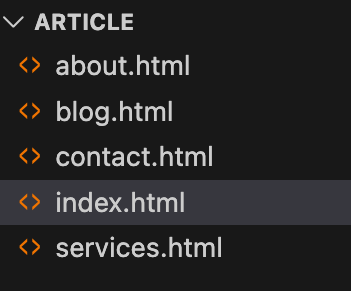
Example Website Structure
index.html
about.html
services.html
contact.html
blog.html
For Blog Posts
blog/
├── index.html
├── html-basics.html
├── css-selectors.html
Avoid vague names like:
page1.html
test.html
new.html
They provide no context and become impossible to manage at scale.
Avoid Version Numbers in File Names
Best practice:
Do not include versions or dates in HTML file names.
Bad Example
about_v2.html
homepage_final_final.html
contact_2026.html
Why This Is a Problem
• Breaks links
• Confuses collaborators
• Encourages messy project structure
Instead, use version control tools or backups not file names.
Match File Names With Page Purpose
Your file name should reflect the primary purpose of the page.
| Page Purpose | File Name |
| Homepage | index.html |
| About page | about.html |
| Contact form | contact.html |
| Pricing page | pricing.html |
Avoid clever or branded names unless absolutely necessary.
Be Consistent Across the Entire Project
Consistency is more important than perfection.
If you choose:
contact-us.html
Do not mix it with:
about_us.html
Pick one style and apply it everywhere.
HTML File Naming and SEO
While file names alone do not rank websites, they contribute to:
• Clean URLs
• User trust
• Link clarity
• Search engine understanding
Example:
example.com/html-file-naming-best-practices.html
is more informative than:
example.com/page?id=17
Good file naming supports long-term SEO hygiene.
Common HTML File Naming Mistakes
Avoid these frequent errors:
• Using uppercase letters
• Adding spaces
• Naming files after temporary ideas
• Using meaningless numbers
• Renaming files without updating links
Each mistake creates unnecessary problems that compound over time.
A Simple HTML File Naming Checklist
Before creating or publishing a file, ask:
• Is it lowercase?
• Does it use hyphens?
• Is it short and clear?
• Does it describe the page purpose?
• Is it consistent with other files?
If yes, your naming is solid.
HTML file naming best practices are not about aesthetics or trends. They are about clarity, discipline, and professionalism. A well-named file structure reduces errors, improves collaboration, and supports long-term growth.
You do not need complex tools or advanced skills to get this right. You only need consistency and intention.
If you develop the habit of clean HTML file naming early, every future project becomes easier to manage no matter how large it grows.