Forms are one of the most important parts of any website. They help users log in, sign up, contact you, search content, and complete actions. But even a well-built form can feel confusing or uncomfortable if it is not styled properly. One small but powerful detail that improves form usability is the input focus effect.
Input focus effects show users which field is currently active. When someone clicks or taps on an input field, the visual change helps them understand where they are and what to do next. This article explains how to style a form with input focus effects using simple CSS, why it matters, and how to apply it correctly for modern websites.
What Is an Input Focus Effect?
An input focus effect is the visual change that happens when a user clicks or tabs into a form field. The browser automatically applies a default focus style, usually a blue or black outline. While this works, it often does not match a website’s design.
By styling focus effects, you can:
- Make forms easier to use
- Improve accessibility
- Match your website’s branding
- Guide users through the form smoothly
Focus effects can include color changes, shadows, border animations, or subtle transitions.
Why Input Focus Effects Are Important
Input focus effects are not just about looks. They serve a functional purpose.
1. Better User Experience
When users see which input is active, they feel more confident filling out the form. This reduces mistakes and frustration.
2. Accessibility Support
Keyboard users rely on focus indicators to navigate forms. Removing or hiding focus styles can make your site difficult or impossible to use for some people.
3. Modern Design Expectation
Most modern websites use clean, visible focus effects. Without them, forms may feel outdated or broken.
Basic HTML Form Structure
Before styling focus effects, you need a simple form structure like this :


Styling Inputs With CSS
Let’s start with basic input styling.

This creates a clean and readable form layout.

Using the :focus Pseudo-Class
CSS provides the :focus pseudo-class to target active inputs.
Simple Focus Effect

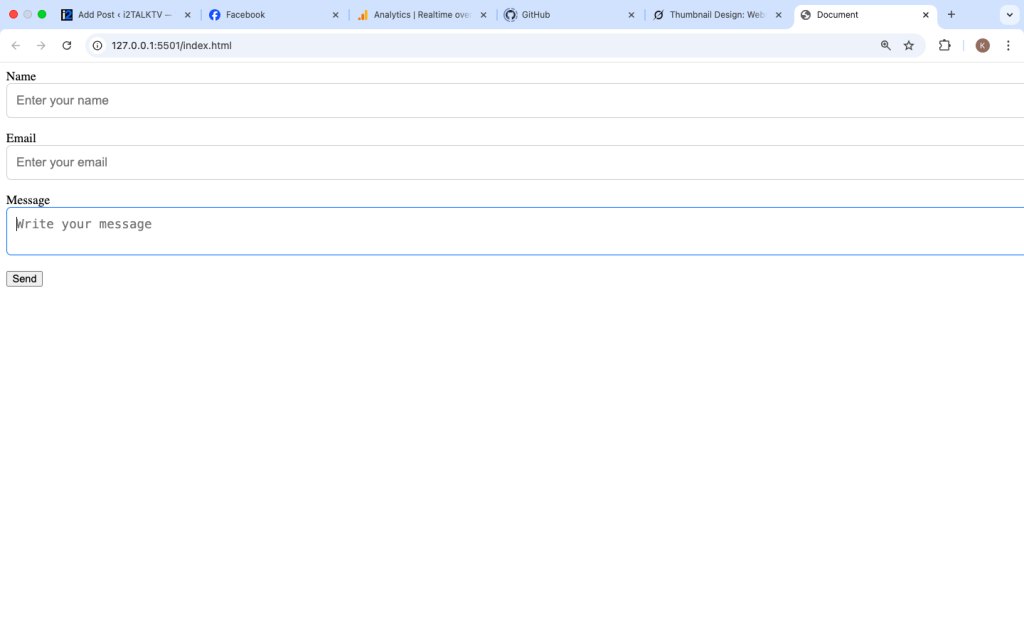
This changes the border color when the input is focused.
What this does:
- Makes the active field obvious
- Keeps the form clean and modern
Adding Smooth Transitions
Transitions make focus effects feel natural instead of sudden.

Now, when the border color changes, it animates smoothly.
Using Box Shadow for Focus
Box shadows are popular for focus effects because they add depth.

This creates a soft glow around the active input.

Styling Focus for Buttons
Buttons also receive focus when navigated with a keyboard.


This ensures buttons remain accessible and visible during navigation.
Focus vs Hover Effects
Hover and focus are different but often confused.
- Hover: Triggered by mouse movement
- Focus: Triggered by clicking or keyboard navigation
You can combine them, but they should still work independently.

Always keep focus styles visible even if hover effects exist.
Using :focus-visible for Better Accessibility
Modern browsers support :focus-visible, which shows focus styles only when needed.

This prevents focus styles from appearing during mouse clicks while still supporting keyboard users.
Styling Placeholder Text on Focus
Sometimes you may want placeholder text to fade or change when focused.

This helps reduce visual noise while typing.
Floating Labels With Focus Effects (Optional)
Floating labels move when the input is focused or filled. This improves clarity.
Basic Concept
- Label sits inside input
- Moves upward on focus
This pattern is popular in modern UI designs but should be implemented carefully to maintain accessibility.
Common Mistakes to Avoid
1. Removing Focus Without Replacement
Never do this:

Without adding a new focus style, users lose visual guidance.
2. Low Contrast Focus Colors
Ensure focus styles are clearly visible against the background.
3. Inconsistent Focus Styling
All inputs should follow the same focus pattern for consistency.
Mobile and Touch Considerations
On mobile devices:
- Focus effects still matter
- Inputs should be large enough
- Focus styles should not rely only on hover
Test your form on real devices to ensure good usability.
How Focus Effects Improve Conversion
Well-styled focus effects can:
- Reduce form abandonment
- Make forms easier to complete
- Increase trust and professionalism
Small design improvements often lead to better results.
Best Practices for Input Focus Effects
- Always keep focus visible
- Use smooth transitions
- Match your brand colors
- Test with keyboard navigation
- Keep it simple and readable
Styling a form with input focus effects is a small detail that makes a big difference. It improves usability, accessibility, and overall design quality. You do not need complex animations or heavy code. Simple border changes, shadows, and transitions are enough to guide users smoothly.
When designing forms, always think from the user’s perspective. If users can clearly see where they are typing, they are more likely to complete the form without confusion. Focus effects are not optional in modern web design they are essential.
By applying the techniques explained in this guide, you can create forms that look professional, feel modern, and remain accessible for everyone.
Why Input Focus Effects Matter in Modern Websites
Styling a form with input focus effects may look like a small design detail, but in modern web design, it plays a very important role. Forms are one of the main ways users interact with a website. Whether it is signing up, logging in, sending a message, or making a purchase, users rely on forms to complete actions. When those forms are easy to understand and comfortable to use, people are more likely to finish what they started.
Input focus effects help users clearly see where they are typing. When a field highlights on click or keyboard navigation, it removes confusion and guides the user step by step through the form. This is especially helpful on longer forms where users move between multiple fields. Without focus styling, users may lose track of the active input, leading to mistakes, frustration, or form abandonment.
In today’s web environment, accessibility is no longer optional. Many users navigate websites using keyboards, screen readers, or assistive technologies. Focus indicators are essential for these users to move through forms safely and confidently. Styling focus effects properly ensures that your website is usable by a wider audience and meets modern accessibility standards. Removing focus styles or making them hard to see can unintentionally block users from interacting with your content.
From a design perspective, custom focus effects allow your forms to match your brand and overall layout. Instead of relying on default browser styles, you can create a clean and consistent experience that feels professional and intentional. Smooth transitions, clear borders, or subtle shadows make interactions feel polished and modern without overwhelming the user.
Finally, well styled focus effects contribute to better performance and trust. When users feel comfortable and guided while filling out a form, they are more likely to complete it. This can improve conversions, reduce errors, and create a positive impression of your website. In modern web design, every detail matters, and input focus effects are a simple but powerful way to improve usability, accessibility, and user experience all at once.