Pricing tables are one of the most important sections on many websites. They help users quickly understand your plans, compare features, and decide which option is best for them. A pricing plan hover effect adds interaction and visual feedback, making your pricing section more engaging and professional.
In this guide, you will learn how to build a pricing plan hover effect from scratch using HTML and CSS. Everything is explained step by step, in simple language, so beginners can follow along easily. You will also see clear places where screenshots can be added to make the explanation even more helpful.
This tutorial is evergreen, meaning the concepts will remain useful even as design trends change.
What Is a Pricing Plan Hover Effect?
A pricing plan hover effect is a visual change that happens when a user moves their mouse over a pricing card. This change can include:
- Slightly increasing the card size
- Changing background color
- Adding a shadow
- Highlighting a button
- Showing emphasis on a popular plan
The goal is to draw attention, guide user focus, and improve user experience.
Why hover effects matter:
- They make the interface feel interactive
- They guide users toward important actions
- They improve the overall design quality
- They help highlight recommended plans
What You Will Build in This Tutorial
By the end of this guide, you will have:
- A clean pricing table layout
- Multiple pricing cards
- A smooth hover effect using only CSS
- A design that works on desktop and mobile
You will use:
- HTML for structure
- CSS for layout, styling, and hover effects
No JavaScript is required.

This structure is simple and readable:
- Each plan is inside
.pricing-card - Headings show the plan name
- A list explains features
- A button encourages actio

Step 2: Basic CSS Layout for Pricing Section
Now let’s style the pricing section so the cards appear in a row and look clean.
Example CSS:


This CSS:
- Places cards side by side using Flexbox
- Adds spacing between cards
- Centers the pricing section
- Gives cards a white background
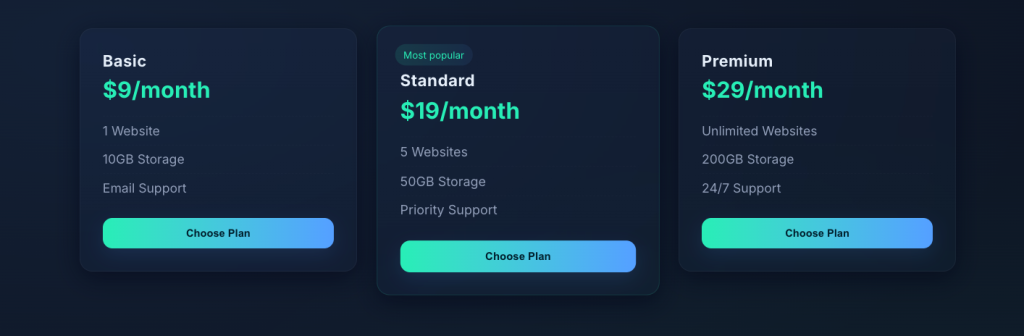
Step 3: Styling Text, Price, and Features
Let’s improve readability and visual balance.
This step:
- Makes plan names clear
- Highlights the price
- Keeps feature lists clean and readable
Step 4: Styling the Button
Buttons are important because they lead to conversions.
At this stage, your pricing cards should already look professional, even without hover effects.
Step 5: Adding the Hover Effect
Now comes the most important part: the hover effect.
What this does:
transitionmakes changes smoothtransformlifts the card slightlybox-shadowadds depth
This creates a clean and modern hover effect that feels responsive.
Step 6: Enhancing Hover Effect for Buttons
You can also animate the button on hover.


This helps guide users toward clicking.
Step 7: Making the Pricing Section Responsive
Your pricing plans should work well on mobile.
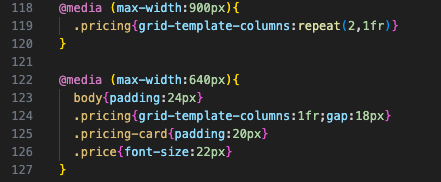

This stacks cards vertically on small screens.
Common Mistakes to Avoid
- Making hover effects too aggressive
- Using too many animations
- Forgetting mobile responsiveness
- Overloading cards with text
- Poor contrast between text and background
Simple designs usually perform better.
Best Practices for Pricing Hover Effects
- Keep animations subtle
- Maintain consistent spacing
- Highlight value clearly
- Make buttons easy to click
- Test on multiple devices
Why Pricing Hover Effects Improve User Experience
Hover effects:
- Make the page feel interactive
- Help guide attention
- Improve visual hierarchy
- Increase user engagement
Small details like hover effects often create a big difference in how users perceive your website.
Building a pricing plan hover effect using HTML and CSS is a powerful way to improve your website’s design and usability. With simple structure, clean styling, and smooth transitions, you can create a pricing section that looks professional and feels interactive without using JavaScript.
This guide showed you how to:
- Structure pricing plans using HTML
- Style them cleanly with CSS
- Add hover effects that enhance user experience
- Keep everything responsive and beginner-friendly
Once you understand these basics, you can customize colors, animations, layouts, and spacing to match your brand. The techniques used here are evergreen and can be applied to many other UI components beyond pricing tables.
Hover effects play an important role in how modern websites communicate with users. They may look simple on the surface, but they help guide interaction, improve clarity, and make a website feel more responsive and alive. In the case of pricing plans, hover effects are especially useful because they help users focus, compare options, and understand where to take action.
One of the main reasons hover effects are needed today is user feedback. When a visitor moves their mouse over a pricing card and sees a change such as a shadow, movement, or color shift—it confirms that the element is interactive. This feedback reassures users that they can click, explore, or take action. Without hover effects, a page can feel static, which may confuse users or make the interface feel less intuitive.
Hover effects also help improve visual hierarchy. On pricing pages, users often scan quickly to find the best plan. A subtle hover effect draws attention without forcing it. It allows users to explore each plan naturally while keeping the design clean. Highlighting pricing cards on hover helps guide the eye and makes comparisons easier, especially when multiple plans are shown side by side.
Another important reason hover effects are required in modern websites is engagement. Small interactions create a sense of responsiveness that keeps users interested. When a pricing card gently lifts, changes color, or highlights a button on hover, the experience feels smoother and more polished. These small details can make a website feel professional and well-designed, even if the layout itself is simple.
Hover effects also support conversion goals. On pricing sections, the goal is often to encourage users to choose a plan. Hover effects can subtly guide attention toward call-to-action buttons, making them more noticeable without being aggressive. This helps users make decisions faster and with more confidence.
From a design perspective, hover effects allow websites to communicate more with less content. Instead of adding extra text or instructions, hover interactions visually explain what elements do. This keeps pages clean, readable, and user-friendly.
In conclusion, hover effects are not just decorative elements. They are functional design tools that improve usability, clarity, and engagement. In modern websites, especially in pricing sections, hover effects help users interact more confidently and comfortably. When used thoughtfully, they enhance the user experience while keeping the design simple, responsive, and effective.