If you are just starting to learn web development, two of the first technologies you will probably encounter are HTML and CSS.
You may see developers working with both at the same time and wonder: What exactly does HTML do, and what does CSS do? Why do I need both?
The easiest way to understand the difference is to think about building a house.
HTML is the structure of the house, while CSS is the design and appearance of the house.
HTML creates the different parts of a webpage, such as headings, paragraphs, buttons, images, links, forms, and sections. CSS then controls how those parts look, including their colors, sizes, spacing, positions, fonts, borders, and backgrounds.
They work together, but they have different jobs.
In this guide, we will explain HTML and CSS from the ground up, compare their roles, look at a simple practical example, and explain when and why you use each one.
What Is HTML?
HTML stands for HyperText Markup Language.
HTML is the standard markup language used to structure content on a webpage.
When you create a webpage, HTML tells the browser what the different pieces of content are.
For example, HTML can tell the browser:
- This is a heading.
- This is a paragraph.
- This is an image.
- This is a link.
- This is a button.
- This is a list.
- This is a form.
- This is a section of the page.
HTML is therefore mainly concerned with structure and meaning.
Imagine opening a webpage with no CSS at all. You would still be able to see the content, but it would probably look very plain.
The headings, paragraphs, links, and other elements would still exist because HTML created them.
What Is CSS?
CSS stands for Cascading Style Sheets.
CSS is used to control the visual presentation of HTML content.
While HTML creates the structure, CSS decides how that structure should look.
CSS can control things such as:
- Colors
- Fonts
- Font sizes
- Widths and heights
- Margins
- Padding
- Borders
- Backgrounds
- Shadows
- Alignment
- Layouts
- Responsive behavior
- Animations
For example, HTML can create a button, while CSS can make that button blue, rounded, larger, centered, and attractive.
So you can think of CSS as the styling and presentation layer of a webpage.
The Simplest Way to Remember the Difference
A simple way to remember the relationship is:
HTML = What is on the page
CSS = How it looks
For example, suppose you want to create a heading that says:
Welcome to My Website
HTML creates the heading.
CSS can then make that heading:
- Large
- Bold
- Centered
- A particular color
- Using a specific font
The words themselves come from HTML. Their appearance comes from CSS.
HTML and CSS Work Together
Although HTML and CSS have different responsibilities, they are normally used together.
A webpage without HTML would have no basic structure.
A webpage without CSS could still work, but it would usually look very basic.
This is why beginners should learn the two technologies together, while still understanding that they are separate.
HTML provides the foundation.
CSS builds the visual appearance on that foundation.
A Simple Example
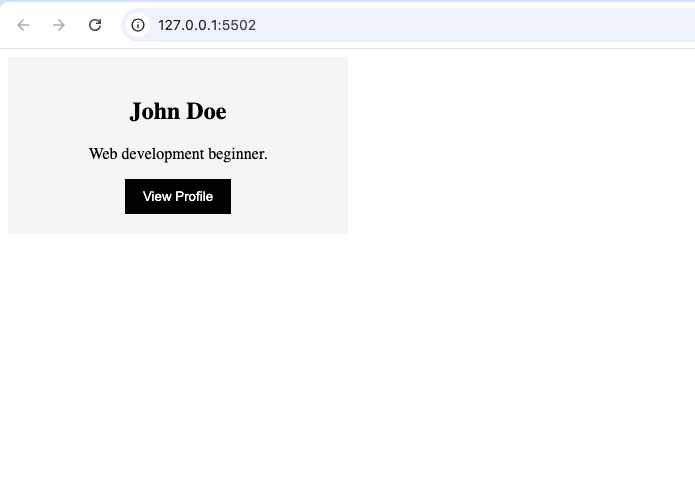
Let’s create a small profile card.
The HTML will create:
- A card
- A heading
- A paragraph
- A button
Then CSS will make the card look cleaner.
HTML
<div class="card">
  <h2>John Doe</h2>
  <p>Web development beginner.</p>
  <button>View Profile</button>
</div>
This HTML creates the actual content and structure.
At this stage, there is nothing particularly fancy about the design.
Now let’s add some CSS.
CSS
.card {
  width: 300px;
  padding: 20px;
  background: #f5f5f5;
  text-align: center;
}

button {
  padding: 10px 18px;
  background: black;
  color: white;
  border: none;
}
The HTML still provides the structure, while the CSS changes the appearance.
The card now has spacing, a background, centered text, and a styled button.
The important thing to notice is that CSS did not create the heading or paragraph.
HTML created those elements.
CSS simply changed how they appear.
What Happens When HTML Is Used Without CSS?
This is an important experiment for beginners.
Try creating a small webpage using only HTML.
You can add:
- A heading
- Some paragraphs
- A link
- A button
- An image
The content will appear in the browser.
However, the page will have a very basic appearance.
The browser has default styles for many HTML elements, but you have not specifically designed the page.
This demonstrates something important:
HTML does not depend on CSS to create content.
CSS enhances the presentation of that content.
What Happens When CSS Is Used Without HTML?
CSS is primarily designed to style HTML elements.
If you write CSS rules but have no elements for those rules to affect, there is not much to style.
For example, you could write a rule that says a heading should be blue.
But if your webpage does not contain a heading, that particular rule has nothing to change.
This is another reason the two technologies are connected.
HTML provides elements.
CSS styles those elements.
HTML Focuses on Structure
One of the most important concepts to understand is that HTML describes the structure of a webpage.
Consider a typical website.
It might contain:
- A header
- Navigation
- Main content
- Articles
- Images
- Sidebars
- Forms
- A footer
HTML provides elements that represent these parts.
For example, developers can use semantic elements such as <header>, <nav>, <main>, <article>, <section>, and <footer>.
These elements help organize the page.
HTML is therefore not simply about putting text on a screen. It also provides meaning and structure.
CSS Focuses on Presentation
CSS takes the HTML structure and controls its visual appearance.
For example, imagine your HTML contains three sections.
CSS can decide whether those sections should:
- Appear side by side
- Appear vertically
- Have different backgrounds
- Have equal widths
- Have specific spacing
CSS can also make the layout change when someone views the website on a smaller screen.
This is particularly important because websites are now viewed on many different devices.
HTML Uses Elements and Tags
HTML is made up of elements.
You have probably already seen tags such as:
<h1><p><a><img><button><div>
These elements tell the browser what type of content it is dealing with.
For example, an <h1> represents a main heading, while a <p> represents a paragraph.
HTML therefore gives content its basic structure.
CSS Uses Selectors and Properties
CSS works differently.
Instead of creating webpage elements, CSS selects elements and applies styles to them.
For example, a CSS selector can target a button.
You can then use properties to control that button’s appearance.
Some common CSS properties include:
colorbackgroundfont-sizemarginpaddingwidthheightborder
You do not need to memorize all of them when you are starting.
The important thing is to understand the relationship:
Selector → Property → Value
This is the basic pattern behind many CSS rules.
HTML Is About Content and Meaning
HTML is also important for accessibility and document structure.
When you correctly use an HTML heading for a heading and a paragraph element for a paragraph, you are giving the browser and assistive technologies useful information about your content.
For example, a screen reader can understand that a piece of text is a heading rather than simply treating it as ordinary text.
This is one reason developers should not use HTML elements only because they look a certain way.
The meaning and purpose of the element matter.
CSS Is About Visual Design
CSS does not normally determine whether something is a heading, paragraph, button, or navigation area.
Instead, CSS determines how those elements should be presented.
For example, you could make a paragraph large and bold using CSS, but that does not turn the paragraph into a heading.
The HTML element still determines its underlying meaning.
This distinction is important as you become more experienced with web development.
HTML vs CSS: A Quick Comparison
| HTML | CSS |
|---|---|
| Structures webpages | Styles webpages |
| Creates content elements | Changes their appearance |
| Defines headings and paragraphs | Controls fonts and text appearance |
| Creates buttons | Styles buttons |
| Creates links | Styles links |
| Creates forms | Controls form appearance |
| Provides semantic structure | Provides visual presentation |
| Uses HTML elements | Uses selectors and properties |
The two technologies have different responsibilities, but they are designed to work together.
Can You Learn HTML Without CSS?
Yes.
In fact, learning basic HTML before becoming heavily focused on CSS can be helpful.
It allows you to understand:
- What elements are
- How webpages are structured
- How HTML documents are organized
- How different elements work
Once you understand the structure, CSS becomes easier because you already know what you are styling.
However, you do not need to completely master HTML before starting CSS.
You can learn both progressively.
Can You Learn CSS Without HTML?
You can learn CSS syntax independently, but understanding HTML makes CSS much easier.
CSS is usually applied to HTML elements.
Therefore, beginners should understand basic HTML concepts before going deeply into CSS.
You don’t need to know every HTML element.
Knowing common elements such as headings, paragraphs, links, images, buttons, lists, sections, and forms is enough to begin practicing CSS.
A Real-Life Analogy
Imagine you are designing a bedroom.
HTML is like deciding what exists in the room:
- Bed
- Desk
- Chair
- Window
- Door
CSS is like deciding how those things look and where they are presented:
- Wall color
- Furniture size
- Spacing
- Position
- Font style
- Decoration
You cannot style a desk that does not exist.
In the same way, CSS usually needs HTML elements to style.
HTML, CSS, and JavaScript
As you continue learning web development, you will eventually encounter JavaScript.
This gives you another useful way to understand the three technologies.
HTML creates the structure.
CSS controls the appearance.
JavaScript adds behavior and interaction.
For example, imagine a button.
HTML creates the button.
CSS makes the button look attractive.
JavaScript can make something happen when the user clicks it.
This basic division of responsibilities is one of the most important concepts for new web developers.
Where HTML and CSS Are Used
Almost every traditional webpage uses HTML.
CSS is also used on virtually every modern website that requires custom visual presentation.
Together, they can be used to create:
- Personal websites
- Portfolios
- Blogs
- Business websites
- Landing pages
- Online stores
- Dashboards
- Documentation websites
- Web applications
Even large applications built with modern frameworks still rely on the concepts of HTML and CSS.
Why Beginners Should Learn Both
If your goal is to become a web developer, learning HTML and CSS is one of the best places to start.
HTML teaches you how webpages are structured.
CSS teaches you how to control their appearance.
Once you understand both, you can start building real projects instead of simply following isolated tutorials.
You will also begin to understand how professional websites are constructed.
Common Beginner Mistakes
There are a few mistakes beginners commonly make when learning HTML and CSS.
Mixing Structure and Styling
A beginner may try to use HTML elements simply because they look a certain way.
For example, they may choose a heading because it appears larger.
Instead, choose HTML elements based on their meaning and use CSS to control their appearance.
Trying to Learn Everything at Once
HTML and CSS contain many features.
You do not need to memorize everything.
Start with the basics and practice regularly.
Writing Too Much CSS
Beginners sometimes create complicated styles for simple elements.
Keep your CSS clean and understandable.
As you gain experience, you will learn better ways to organize your styles.
Ignoring Responsive Design
A webpage that looks good on a large desktop may not look good on a phone.
Start developing the habit of checking your projects at different screen sizes.
A Good Learning Order
If you are completely new to web development, a simple learning path can look like this:
Step 1: Learn Basic HTML
Start with:
- Headings
- Paragraphs
- Links
- Images
- Lists
- Buttons
- Sections
- Forms
Step 2: Learn Basic CSS
Then learn:
- Colors
- Fonts
- Spacing
- Borders
- Width and height
- Backgrounds
Step 3: Learn CSS Layout
Move into:
- Flexbox
- Grid
- Positioning
- Responsive design
Step 4: Build Small Projects
Practice by creating:
- Profile cards
- Landing pages
- Navigation bars
- Login forms
- Simple portfolios
Step 5: Learn JavaScript
Once you are comfortable with HTML and CSS, JavaScript can help you add interaction and functionality.
Practice Is More Important Than Memorization
You do not need to memorize every HTML tag or CSS property.
Instead, focus on understanding what each technology is designed to do.
For example, if you understand that HTML provides structure and CSS provides styling, you can always look up the exact syntax when you forget it.
The goal is to become comfortable building things.
The more small projects you create, the easier HTML and CSS will become.
HTML and CSS are two fundamental technologies of web development, but they are not the same thing.
HTML creates the structure and content of a webpage, while CSS controls its visual appearance.
HTML tells the browser what something is. CSS tells the browser how that element should look.
You can think of HTML as the foundation of a webpage and CSS as the design placed on top of that foundation.
Understanding this difference will make many other web development concepts easier to learn.
If you are a beginner, don’t worry about mastering everything immediately. Start with basic HTML elements, learn simple CSS properties, and gradually combine them in small practice projects.
Once you understand how HTML and CSS work together, you will have a strong foundation for moving into responsive design, JavaScript, and eventually more advanced web development technologies.
Try it yourself
Change the code, then run it to see the result.