
If you have ever visited a programming tutorial website, read developer documentation, or followed an online coding guide, you have probably seen pieces of code displayed inside a webpage. HTML provides a special element designed specifically for this purpose: the <code> tag.
The HTML <code> element helps identify text that represents computer code. Whether you are showing HTML, CSS, JavaScript, Python, or another programming language, the <code> tag tells browsers and developers that the enclosed content should be treated as code rather than normal text.
Although the <code> tag is simple, it plays an important role in making technical content easier to read and understand. It also improves the structure and meaning of a webpage.
In this beginner-friendly guide, you’ll learn what the HTML <code> tag is, how it works, when to use it, practical examples, common mistakes, and why it remains an important part of modern HTML.
This article focuses on clear explanations and practical understanding rather than overwhelming you with lots of code.
What is the HTML <code> Tag?
The HTML <code> tag is used to represent a piece of computer code within a webpage.
In simple terms, it tells the browser:
“This text is code.”
The code might be:
- HTML code
- CSS code
- JavaScript code
- Python code
- SQL commands
- Terminal commands
- Programming variables
When browsers display text inside a <code> element, they typically use a monospace font. This helps distinguish code from regular text.
Why the <code> Tag Exists
Imagine reading a programming tutorial where code and normal text looked exactly the same.
It would quickly become confusing.
For example:
Use the div element to create a container.
Without formatting, readers might not know whether “div” refers to a concept or an actual HTML tag.
Using the <code> element makes the distinction clearer.
Example:
<code>div</code>
Now readers immediately recognize it as code.
Basic Syntax of the <code> Tag
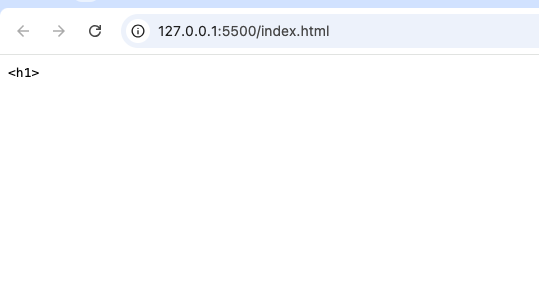
A simple example looks like this:
<code><h1></code>
This indicates that the text represents code rather than ordinary content.
How the <code> Tag Works
The <code> element wraps code-related text.
For example:
<code>console.log()</code>
Browsers usually display this text using a monospace font.
Monospace fonts make every character occupy the same amount of horizontal space, which improves readability for code.
Why Monospace Fonts Matter
Programming code often depends on alignment and spacing.
Monospace fonts help maintain a clean appearance.
For example:
- Variables line up correctly.
- Commands are easier to read.
- Technical instructions look consistent.
This is why most code editors and programming environments also use monospace fonts.
Common Uses of the <code> Tag
The <code> element is useful in many situations.
1. Programming Tutorials
One of the most common uses is in coding tutorials.
For example, when explaining HTML tags:
<code><p></code>
Readers immediately know the text refers to code.
2. Technical Documentation
Software documentation often includes:
- Function names
- Commands
- Variables
- Configuration settings
The <code> tag helps distinguish these elements from ordinary text.
3. Developer Blogs
Programming blogs frequently mention code snippets within paragraphs.
Example:
Use the <code>fetch()</code> function to retrieve data.
This improves clarity.
4. API References
API documentation often contains:
- Endpoints
- Methods
- Parameters
The <code> element helps identify these technical items.
Inline Code vs Block Code
Understanding this difference is important.
Inline Code
Inline code appears within a sentence.
Example:
Use <code><img></code> to display images.
The code becomes part of the paragraph.
Block Code
Large code examples usually require separate formatting.
Developers often combine <code> with the <pre> element.
Example:
<pre>
<code>
Example code here
</code>
</pre>
This preserves spacing and line breaks.
Difference Between <code> and <pre>
Beginners often confuse these two elements.
Here’s the difference:
<code> | <pre> |
|---|---|
| Identifies code | Preserves formatting |
| Adds semantic meaning | Maintains spaces and line breaks |
| Usually used for short code | Often used for larger code blocks |
They frequently work together.
Why Semantic HTML Matters
The <code> tag is a semantic element.
Semantic HTML provides meaning to content.
Instead of simply styling text, semantic elements explain what the content represents.
When browsers, developers, or assistive technologies see a <code> element, they understand that the content is computer code.
Practical Examples of Using <code>
Let’s explore some real-world uses.
Showing HTML Tags
Tutorials often explain HTML tags using <code>.
Examples include:
<html><head><body><div>
Without the <code> element, these examples might be harder to distinguish.
Showing CSS Properties
When discussing CSS, developers often reference properties such as:
colorfont-sizemargin
The <code> tag helps identify them clearly.
Showing JavaScript Functions
JavaScript tutorials frequently mention functions like:
alert()setTimeout()querySelector()
Using <code> makes these function names stand out.
Showing Terminal Commands
Many tutorials include terminal commands.
Examples:
npm installgit clonecd project-folder
The <code> tag helps readers recognize them as commands.
Using <code> in Documentation
Documentation often includes references to:
- Variables
- Methods
- Classes
- Functions
For example:
The username variable stores the user’s name.
Using <code> improves readability.
HTML5 and the <code> Element
The <code> tag has been part of HTML for many years and continues to be supported in HTML5.
Its purpose remains unchanged:
Represent computer code within a document.
Because coding tutorials remain popular, the <code> element is still widely used.
Browser Support
The <code> element is supported by all modern browsers, including:
- Chrome
- Firefox
- Safari
- Edge
- Opera
It is one of the most reliable HTML elements available.
Accessibility Benefits
Accessibility involves making content usable for everyone.
The <code> tag helps assistive technologies understand that certain text represents code.
This additional meaning can improve the experience for users who rely on screen readers.
SEO Benefits
The <code> tag does not directly improve search rankings.
However, it contributes to:
- Better content structure
- Improved readability
- Clearer technical documentation
Well-structured content often provides a better user experience.
Practical Project Ideas Using <code>
Beginners can use the <code> element in many practice projects.
Coding Tutorial Website
Create lessons that explain:
- HTML tags
- CSS properties
- JavaScript functions
Use <code> throughout the content.
Developer Portfolio
Show snippets of your favorite code examples.
Programming Blog
Write articles about coding concepts and highlight technical terms with <code>.
Documentation Website
Create documentation for a project and format commands using the <code> tag.
Online Learning Platform
Display programming examples and commands throughout lessons.
Common Beginner Mistakes
Let’s look at mistakes beginners often make.
1. Using <code> Only for Styling
The purpose of <code> is meaning, not appearance.
Although browsers usually apply monospace fonts, the main goal is to identify code.
2. Forgetting About <pre>
Large code blocks often need preserved formatting.
Using <code> alone may not maintain spacing and line breaks.
3. Overusing the Tag
Not every technical word requires <code> formatting.
Use it when content genuinely represents code or commands.
4. Mixing Code and Regular Text
Make sure readers can easily distinguish code from explanations.
Clear formatting improves understanding.
Difference Between <code> and <kbd>
Another tag beginners encounter is <kbd>.
Here is the difference:
<code> | <kbd> |
|---|---|
| Represents code | Represents keyboard input |
| Used for programming content | Used for user keystrokes |
Example:
<kbd>Ctrl + C</kbd>
This indicates a keyboard shortcut rather than code.
Difference Between <code> and <samp>
The <samp> element is also related.
<code> | <samp> |
|---|---|
| Code written by developers | Output produced by a computer |
| Input or source code | Program output |
Understanding these differences helps improve semantic HTML.
Why Developers Still Use <code>
Despite the rise of advanced frameworks and development tools, the <code> element remains valuable because it:
- Clearly identifies code
- Improves readability
- Supports accessibility
- Enhances documentation
- Adds semantic meaning
It continues to be a standard part of technical content.
Best Practices for Using <code>
Here are some useful guidelines.
Use It for Actual Code
Only wrap content that genuinely represents code.
Combine with <pre> for Large Examples
This preserves formatting and improves readability.
Keep Documentation Clear
Use <code> consistently throughout tutorials and guides.
Maintain Good Structure
Readers should instantly recognize code examples.
Focus on Understanding
The goal is to make technical information easier to read and understand.
Real-World Websites That Use <code>
Many websites rely heavily on the <code> element.
Examples include:
- Programming tutorials
- Documentation platforms
- Developer blogs
- Online coding courses
- Software manuals
If you’ve ever learned programming online, you’ve almost certainly seen <code> in action.
Why Every Beginner Should Learn <code>
The <code> tag is one of the most important elements for anyone interested in web development or programming education.
Even if you only create simple websites, understanding how to display technical content correctly is a useful skill.
Learning the <code> element helps you:
- Write better tutorials
- Create clearer documentation
- Build educational websites
- Understand semantic HTML
The HTML <code> tag is a simple but essential element used to represent computer code within webpages. It helps distinguish programming content from regular text, improves readability, and provides semantic meaning that benefits developers, browsers, and assistive technologies.
Whether you’re creating a coding tutorial, technical documentation, developer portfolio, or programming blog, the <code> element helps present code clearly and professionally.
As you continue learning HTML, you’ll discover that small semantic elements like <code> can make a big difference in how users understand your content. Mastering these fundamentals will help you build cleaner, more organized, and more professional websites.
Anyone else playing on 6ffgame? Wondering if its solid. Give me you feedback folks, let me know your experince! 6ffgame
Checking out the SXBL results for today. Hope I win something! Good luck to everyone else playing! Find updates here: sxbl hom nay
Okay, checking out rồng bạch kim .net. The site is a bit clunky, honestly. Is it reliable? Has anyone used this for a while? Feedback! rồng bạch kim .net
The registration process was so fast and I was playing my favorite games within minutes. Really impressed with 69jilicasinologinregister.