
When writing content for a webpage, not all text needs to appear the same size. Some text should be less noticeable than the main content. For example, copyright notes, disclaimers, or extra information usually appear smaller than the main text.
This is where the <small> tag in HTML becomes useful.
The <small> tag is used to display smaller text compared to the surrounding text. It helps show that some information is secondary or less important than the main content.
In this guide, you will learn what the <small> tag is, how it works, when to use it, and how it compares with other HTML elements. The explanation is simple and easy to follow so beginners can understand it clearly.
Understanding the <small> Tag
The <small> tag is an HTML element used to display smaller-sized text.
Browsers automatically reduce the font size of any text placed inside the <small> tag.
Basic Syntax
The <small> tag has two parts:
- Opening tag
- Closing tag
Example:

Anything between <small> and </small> will appear smaller when the webpage loads.
Example of the <small> Tag
Here is a simple example inside a paragraph.

When the browser displays this code, the second line will appear slightly smaller than the first.
This difference helps show that the second line is less important information.

Why the <small> Tag Is Used
The <small> tag is used to show secondary information.
In modern HTML, it usually represents:
- Side comments
- Legal text
- Copyright notes
- Disclaimers
- Extra details
Instead of making all text look the same, this tag helps create visual hierarchy.
Visual hierarchy means some text stands out more than others.
Common Use Cases of the <small> Tag
Let’s look at situations where the <small> tag is commonly used.
1. Copyright Information
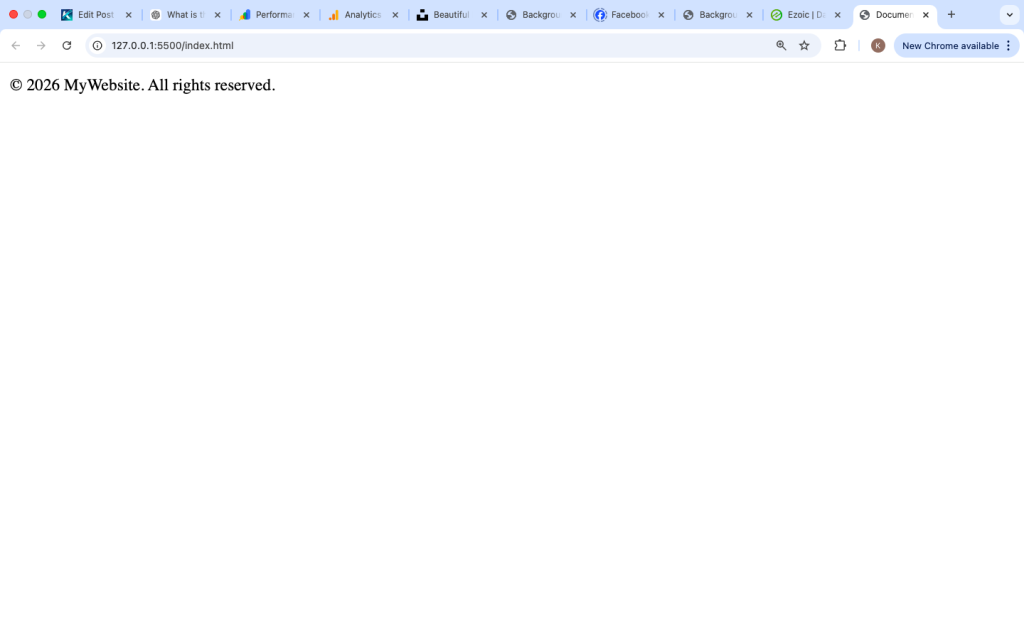
Many websites use <small> for copyright notices in the footer.
Example:

This text is smaller because it is not the main content of the page.
2. Legal Disclaimers
Legal disclaimers often appear in smaller text.
Example:

The smaller text signals additional information.
3. Product Descriptions
E-commerce websites sometimes show extra product details in small text.
Example:

This keeps the main information clear while still showing extra details.
4. Notes or Side Comments
Example:

The note appears smaller so readers understand it is secondary.

How Browsers Display the <small> Tag
Browsers automatically apply styling similar to this:
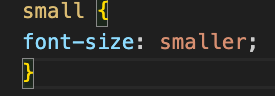
This means the browser reduces the font size relative to surrounding text.
Modern browsers such as:
- Chrome
- Firefox
- Edge
- Safari
all support the <small> tag.
Using <small> Inside a Paragraph
You can place the <small> tag inside other elements like paragraphs.
Example:
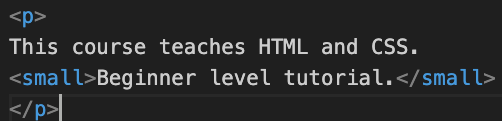
The smaller text appears after the main sentence.
This is often used for notes or additional context.

<small> Tag vs CSS Font Size
Some developers use CSS instead of the <small> tag.
Example using CSS:

CSS:
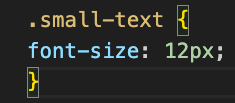
Both methods reduce text size, but they serve different purposes.
<small> Tag
- Semantic meaning
- Indicates secondary text
CSS Font Size
- Pure styling
- Used for design control
The <small> tag communicates meaning, while CSS focuses on appearance.
Using <small> Multiple Times
The <small> tag can be used multiple times on a page.
Example:

Each <small> element will appear smaller than normal text.

Combining <small> With Other Tags
The <small> tag can work with other HTML tags.
Example:

In this case:
<small>makes the text smaller<em>makes it italic
This combination can improve readability.
Example of <small> in a Website Footer
Many websites place small text in the footer.
Example:

Here the copyright text is smaller than the main footer content.

Accessibility and the <small> Tag
The <small> tag is safe to use and supported by assistive technologies.
However, developers should avoid making important information too small.
Small text can sometimes be harder to read for users with vision difficulties.
Good practice is to keep the font readable.
Common Mistakes Beginners Make
Here are some mistakes beginners often make when using the <small> tag.
1. Using <small> for Important Information
Important information should not appear smaller.
Example mistake:

Warnings should be clear and noticeable.
Better approach:
Use <strong> or larger text.
2. Making Large Paragraphs Small
The <small> tag should not contain long paragraphs.
Example mistake:

Small text works best for short notes or details.
3. Using <small> Only for Design
The tag should indicate secondary content, not just styling.
For design purposes, CSS is better.
Best Practices for Using the <small> Tag
Follow these tips to use the <small> tag effectively.
Use It for Secondary Information
Use <small> for information that supports the main content.
Keep the Text Short
Small text should usually be one sentence or a short phrase.
Avoid Important Messages
Important information should not be hidden in small text.
Combine With Good Layout
Place small text near the content it relates to.
Real Example of the <small> Tag
Here is a small webpage example.

In this example:
- The main text explains the topic
- The
<small>tag adds additional details

Is the <small> Tag Still Used Today?
Yes, the <small> tag is still part of modern HTML.
It is widely used for:
- Website footers
- Legal text
- Secondary notes
- Product disclaimers
Even though CSS can change font sizes, the <small> tag remains useful because it provides semantic meaning.